AceGamer / Racing Wheels
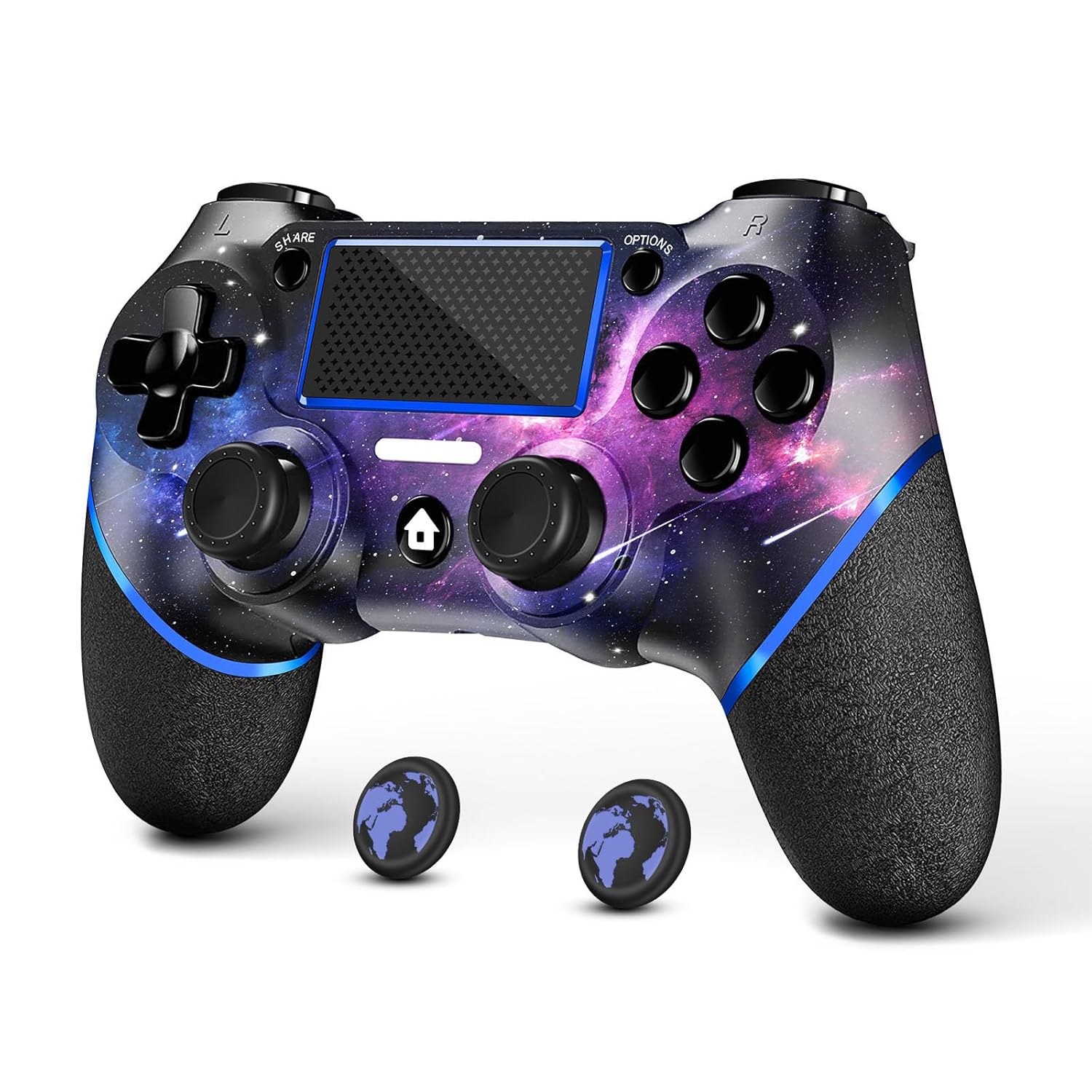
AceGamer Wireless Controller for PS4 Custom Design V2 Gamepad Joystick for PS4 with Non-Slip Grip of Both Sides
 1 / 7
Prices are shown for browsing. Purchases are currently unavailable.
AceGamer Wireless Controller for PS4 Custom Design V2 Gamepad Joystick for PS4 with Non-Slip Grip of Both Sides, $45.98, Availability unknown. Image 1 of 7.
- Selected option
- AceGamer Wireless Controller for PS4 Custom Design V2 Gamepad Joystick for PS4 with Non-Slip Grip of Both Sides
- SKU
- JC11616
The details
About this item
.com: AceGamer Wireless Controller for PS4, Custom Design V2 Gamepad Joystick for PS4 with Non-Slip Grip of Both Sides and 3.5mm Audio Jack! Thumb Caps Included! (Galaxy) : Video Games 🎮【Attention】It's compatible with PS4/Pro/Slim/Windows PC. When you are connecting it to game console for the first time, you need to use the charge cable in the package. When you are connecting it to PC, you need to hold down 'share + home' for 3 seconds. The controller's white light would flash, and you'll see the controller on your PC, which has the BT name 'wireless controller'.; 🎮【Unique Design】The Galaxy design is inspired by the designer's love for the vast universe, different colors of nebulae accompanied by meteorites, if you use it at night, with a little light, then, you are not only holding the controller, but the whole universe.; 🎮【Custom Choose your platform/edition, then jump in—story, missions, and extras depend on the version. Rated 4.3 out of 5.
- 🎮【Attention】It's compatible with PS4/Pro/Slim/Windows PC. When you are connecting it to game console for the first time, you need to use the charge cable in the package. When you are connecting it to PC, you need to hold down 'share + home' for 3 seconds. The controller's white light would flash, and you'll see the controller on your PC, which has the BT name 'wireless controller'.
- 🎮【Unique Design】The Galaxy design is inspired by the designer's love for the vast universe, different colors of nebulae accompanied by meteorites, if you use it at night, with a little light, then, you are not only holding the controller, but the whole universe.
- 🎮【Custom Process】The galaxy design are printed on the controller shell by water transfer process. They are not cheap stickers. We apply a smooth hand feel oil to the surface to ensure that hand sweat will not erode it.
- 🎮【Turbo Function】You can customize any key as a turbo key. First, hold down the 'share' key, then click the turbo key you want to set up successfully. Secondly, you can adjust the turbo frequency. First, hold down the 'share' key, then touch the joystick on the right up and down. There are three gears to adjust in total.
- 🎮【To Be AceGamer】You Can Get:1x Controller for PS4;1x USB-C Charge Cable;1x User Manual. AceGamer specializes in providing customized controllers for game lovers. No matter what problem you encounter, please leave us a message, we will reply to you within 24 hours.
From the manufacturer
Product details
.com: AceGamer Wireless Controller for PS4, Custom Design V2 Gamepad Joystick for PS4 with Non-Slip Grip of Both Sides and 3.5mm Audio Jack! Thumb Caps Included! (Galaxy) : Video Games
Highlights: 🎮【Attention】It's compatible with PS4/Pro/Slim/Windows PC. When you are connecting it to game console for the first time, you need to use the charge cable in the package. When you are connecting it to PC, you need to hold down 'share + home' for 3 seconds. The controller's white light would flash, and you'll see the controller on your PC, which has the BT name 'wireless controller'. 🎮【Unique Design】The Galaxy design is inspired by the designer's love for the vast universe, different colors of nebulae accompanied by meteorites, if you use it at night, with a little light, then, you are not only holding the controller, but the whole universe. 🎮【Custom Process】The galaxy design are printed on the controller shell by water transfer process. They are not cheap stickers. We apply a smooth hand feel oil to the surface to ensure that hand sweat will not erode it. 🎮【Turbo Function】You can customize any key as a turbo key. First, hold down the 'share' key, then click the turbo key you want to set up successfully. Secondly, you can adjust the turbo frequency. First, hold down the 'share' key, then touch the joystick on the right up and down. There are three gears to adjust in total. 🎮【To Be AceGamer】You Can Get:1x Controller for PS4;1x USB-C Charge Cable;1x User Manual. AceGamer specializes
What you can expect: 🎮【Attention】It's compatible with PS4/Pro/Slim/Windows PC. When you are connecting it to game console for the first time, you need to use the charge cable in the package. When you are connecting it to PC, you need to hold down 'share + home' for 3 seconds. The controller's white light would flash, and you'll see the controller on your PC, which has the BT name 'wireless controller'. 🎮【Unique Design】The Galaxy design is inspired by the designer's love for the vast universe, different colors of nebulae accompanied by meteorites, if you use it at night, with a little light, then, you are not only holding the controller, but the whole universe. 🎮【Custom Process】The galaxy design are printed on the controller shell by water transfer process. They are not cheap stickers. We apply a smooth hand feel oil to the surface to ensure that hand sweat will not erode it. 🎮【Turbo Function】You can customize any key as a turbo key. First, hold down the 'share' key, then click the turbo key you want to set up successfully. Secondly, you can adjust the turbo frequency. First, hold down the 'share' key, then touch the joystick on the right up and down. There are three gears to adjust in total. 🎮【To Be AceGamer】You Can Get:1x Controller for PS4;1x USB-C Charge Cable;1x User Manual. AceGamer specializes in providing customized controllers for game lovers. No matter what problem you encounter, please leave us a message, we will
Customer feedback: 4.3/5 average rating.
Review snippets: Got this controller as a gift for my cousin and he really liked it. The response is great and it feels very similar to the original PlayStation controller. Buttons are responsive, sticks feel smooth, and overall it performs just as / The controller worked fine at first, but I couldn't connect it. I didn't know why, but I realized the USB cable that came with the controller wasn't working properly. The light on the controller came on as if it was