Aeehuck / Clocks
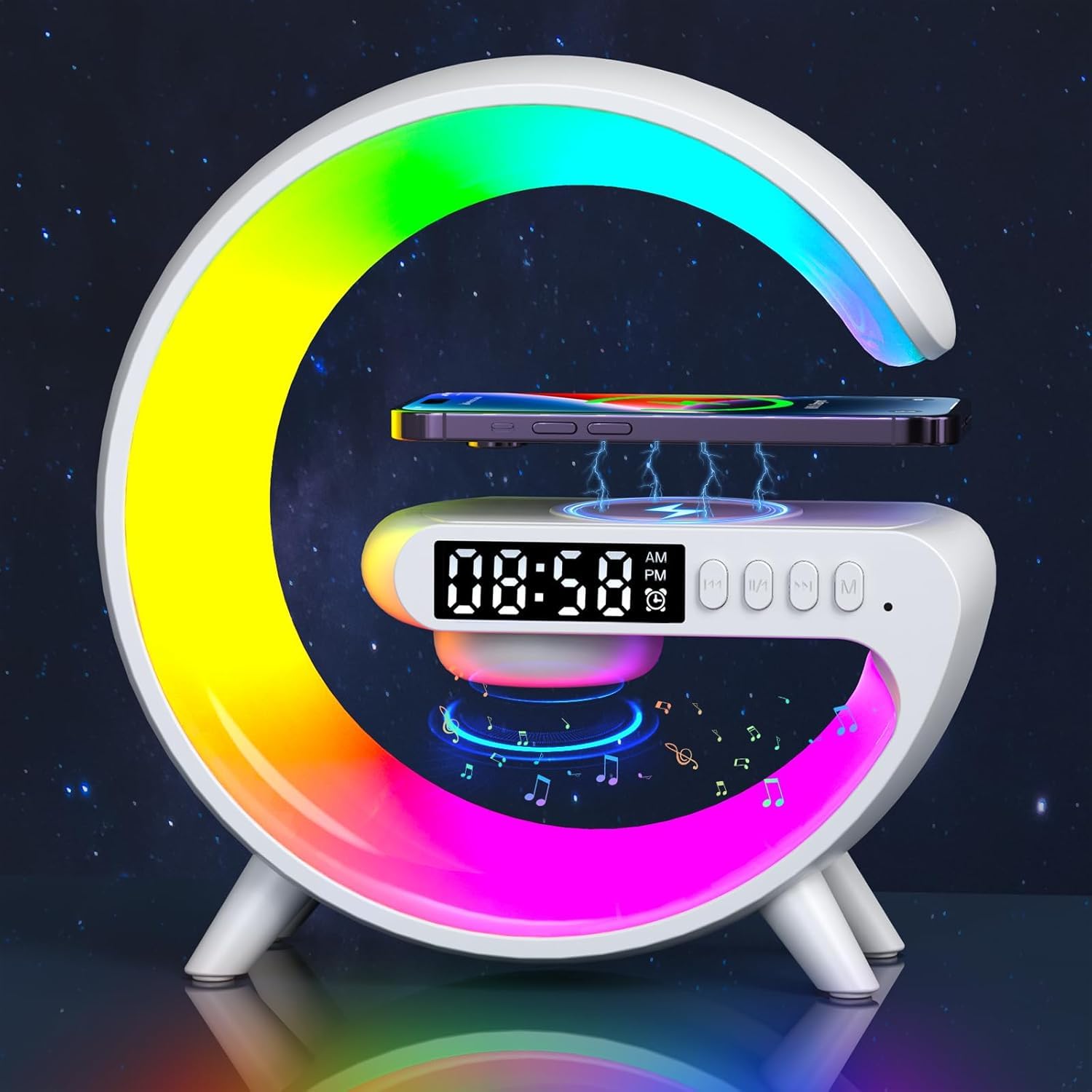
Aeehuck Mini Wireless Speaker with Atmosphere Light Wireless Charging Alarm Clock and Bedside Lamp White
 1 / 7
Prices are shown for browsing. Purchases are currently unavailable.
Aeehuck Mini Wireless Speaker with Atmosphere Light Wireless Charging Alarm Clock and Bedside Lamp White, $51.98, Availability unknown. Image 1 of 7.
- Selected option
- Aeehuck Mini Wireless Speaker with Atmosphere Light Wireless Charging Alarm Clock and Bedside Lamp White
- SKU
- JC1879
Source specifications
- Brand
- Aeehuck
- Speaker Maximum Output Power
- 15 Watts
- Connectivity Technology
- Bluetooth
- Audio Output Mode
- Stereo
- Mounting Type
- Tabletop Mount
- Material
- Plastic
- Model Name
- Aeehuck Mini Wireless Speaker
- Speaker Type
- Indoor
- Special Feature
- Alarm, Wireless Charging
- Recommended Uses For Product
- For Bedside Use, For Living Room or Home Office Use
- Compatible Devices
- Smartphone
- Unit Count
- 1.0 Count
- Surround Sound Channel Configuration
- 2.0
- Color
- White
- Item Weight
- 9.6 ounces
- Is Waterproof
- False
- Warranty Type
- Limited
- Number of Items
- 1
- Control Method
- Touch
- Wireless Communication Technology
- Bluetooth
- Speaker Size
- 16.21 Centimeters
- Power Source
- Corded Electric
- Audio Driver Type
- Dynamic Driver
- Specific Uses For Product
- Home (Bedroom, Living Room)
- Style
- Modern
- Indoor/Outdoor Usage
- Indoor
- Manufacturer
- Aeehuck
- Shape
- Rectangular Prism
- Set Name
- Single Unit
- Product Dimensions
- 2.6 x 1.5 x 6 inches
- Item model number
- Aeehuck Alarm Clock and Bedside Lamp
- Battery Capacity
- 1200 Milliamp Hours
- Charging Time
- 2.5 Hours
The details
About this item
Product description Mini Wireless Speaker with Atmosphere Light How do you use the Wireless Speaker Charger Light? ▸▸| button: Short press ▸▸| for next song , long press for volume increase. |◁◁ button: Short press |◁◁ the previous song , long press the volume to decrease. Double click to turn on music rhythm,Double click again to turn off music rhythm. Lighting Settings: Short press the Ⅿ button to switch the lighting effect, and press and hold for 0.5 seconds to turn off the light. Mode switching: The standard Bluetooth mode is activated. Double click the Ⅿ button to switch to Clock TF AUX mode. Clock setting: The IOS mobile phone automatically sets the time when connected with Bluetooth. The Android phone needs to set the time manually. Double-click the M button to enter clock mode, press the |◁◁ button to 【Wireless Convenience】:Transform your bedtime routine with our wireless speaker. Effortlessly charge your phone with 15W fast charging by simply placing it on the lamp base. (Note: The phone must have wireless charging capabilities and be plugged in.); 【Musical Light Show】:Immerse yourself in a mesmerizing light show with Aeehuck night light with wireless speakers! Experience
- 【Wireless Convenience】:Transform your bedtime routine with our wireless speaker. Effortlessly charge your phone with 15W fast charging by simply placing it on the lamp base. (Note: The phone must have wireless charging capabilities and be plugged in.)
- 【Musical Light Show】:Immerse yourself in a mesmerizing light show with Aeehuck night light with wireless speakers! Experience six color modes that sync with your music for an immersive experience.
- 【Improve Sound Quality】:Get ready for a premium music experience with our wireless speaker night light. The Type G wireless speaker provides crystal clear, high quality sound.
- 【Continuous Sound】:With a 1200mAh battery, our wireless speaker night light provides 6 hours of music after a 2-3 hour USB charge. Keep your ambience lively all night long!
- 【Beautiful Room Decoration】:Enhance your home decor with this night light with wireless speaker. It adds a warm and inviting touch to any room and serves as both a functional and beautiful gift for special occasions such as thanksgiving and Christmas.
Product information
Materials and care
- Material
- Plastic
From the manufacturer
Product details
Product description Mini Wireless Speaker with Atmosphere Light How do you use the Wireless Speaker Charger Light? ▸▸| button: Short press ▸▸| for next song , long press for volume increase. |◁◁ button: Short press |◁◁ the previous song , long press the volume to decrease. Double click to turn on music rhythm,Double click again to turn off music rhythm. Lighting Settings: Short press the Ⅿ button to switch the lighting effect, and press and hold for 0.5 seconds to turn off the light. Mode switching: The standard Bluetooth mode is activated. Double click the Ⅿ button to switch to Clock TF AUX mode. Clock setting: The IOS mobile phone automatically sets the time when connected with Bluetooth. The Android phone needs to set the time manually. Double-click the M button to enter clock mode, press the |◁◁ button to set the hour, press the ▸▸| button to set the minute, and press the ||/ button ◁ to confirm the time. After 2 minutes, it will automatically return to Bluetooth mode. Double-click the Ⅿ button to return to other modes for controlling the lights. Alarm clock setting: Double click the Ⅿ button to enter clock mode, short press the M button to set and display the alarm clock. After the alarm clock icon flashes, start setting the alarm clock. Press
Highlights: 【Wireless Convenience】:Transform your bedtime routine with our wireless speaker. Effortlessly charge your phone with 15W fast charging by simply placing it on the lamp base. (Note: The phone must have wireless charging capabilities and be plugged in.) 【Musical Light Show】:Immerse yourself in a mesmerizing light show with Aeehuck night light with wireless speakers! Experience six color modes that sync with your music for an immersive experience. 【Improve Sound Quality】:Get ready for a premium music experience with our wireless speaker night light. The Type G wireless speaker provides crystal clear, high quality sound. 【Continuous Sound】:With a 1200mAh battery, our wireless speaker night light provides 6 hours of music after a 2-3 hour USB charge. Keep your ambience lively all night long! 【Beautiful Room Decoration】:Enhance your home decor with this night light with wireless speaker. It adds a warm and inviting touch to any room and serves as both a functional and beautiful gift for special occasions such as thanksgiving and Christmas.
Key details: Material: Plastic | Model Name: Aeehuck Mini Wireless Speaker | Speaker Type: Indoor | Special Feature: Alarm, Wireless Charging | Recommended Uses For Product: For Bedside Use, For Living Room or Home Office Use | Compatible Devices: Smartphone | Unit Count: 1.0 Count | Surround Sound Channel Configuration: 2.0 | Color: White | Item Weight: 9.6 ounces
How it fits your day: Use the key specs and highlights above to match it to your setup, space, or routine before you check out.
Customer feedback: 3.6/5 average rating.
Customers say: Customers find the speaker stylish and appreciate its sound quality, noting it's perfect for bedside tables.
Review snippets: I wasn’t expecting much from a speaker this tiny, but it’s honestly great. The sound is fuller and clearer than I thought it would be, and it gets loud enough to fill a room without distortion. The little ambient light / Cheaply Made Read more
Product description Mini Wireless Speaker with Atmosphere Light How do you use the Wireless Speaker Charger Light? ▸▸| button: Short press ▸▸| for next song , long press for volume increase. |◁◁ button: Short press |◁◁ the previous song , long press the volume to decrease. Double click to turn on music rhythm,Double click again to turn off music rhythm. Lighting Settings: Short press the Ⅿ button to switch the lighting effect, and press and hold for 0.5 seconds to turn off the light. Mode switching: The standard Bluetooth mode is activated. Double click the Ⅿ button to switch to Clock TF AUX mode. Clock setting: The IOS mobile phone automatically sets the time when connected with Bluetooth. The Android phone needs to set the time manually. Double-click the M button to enter clock mode, press the |◁◁ button to set the hour, press the ▸▸| button to set the minute, and press the ||/ button ◁ to confirm the time. After 2 minutes, it will automatically return to Bluetooth mode. Double-click the Ⅿ button to return to other modes for controlling the lights. Alarm clock setting: Double click the Ⅿ button to enter clock mode, short press the M button to set and display the alarm clock. After the alarm clock icon flashes, start setting the alarm clock. Press the |◁◁ button to set the hour. Press the ▸▸| button to set the minute. Press the ||/◁ button to confirm the alarm time. After the alarm is set successfully, the alarm marker will remain on. It will then automatically