PEIBO / Mice
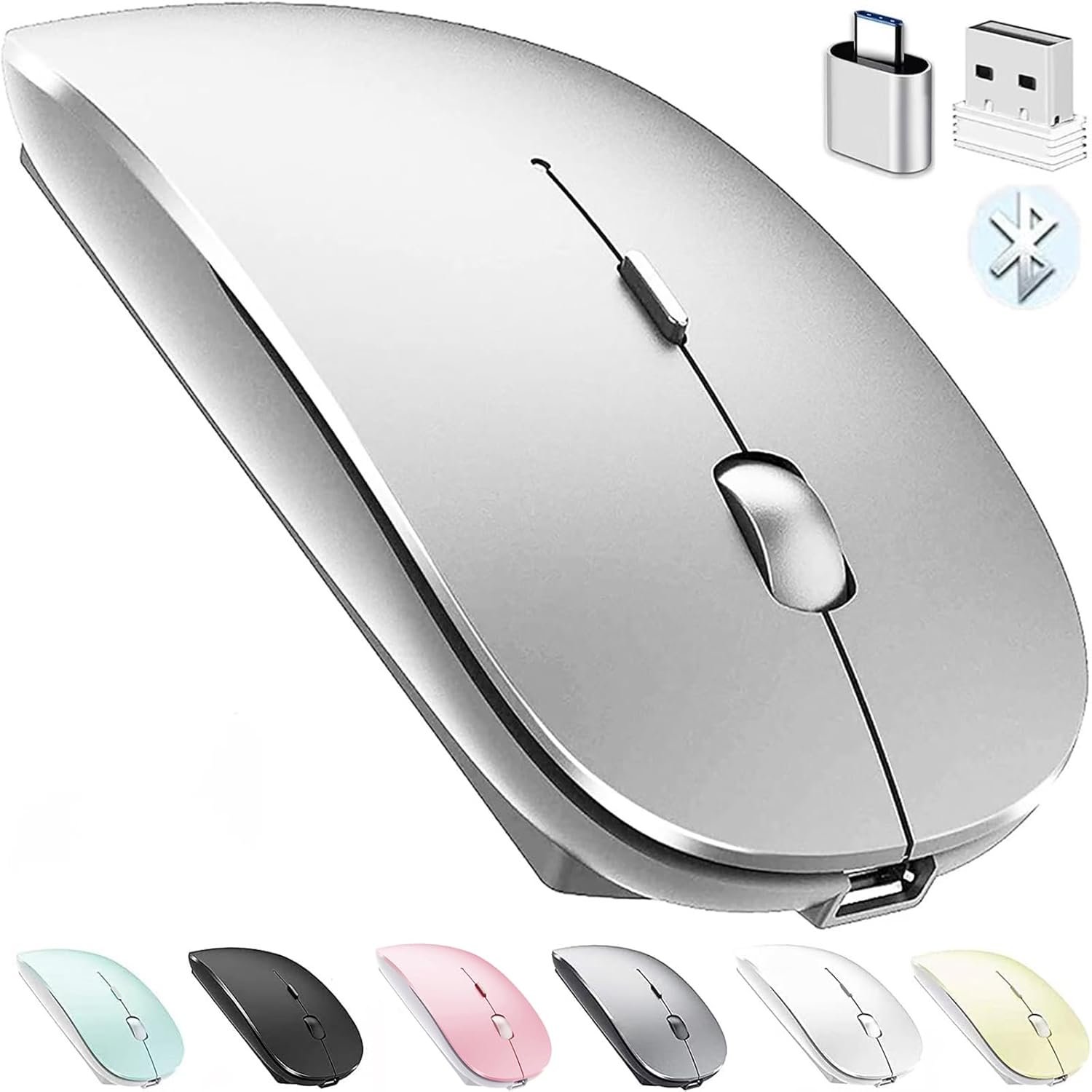
Bluetooth Wireless Mouse for Laptop mac MacBook ipad MacBook air MacBook pro pc Desktop Computer Windows Chromebook Notebook
 1 / 9
Prices are shown for browsing. Purchases are currently unavailable.
Bluetooth Wireless Mouse for Laptop mac MacBook ipad MacBook air MacBook pro pc Desktop Computer Windows Chromebook Notebook, $27.51, Availability unknown. Image 1 of 9.
- Selected option
- Bluetooth Wireless Mouse for Laptop mac MacBook ipad MacBook air MacBook pro pc Desktop Computer Windows Chromebook Notebook
- SKU
- JC5416
Source specifications
- Brand
- PEIBO
- Color
- silver
- Connectivity Technology
- Bluetooth Wireless USB/USB C Adapter
- Special Feature
- Bluetooth Wireless USB/USB C Adapter
- Movement Detection Technology
- Optical
- Product Dimensions
- 4.65 x 2.28 x 0.91 inches
- Item Weight
- 3.2 ounces
- Item model number
- 8541646059
- Batteries
- 1 Lithium Polymer batteries required. (included)
- Manufacturer
- PEIBO
The details
About this item
Choose PEIBO dual-mode Bluetooth wireless mouse (BT5.2+BT3.0+2.4Greceiver+USB C adapter), which is more conducive to our connection and use on any computer device, HOW to use Bluetooth mouse mode: First, slide the mouse switch to Bluetooth mode (blue light) > open laptop system preferences settings> turn on Bluetooth function >, when laptop Bluetooth is searching for nearby Bluetooth devices> you need to press and hold the blue button at the bottom of the mouse '' for 3 -4 seconds, The blue light flashes . > Bluetooth search there appears Bluetooth 5.2 mouse>click to connect "BT5.2 mouse or BT3.0 mouse (BT3.0 for old laptop)" > connection is successful How to use mouse 2.4G USB receiver mode: First, switch the mouse switch to 2.4G mode (green light)> Then remove the USB receiver from the slot on the bottom of the mouse > Plug 【 BLUETOOTH 5.2 + 3.0 +2.4G USB Receiver +USB C adapter Wireless Bluetooth Dual-Mode Mouse】You can switch between Bluetooth mode or 2.4G mode,Compatible systems are: iPadOS、 macOS、apple / Windows 、win7/8/10/11, UNIX, Linux, Chrome OS. ❮Bluetooth mode is available for all Bluetooth-enabled laptops, MacBook pro macbook air macbook Mac iMac (ipad pro ipad air ipa
- 【 BLUETOOTH 5.2 + 3.0 +2.4G USB Receiver +USB C adapter Wireless Bluetooth Dual-Mode Mouse】You can switch between Bluetooth mode or 2.4G mode,Compatible systems are: iPadOS、 macOS、apple / Windows 、win7/8/10/11, UNIX, Linux, Chrome OS. ❮Bluetooth mode is available for all Bluetooth-enabled laptops, MacBook pro macbook air macbook Mac iMac (ipad pro ipad air ipad mini ipad10th iPad9th, iPhone, iMac, tablet, all-in-one computer, etc. ❯ The 2.4G USB receiver mode is suitable for all laptops, desktops, all-in-ones, Dell, HP, Mac, iMAC, etc. with USB/USB C ports.plug and play.
- AUTO ENERGY-SAVINGSLEEPING MODE: Li-polymer batteries,high cycle life.the Auto Switch Off function will help you save energy as your bluetooth mouse will switch off when your PC is turned off or the receiver is disconnected. If you do not use the mouse for eight minutes, it will go to sleeping mode, you can press the any button to weak it up.
- With 3 Adjustable DPI: DPI800/1200/1600, you are able to change the DPI according to your different demands. 1000 is office mouse territory. This bluetooth mouse using the high performance optical chips, which will work faster and more precision than the traditional mouse. You are able to get your work more efficient and save your time, ideal Mouse for office, home and leisure.
- ERGONOMIC DESIGN: Good surface coating technology given you a skin-like touch feeling. User-friendly design provide all-day comfort for work and entertainment, portable and pocket-sized perfect for travel, Mute design keeps away annoying clicks.
- PEIBO BLUETOOTH WIRELESS MOUSE works on all laptops and desktops
From the manufacturer
Product details
Choose PEIBO dual-mode Bluetooth wireless mouse (BT5.2+BT3.0+2.4Greceiver+USB C adapter), which is more conducive to our connection and use on any computer device, HOW to use Bluetooth mouse mode: First, slide the mouse switch to Bluetooth mode (blue light) > open laptop system preferences settings> turn on Bluetooth function >, when laptop Bluetooth is searching for nearby Bluetooth devices> you need to press and hold the blue button at the bottom of the mouse '' for 3 -4 seconds, The blue light flashes . > Bluetooth search there appears Bluetooth 5.2 mouse>click to connect "BT5.2 mouse or BT3.0 mouse (BT3.0 for old laptop)" > connection is successful How to use mouse 2.4G USB receiver mode: First, switch the mouse switch to 2.4G mode (green light)> Then remove the USB receiver from the slot on the bottom of the mouse > Plug the USB receiver into the USB port of your laptop,plug and play.(Works with all USB ports and USB c Laptop and desktop ports, (Note: Computers with usb c ports please use with usb c adapter)) How to use the bluetooth mouse on the ipadOS13 and above iPad pro 11/12.9inch ipad air 10.9inch ipad mini 8.3inch iPad 10th gen 9th gen 10.9inch : First, open iPad settings, find accessibility, turn on touch controls, find assistive touch controls, turn on assistive touch
Highlights: 【 BLUETOOTH 5.2 + 3.0 +2.4G USB Receiver +USB C adapter Wireless Bluetooth Dual-Mode Mouse】You can switch between Bluetooth mode or 2.4G mode,Compatible systems are: iPadOS、 macOS、apple / Windows 、win7/8/10/11, UNIX, Linux, Chrome OS. ❮Bluetooth mode is available for all Bluetooth-enabled laptops, MacBook pro macbook air macbook Mac iMac (ipad pro ipad air ipad mini ipad10th iPad9th, iPhone, iMac, tablet, all-in-one computer, etc. ❯ The 2.4G USB receiver mode is suitable for all laptops, desktops, all-in-ones, Dell, HP, Mac, iMAC, etc. with USB/USB C ports.plug and play. AUTO ENERGY-SAVINGSLEEPING MODE: Li-polymer batteries,high cycle life.the Auto Switch Off function will help you save energy as your bluetooth mouse will switch off when your PC is turned off or the receiver is disconnected. If you do not use the mouse for eight minutes, it will go to sleeping mode, you can press the any button to weak it up. With 3 Adjustable DPI: DPI800/1200/1600, you are able to change the DPI according to your different demands. 1000 is office mouse territory. This bluetooth mouse using the high performance optical chips, which will work faster and more precision than the traditional mouse. You are able to get your work more efficient and save your time, ideal Mouse for office, home and leisure. ERGONOMIC DESIGN: Good surface coating technology given you a skin-like touch
Key details: Product Dimensions: 4.65 x 2.28 x 0.91 inches | Item Weight: 3.2 ounces | Batteries: 1 Lithium Polymer batteries required. (included) | Customer Reviews: 4.3 4.3 out of 5 stars (21,419) 4.3 out of 5 stars | Is Discontinued By Manufacturer: No
What you can expect: 【 BLUETOOTH 5.2 + 3.0 +2.4G USB Receiver +USB C adapter Wireless Bluetooth Dual-Mode Mouse】You can switch between Bluetooth mode or 2.4G mode,Compatible systems are: iPadOS、 macOS、apple / Windows 、win7/8/10/11, UNIX, Linux, Chrome OS. ❮Bluetooth mode is available for all Bluetooth-enabled laptops, MacBook pro macbook air macbook Mac iMac (ipad pro ipad air ipad mini ipad10th iPad9th, iPhone, iMac, tablet, all-in-one computer, etc. ❯ The 2.4G USB receiver mode is suitable for all laptops, desktops, all-in-ones, Dell, HP, Mac, iMAC, etc. with USB/USB C ports.plug and play. AUTO ENERGY-SAVINGSLEEPING MODE: Li-polymer batteries,high cycle life.the Auto Switch Off function will help you save energy as your bluetooth mouse will switch off when your PC is turned off or the receiver is disconnected. If you do not use the mouse for eight minutes, it will go to sleeping mode, you can press the any button to weak it up. With 3 Adjustable DPI: DPI800/1200/1600, you are able to change the DPI according to your different demands. 1000 is office mouse territory. This bluetooth mouse using the high performance optical chips, which will work faster and more precision than the traditional mouse. You are able to get your work more efficient and save your time, ideal Mouse for office, home and leisure. ERGONOMIC DESIGN: Good surface coating technology given you a skin-like touch feeling. User-friendly design provide all-day comfort for work and entertainment, portable and pocket-sized perfect for travel, Mute design keeps away
Customer feedback: 4.3/5 average rating.
Customers say: Customers find the wireless mouse easy to use and set up, with excellent Bluetooth connectivity that allows for a cable-free experience.
Review snippets: First - I am definitely not getting paid nor given anything free for this review. I recently purchased a MacBook Air and generally like the touchpad - but still prefer to interact with a mouse. I was not motivated to / The Bluetooth Wireless Mouse for Laptop Mac is a convenient accessory if you want a cable-free experience with your MacBook or other Apple laptops. It usually offers smooth tracking, easy pairing via Bluetooth, and decent battery life. Many users appreciate