Complete product information
{
  "id": "diswoe-upgraded-wireless-controller-for-switch-lite-oled-switch-2-pro-controller-for-switch-remote-joystick-gamepad-supports",
  "handle": "diswoe-upgraded-wireless-controller-for-switch-lite-oled-switch-2-pro-controller-for-switch-remote-joystick-gamepad-supports",
  "sku": "JC5778",
  "asin": "B07TRQH45S",
  "title": "Diswoe Upgraded Wireless Controller for Switch Lite OLED Switch 2 Pro Controller for Switch Remote Joystick Gamepad Supports",
  "title_original": "Diswoe Upgraded Wireless Controller for Switch/Lite/OLED/Switch 2 Pro Controller for Switch Remote Joystick Gamepad Supports Wake up, Gyro Axis, Turbo, Dual Vibration and Screenshot Function",
  "brand": "Diswoe",
  "price": 53.98,
  "social_proof": {
    "bought_past_month": 935,
    "text": "935+ bought in the past month"
  },
  "images": [
    "https://m.media-amazon.com/images/I/71PZm+JQyqL._SL1500_.jpg",
    "https://m.media-amazon.com/images/I/7197cN56SqL._SL1500_.jpg",
    "https://m.media-amazon.com/images/I/71WWOV6EpPL._SL1500_.jpg",
    "https://m.media-amazon.com/images/I/71ti6bC2s5L._SL1500_.jpg",
    "https://m.media-amazon.com/images/I/71rG01+9i1L._SL1500_.jpg"
  ],
  "aplus_images": [
    "https://m.media-amazon.com/images/S/aplus-media-library-service-media/aef74658-9663-41bf-87ab-47b069e928cc.__CR0,0,970,600_PT0_SX970_V1___.jpg",
    "https://m.media-amazon.com/images/S/aplus-media-library-service-media/a4d499c8-c8e3-4aa3-ae98-a85c5e2921e1.__CR0,0,970,300_PT0_SX970_V1___.jpg",
    "https://m.media-amazon.com/images/S/aplus-media-library-service-media/a67db12a-fef9-4a42-9b04-13ae687a398e.__CR0,0,970,300_PT0_SX970_V1___.jpg",
    "https://m.media-amazon.com/images/S/aplus-media-library-service-media/732f05c8-7b2b-404f-8bcf-cdc7deaf2c74.__CR0,0,970,600_PT0_SX970_V1___.jpg",
    "https://m.media-amazon.com/images/S/aplus-media-library-service-media/eeee7a8a-3e19-4b26-8a57-3d4493d2dbbd.__CR0,0,970,600_PT0_SX970_V1___.jpg",
    "https://m.media-amazon.com/images/I/51KeP7maDQL._SL1500_.jpg",
    "https://m.media-amazon.com/images/S/aplus-media-library-service-media/02b172a3-59da-4727-ae33-03e77f942f6e.__CR0,0,150,300_PT0_SX150_V1___.jpg",
    "https://m.media-amazon.com/images/S/aplus-media-library-service-media/389aa615-1d1c-4667-b018-43f535d2cc5c.__CR0,0,150,300_PT0_SX150_V1___.jpg",
    "https://m.media-amazon.com/images/I/419jdWZsfmL._SL1500_.jpg",
    "https://m.media-amazon.com/images/S/aplus-media-library-service-media/c912fc2c-f79a-4219-b20f-d38aae0b3c25.__CR0,123,1464,625_PT0_SX1464_V1___.jpg",
    "https://m.media-amazon.com/images/S/aplus-media-library-service-media/ef87b015-71c3-4c18-bfda-4ab6cdfc73b9.__CR0,0,315,145_PT0_SX315_V1___.jpg",
    "https://m.media-amazon.com/images/I/514KwLC079L._SL1500_.jpg",
    "https://m.media-amazon.com/images/I/41EmgH9seGL._SL1500_.jpg",
    "https://m.media-amazon.com/images/I/41V7tma1bjL._SL1500_.jpg"
  ],
  "bullets": [
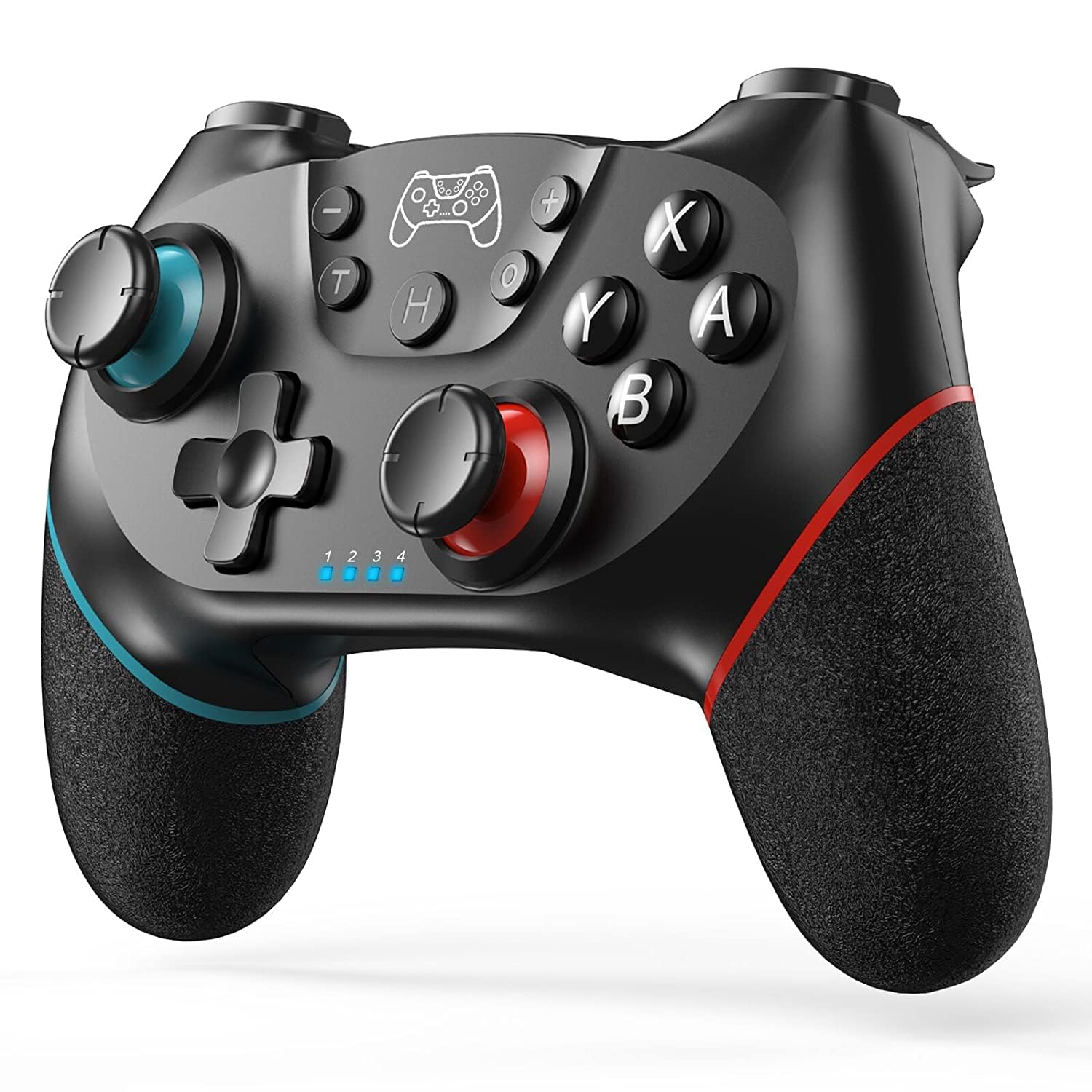
    "UNIVERSAL COMPATIBILITY : Pro Controller is fully compatible with Switch 2/Switch/Switch Lite/Switch OLED , also compatible with Windows PC and Android Phone, and perfectly compatible with games. No need to install any driver. NOTE: ONLY SUPPORT INCLUDED USB CABLE CONNECTION WITH PC, DOES NOT SUPPORT WIRELESS BLUETOOTH CONNECTION TO PC. This controller only supports connect to switch consoles, PC and Phone , NOT Compatible with other other devices such as: Apple TV, Fire Stick TV, Tesla, Xbox and Playstation consoles.DOES NOT SUPPORT WAKE-UP SWITCH 2 AND AUDIO FUNCTIONS",
    "UPGRADE HALL JOYSTICK, NON-DRIFF: Diswoe Switch controllers is designed with HALL EFFECT joystick, solving the common problem of joystick drift. Unlike ALPS joysticks, high-sensitivity Hall sensors use Electromagnetic Induction to etect the movement of the joystick, the internal parts have no contact with each other, the sensor part will not wear out, faster response speed, especially for FPS shooting games.",
    "POWERFUL FUNCTION : Have dual vibration motors that provide you excellent vibration feedback to enhance the game immersion. With the 6-axis gyro sensor, this controller can detect the inclination of the controller and make a quick response, give you more fun while playing motion-sensing games. No NFC function.",
    "LOW ENERGY CONSUMPTION, LONG BATTERY LIFE : This perfected controller has a high-performance rechargeable battery with automatic sleep, Charging prompt and low voltage warning. The high-performance built-in 550mAh battery can service for 8 hours after fully charged, make sure you can enjoy games longer without interruption.",
    "EXCELLENT HAND FEELING : The wireless controller is built with ergonomic and lightweight construction, make it comfortable even for long hours of continuous play. The gamepad comes with non-slip design, which will never slip off even if your hand sweats during intense gameplay.",
    "STABLE WIRELESS BLUETOOTH CONNECTION : It provides stable and reliable signal without delay or drop-off within EIGHT meters. Featured with strong anti-interference technology and won't be affected by other wireless devices. Please read the user manual first before pairing."
  ],
  "specs": {},
  "category": "Video Games > PC > Accessories > Controllers > Flight Controls",
  "category_path": [
    "Video Games",
    "PC",
    "Accessories",
    "Controllers",
    "Flight Controls"
  ],
  "category_slug": "video-games/pc/accessories/controllers/flight-controls",
  "category_leaf": "Flight Controls",
  "variations": {
    "sizes": [],
    "colors": [],
    "size_chart": null
  },
  "reviews": {
    "average_rating": 4.4,
    "customers_say": "Customers find this controller to be the best Nintendo Switch controller, with good ergonomics as it feels like a PS4 controller and fits well in the hand.",
    "items": [
      {
        "title": "5.0 out of 5 stars Diswoe Upgraded Wireless Controller",
        "body": "Great budget-friendly controller with solid performance. It connects quickly and works smoothly with Switch and PC, offering responsive buttons and good vibration feedback. The ergonomic design makes it comfortable for long gaming sessions. A reliable and affordable alternative to more expensive controllers. Read more",
        "author": "Ana Lucia Gonzalez",
        "rating": 5,
        "date": "April 2, 2026",
        "verified": true,
        "images": []
      },
      {
        "title": "5.0 out of 5 stars Perfect.",
        "body": "Worked great and connected right away. It feels nice and sturdy, too. Read more",
        "author": "Hawkeye",
        "rating": 5,
        "date": "March 27, 2026",
        "verified": true,
        "images": []
      },
      {
        "title": "5.0 out of 5 stars Great bargain",
        "body": "Great cheap controller, works is expected no frills and at this price no disappointment. Read more",
        "author": "Frank A. Santa Maria",
        "rating": 5,
        "date": "March 29, 2026",
        "verified": true,
        "images": []
      },
      {
        "title": "4.0 out of 5 stars Works great",
        "body": "Good controller with excellent instructions. I was able to follow and connect it to our switch. Buttons were responsive and motion was smooth. It’s a good option Read more",
        "author": "Melody hargis",
        "rating": 4,
        "date": "February 3, 2026",
        "verified": true,
        "images": []
      },
      {
        "title": "5.0 out of 5 stars Very Good for the price but dont expect it to work like the pro controller",
        "body": "I went ahead and gave it 5 stars because of what you get for its price point. I bought this controller for an extra when I have company over without having to pay the higher price tag of a pro controller. Has very good battery life, I can go a week playing at least a few hours a day without charging. It is very easy to sync to the Switch, but seems I have to go corded when i use it on my laptop (wireless on switch only). Does not have that precision in the analog like the pro controller does, so its a bit more difficult to make them precise arrow shots in Breath of the wild but for most other games it does just fine where you wont need as much precision. The location of Home, Photo buttons etc., is layed out differently than the pro controller so it can take a little while to get used to when transitioning different controllers. I try to avoid using the motion control when i can, but it seems about on par with the analog. This is probably the only thing i have not thoroughly tested on this controller but it does seem to work as it should. It does shut itself off after a few minutes of being idle. It can get annoying somewhat when you are trying to multitask and play games at once, or even if you got a cutscene that takes more than a few minutes to play out. When it shuts off it will put up that controller screen saying no controllers are connected, even in the middle of a cutscene. This is something that I wish could be changed by the user, I have searched a bit on the web with no luck on how to change this. Nintendo controller updates are not compatible with this, when the switch goes to update controllers it will hang until you cancel updates if it is in wireless mode, plugged into the usb it will give an error. The find controller feature of the switch does seem to work with it. Read more",
        "author": "Joey E. Hoch",
        "rating": 5,
        "date": "January 11, 2023",
        "verified": true,
        "images": []
      },
      {
        "title": "5.0 out of 5 stars Good Controller",
        "body": "Good quality and feel (as expected). Turbo feature is nice. Read more",
        "author": "Tim",
        "rating": 5,
        "date": "April 5, 2026",
        "verified": true,
        "images": []
      },
      {
        "title": "5.0 out of 5 stars Great add on to the system",
        "body": "Easy to connect and works great. The recharge ability is great to never have to change batteries. It is ergonomic and love all of the functions Read more",
        "author": "RoBo",
        "rating": 5,
        "date": "March 5, 2026",
        "verified": true,
        "images": []
      },
      {
        "title": "3.0 out of 5 stars Doesn't work quite right",
        "body": "I'll start with the good: it's comfortable to hold, the buttons are all responsive and it feels like the joysticks sit a little taller than my other pro controller. The bad: it auto shuts off really quickly, not really a big deal just a little annoying if you have to step away for more than a minute, and on mine there is a spot on the left joystick where the input doesn't read correctly, if I hold it all the way to the left my character walks instead of runs like the controller cant tell how far it's being pulled in that direction. Read more",
        "author": "Robert Canning",
        "rating": 3,
        "date": "April 5, 2026",
        "verified": true,
        "images": []
      }
    ]
  },
  "short_description": "Product description How to pair the controller? Switch mode Bluetooth connection Step 1:Turn on the Switch host, click the \"System settings\"menu button at the main page interface, click the “Airplane Mode” option after entering the next level menu option , then click Controller Connection (Bluetooth)option make its Bluetooth function in open state. Step 2: Enter the Switch host handle Bluetooth pairing mode, click the “Controllers” menu button at the main page interface of host, click the “Change Grip/Order” option after entering the next level menu option, the host will automatically searching and pairing the handle. Step 3:Press the HOME button for 3-5 seconds enter the Bluetooth searching and pairing mode,.",
  "about_this_item": "Product description How to pair the controller? Switch mode Bluetooth connection Step 1:Turn on the Switch host, click the \"System settings\"menu button at the main page interface, click the “Airplane Mode” option after entering the next level menu option , then click Controller Connection (Bluetooth)option make its Bluetooth function in open state. Step 2: Enter the Switch host handle Bluetooth pairing mode, click the “Controllers” menu button at the main page interface of host, click the “Change Grip/Order” option after entering the next level menu option, the host will automatically searching and pairing the handle. Step 3:Press the HOME button for 3-5 seconds enter the Bluetooth searching and pairing mode, LED1-LED4 keep flickering quickly, the handle will vibrate for a moment and the corresponding channel indicator light will always on after connect successfully with host and being assigned automatically. Switch UNIVERSAL COMPATIBILITY : Pro Controller is fully compatible with Switch 2/Switch/Switch Lite/Switch OLED , also compatible with Windows PC and Android Phone, and perfectly compatible with games. No need to install any driver. NOTE: ONLY SUPPORT INCLUDED USB CABLE CONNE",
  "long_description": "Product description How to pair the controller? Switch mode Bluetooth connection Step 1:Turn on the Switch host, click the \"System settings\"menu button at the main page interface, click the “Airplane Mode” option after entering the next level menu option , then click Controller Connection (Bluetooth)option make its Bluetooth function in open state. Step 2: Enter the Switch host handle Bluetooth pairing mode, click the “Controllers” menu button at the main page interface of host, click the “Change Grip/Order” option after entering the next level menu option, the host will automatically searching and pairing the handle. Step 3:Press the HOME button for 3-5 seconds enter the Bluetooth searching and pairing mode, LED1-LED4 keep flickering quickly, the handle will vibrate for a moment and the corresponding channel indicator light will always on after connect successfully with host and being assigned automatically. Switch mode wired connection: Put SWITCH in the SWITCH base after open the PRO handle’s wired connection option on Switch host, then connect the handle with the data cable, handle will connect the SWITCH automatically, after pull the data cable out, handle will backconnect to the SWITCH host by Bluetooth automatically Connect the controller to PC WITH THE INCLUDED USB CABLE. PLEASE NOTE: ONLY SUPPORT INCLUDED USB CABLE CONNECTION WITH PC, DOES NOT SUPPORT WIRELESS BLUETOOTH CONNECTION TO PC. Handle on\n\nHighlights: UNIVERSAL COMPATIBILITY : Pro Controller is fully compatible with Switch 2/Switch/Switch Lite/Switch OLED , also compatible with Windows PC and Android Phone, and perfectly compatible with games. No need to install any driver. NOTE: ONLY SUPPORT INCLUDED USB CABLE CONNECTION WITH PC, DOES NOT SUPPORT WIRELESS BLUETOOTH CONNECTION TO PC. This controller only supports connect to switch consoles, PC and Phone , NOT Compatible with other other devices such as: Apple TV, Fire Stick TV, Tesla, Xbox and Playstation consoles.DOES NOT SUPPORT WAKE-UP SWITCH 2 AND AUDIO FUNCTIONS UPGRADE HALL JOYSTICK, NON-DRIFF: Diswoe Switch controllers is designed with HALL EFFECT joystick, solving the common problem of joystick drift. Unlike ALPS joysticks, high-sensitivity Hall sensors use Electromagnetic Induction to etect the movement of the joystick, the internal parts have no contact with each other, the sensor part will not wear out, faster response speed, especially for FPS shooting games. POWERFUL FUNCTION : Have dual vibration motors that provide you excellent vibration feedback to enhance the game immersion. With the 6-axis gyro sensor, this controller can detect the inclination of the controller and make a quick response, give you more fun while playing motion-sensing games. No NFC function. LOW ENERGY CONSUMPTION, LONG BATTERY LIFE : This perfected controller has a high-performance rechargeable battery with automatic sleep, Charging prompt and low voltage warning.\n\nWhat you can expect: UNIVERSAL COMPATIBILITY : Pro Controller is fully compatible with Switch 2/Switch/Switch Lite/Switch OLED , also compatible with Windows PC and Android Phone, and perfectly compatible with games. No need to install any driver. NOTE: ONLY SUPPORT INCLUDED USB CABLE CONNECTION WITH PC, DOES NOT SUPPORT WIRELESS BLUETOOTH CONNECTION TO PC. This controller only supports connect to switch consoles, PC and Phone , NOT Compatible with other other devices such as: Apple TV, Fire Stick TV, Tesla, Xbox and Playstation consoles.DOES NOT SUPPORT WAKE-UP SWITCH 2 AND AUDIO FUNCTIONS UPGRADE HALL JOYSTICK, NON-DRIFF: Diswoe Switch controllers is designed with HALL EFFECT joystick, solving the common problem of joystick drift. Unlike ALPS joysticks, high-sensitivity Hall sensors use Electromagnetic Induction to etect the movement of the joystick, the internal parts have no contact with each other, the sensor part will not wear out, faster response speed, especially for FPS shooting games. POWERFUL FUNCTION : Have dual vibration motors that provide you excellent vibration feedback to enhance the game immersion. With the 6-axis gyro sensor, this controller can detect the inclination of the controller and make a quick response, give you more fun while playing motion-sensing games. No NFC function. LOW ENERGY CONSUMPTION, LONG BATTERY LIFE : This perfected controller has a high-performance rechargeable battery with automatic sleep, Charging prompt and low voltage warning. The high-performance built-in 550mAh battery can service for 8 hours after fully charged, make sure you can enjoy games longer\n\nCustomer feedback: 4.4/5 average rating.\n\nCustomers say: Customers find this controller to be the best Nintendo Switch controller, with good ergonomics as it feels like a PS4 controller and fits well in the hand.\n\nReview snippets: Great budget-friendly controller with solid performance. It connects quickly and works smoothly with Switch and PC, offering responsive buttons and good vibration feedback. The ergonomic design makes it comfortable for long gaming sessions. A reliable and affordable alternative to more / Worked great and connected right away. It feels nice and sturdy, too. Read more\n\nProduct description How to pair the controller? Switch mode Bluetooth connection Step 1:Turn on the Switch host, click the \"System settings\"menu button at the main page interface, click the “Airplane Mode” option after entering the next level menu option , then click Controller Connection (Bluetooth)option make its Bluetooth function in open state. Step 2: Enter the Switch host handle Bluetooth pairing mode, click the “Controllers” menu button at the main page interface of host, click the “Change Grip/Order” option after entering the next level menu option, the host will automatically searching and pairing the handle. Step 3:Press the HOME button for 3-5 seconds enter the Bluetooth searching and pairing mode, LED1-LED4 keep flickering quickly, the handle will vibrate for a moment and the corresponding channel indicator light will always on after connect successfully with host and being assigned automatically. Switch mode wired connection: Put SWITCH in the SWITCH base after open the PRO handle’s wired connection option on Switch host, then connect the handle with the data cable, handle will connect the SWITCH automatically, after pull the data cable out, handle will backconnect to the SWITCH host by Bluetooth automatically Connect the controller to PC WITH THE INCLUDED USB CABLE. PLEASE NOTE: ONLY SUPPORT INCLUDED USB CABLE CONNECTION WITH PC, DOES NOT SUPPORT WIRELESS BLUETOOTH CONNECTION TO PC. Handle on shutdown, connect the PC through USB cable, PC-side will install driver automatically, the light of LED2 on handle always on means that the connection is successful, NOTE: the name displayed: Xbox 360 controller for windows (wired connection) Note of Wireless",
  "long_description_blocks": [
    {
      "type": "p",
      "text": "Product description How to pair the controller? Switch mode Bluetooth connection Step 1:Turn on the Switch host, click the \"System settings\"menu button at the main page interface, click the “Airplane Mode” option after entering the next level menu option , then click Controller Connection (Bluetooth)option make its Bluetooth function in open state. Step 2: Enter the Switch host handle Bluetooth pairing mode, click the “Controllers” menu button at the main page interface of host, click the “Change Grip/Order” option after entering the next level menu option, the host will automatically searching and pairing the handle. Step 3:Press the HOME button for 3-5 seconds enter the Bluetooth searching and pairing mode, LED1-LED4 keep flickering quickly, the handle will vibrate for a moment and the corresponding channel indicator light will always on after connect successfully with host and being assigned automatically. Switch mode wired connection: Put SWITCH in the SWITCH base after open the PRO handle’s wired connection option on Switch host, then connect the handle with the data cable, handle will connect the SWITCH automatically, after pull the data cable out, handle will backconnect to the SWITCH host by Bluetooth automatically Connect the controller to PC WITH THE INCLUDED USB CABLE. PLEASE NOTE: ONLY SUPPORT INCLUDED USB CABLE CONNECTION WITH PC, DOES NOT SUPPORT WIRELESS BLUETOOTH CONNECTION TO PC. Handle on"
    },
    {
      "type": "p",
      "text": "Highlights: UNIVERSAL COMPATIBILITY : Pro Controller is fully compatible with Switch 2/Switch/Switch Lite/Switch OLED , also compatible with Windows PC and Android Phone, and perfectly compatible with games. No need to install any driver. NOTE: ONLY SUPPORT INCLUDED USB CABLE CONNECTION WITH PC, DOES NOT SUPPORT WIRELESS BLUETOOTH CONNECTION TO PC. This controller only supports connect to switch consoles, PC and Phone , NOT Compatible with other other devices such as: Apple TV, Fire Stick TV, Tesla, Xbox and Playstation consoles.DOES NOT SUPPORT WAKE-UP SWITCH 2 AND AUDIO FUNCTIONS UPGRADE HALL JOYSTICK, NON-DRIFF: Diswoe Switch controllers is designed with HALL EFFECT joystick, solving the common problem of joystick drift. Unlike ALPS joysticks, high-sensitivity Hall sensors use Electromagnetic Induction to etect the movement of the joystick, the internal parts have no contact with each other, the sensor part will not wear out, faster response speed, especially for FPS shooting games. POWERFUL FUNCTION : Have dual vibration motors that provide you excellent vibration feedback to enhance the game immersion. With the 6-axis gyro sensor, this controller can detect the inclination of the controller and make a quick response, give you more fun while playing motion-sensing games. No NFC function. LOW ENERGY CONSUMPTION, LONG BATTERY LIFE : This perfected controller has a high-performance rechargeable battery with automatic sleep, Charging prompt and low voltage warning."
    },
    {
      "type": "p",
      "text": "What you can expect: UNIVERSAL COMPATIBILITY : Pro Controller is fully compatible with Switch 2/Switch/Switch Lite/Switch OLED , also compatible with Windows PC and Android Phone, and perfectly compatible with games. No need to install any driver. NOTE: ONLY SUPPORT INCLUDED USB CABLE CONNECTION WITH PC, DOES NOT SUPPORT WIRELESS BLUETOOTH CONNECTION TO PC. This controller only supports connect to switch consoles, PC and Phone , NOT Compatible with other other devices such as: Apple TV, Fire Stick TV, Tesla, Xbox and Playstation consoles.DOES NOT SUPPORT WAKE-UP SWITCH 2 AND AUDIO FUNCTIONS UPGRADE HALL JOYSTICK, NON-DRIFF: Diswoe Switch controllers is designed with HALL EFFECT joystick, solving the common problem of joystick drift. Unlike ALPS joysticks, high-sensitivity Hall sensors use Electromagnetic Induction to etect the movement of the joystick, the internal parts have no contact with each other, the sensor part will not wear out, faster response speed, especially for FPS shooting games. POWERFUL FUNCTION : Have dual vibration motors that provide you excellent vibration feedback to enhance the game immersion. With the 6-axis gyro sensor, this controller can detect the inclination of the controller and make a quick response, give you more fun while playing motion-sensing games. No NFC function. LOW ENERGY CONSUMPTION, LONG BATTERY LIFE : This perfected controller has a high-performance rechargeable battery with automatic sleep, Charging prompt and low voltage warning. The high-performance built-in 550mAh battery can service for 8 hours after fully charged, make sure you can enjoy games longer"
    },
    {
      "type": "p",
      "text": "Customer feedback: 4.4/5 average rating."
    },
    {
      "type": "p",
      "text": "Customers say: Customers find this controller to be the best Nintendo Switch controller, with good ergonomics as it feels like a PS4 controller and fits well in the hand."
    },
    {
      "type": "p",
      "text": "Review snippets: Great budget-friendly controller with solid performance. It connects quickly and works smoothly with Switch and PC, offering responsive buttons and good vibration feedback. The ergonomic design makes it comfortable for long gaming sessions. A reliable and affordable alternative to more / Worked great and connected right away. It feels nice and sturdy, too. Read more"
    },
    {
      "type": "p",
      "text": "Product description How to pair the controller? Switch mode Bluetooth connection Step 1:Turn on the Switch host, click the \"System settings\"menu button at the main page interface, click the “Airplane Mode” option after entering the next level menu option , then click Controller Connection (Bluetooth)option make its Bluetooth function in open state. Step 2: Enter the Switch host handle Bluetooth pairing mode, click the “Controllers” menu button at the main page interface of host, click the “Change Grip/Order” option after entering the next level menu option, the host will automatically searching and pairing the handle. Step 3:Press the HOME button for 3-5 seconds enter the Bluetooth searching and pairing mode, LED1-LED4 keep flickering quickly, the handle will vibrate for a moment and the corresponding channel indicator light will always on after connect successfully with host and being assigned automatically. Switch mode wired connection: Put SWITCH in the SWITCH base after open the PRO handle’s wired connection option on Switch host, then connect the handle with the data cable, handle will connect the SWITCH automatically, after pull the data cable out, handle will backconnect to the SWITCH host by Bluetooth automatically Connect the controller to PC WITH THE INCLUDED USB CABLE. PLEASE NOTE: ONLY SUPPORT INCLUDED USB CABLE CONNECTION WITH PC, DOES NOT SUPPORT WIRELESS BLUETOOTH CONNECTION TO PC. Handle on shutdown, connect the PC through USB cable, PC-side will install driver automatically, the light of LED2 on handle always on means that the connection is successful, NOTE: the name displayed: Xbox 360 controller for windows (wired connection) Note of Wireless"
    },
    {
      "type": "img",
      "src": "https://m.media-amazon.com/images/S/aplus-media-library-service-media/aef74658-9663-41bf-87ab-47b069e928cc.__CR0,0,970,600_PT0_SX970_V1___.jpg",
      "alt": "Diswoe Upgraded Wireless Controller for Switch Lite OLED Switch 2 Pro Controller for Switch Remote Joystick Gamepad Supports details image 1"
    },
    {
      "type": "img",
      "src": "https://m.media-amazon.com/images/S/aplus-media-library-service-media/a4d499c8-c8e3-4aa3-ae98-a85c5e2921e1.__CR0,0,970,300_PT0_SX970_V1___.jpg",
      "alt": "Diswoe Upgraded Wireless Controller for Switch Lite OLED Switch 2 Pro Controller for Switch Remote Joystick Gamepad Supports details image 2"
    },
    {
      "type": "img",
      "src": "https://m.media-amazon.com/images/S/aplus-media-library-service-media/a67db12a-fef9-4a42-9b04-13ae687a398e.__CR0,0,970,300_PT0_SX970_V1___.jpg",
      "alt": "Diswoe Upgraded Wireless Controller for Switch Lite OLED Switch 2 Pro Controller for Switch Remote Joystick Gamepad Supports details image 3"
    },
    {
      "type": "img",
      "src": "https://m.media-amazon.com/images/S/aplus-media-library-service-media/732f05c8-7b2b-404f-8bcf-cdc7deaf2c74.__CR0,0,970,600_PT0_SX970_V1___.jpg",
      "alt": "Diswoe Upgraded Wireless Controller for Switch Lite OLED Switch 2 Pro Controller for Switch Remote Joystick Gamepad Supports details image 4"
    },
    {
      "type": "img",
      "src": "https://m.media-amazon.com/images/S/aplus-media-library-service-media/eeee7a8a-3e19-4b26-8a57-3d4493d2dbbd.__CR0,0,970,600_PT0_SX970_V1___.jpg",
      "alt": "Diswoe Upgraded Wireless Controller for Switch Lite OLED Switch 2 Pro Controller for Switch Remote Joystick Gamepad Supports details image 5"
    },
    {
      "type": "img",
      "src": "https://m.media-amazon.com/images/I/51KeP7maDQL._SL1500_.jpg",
      "alt": "Diswoe Upgraded Wireless Controller for Switch Lite OLED Switch 2 Pro Controller for Switch Remote Joystick Gamepad Supports details image 6"
    },
    {
      "type": "img",
      "src": "https://m.media-amazon.com/images/S/aplus-media-library-service-media/02b172a3-59da-4727-ae33-03e77f942f6e.__CR0,0,150,300_PT0_SX150_V1___.jpg",
      "alt": "Diswoe Upgraded Wireless Controller for Switch Lite OLED Switch 2 Pro Controller for Switch Remote Joystick Gamepad Supports details image 7"
    },
    {
      "type": "img",
      "src": "https://m.media-amazon.com/images/S/aplus-media-library-service-media/389aa615-1d1c-4667-b018-43f535d2cc5c.__CR0,0,150,300_PT0_SX150_V1___.jpg",
      "alt": "Diswoe Upgraded Wireless Controller for Switch Lite OLED Switch 2 Pro Controller for Switch Remote Joystick Gamepad Supports details image 8"
    },
    {
      "type": "img",
      "src": "https://m.media-amazon.com/images/I/419jdWZsfmL._SL1500_.jpg",
      "alt": "Diswoe Upgraded Wireless Controller for Switch Lite OLED Switch 2 Pro Controller for Switch Remote Joystick Gamepad Supports details image 9"
    },
    {
      "type": "img",
      "src": "https://m.media-amazon.com/images/S/aplus-media-library-service-media/c912fc2c-f79a-4219-b20f-d38aae0b3c25.__CR0,123,1464,625_PT0_SX1464_V1___.jpg",
      "alt": "Diswoe Upgraded Wireless Controller for Switch Lite OLED Switch 2 Pro Controller for Switch Remote Joystick Gamepad Supports details image 10"
    },
    {
      "type": "img",
      "src": "https://m.media-amazon.com/images/S/aplus-media-library-service-media/ef87b015-71c3-4c18-bfda-4ab6cdfc73b9.__CR0,0,315,145_PT0_SX315_V1___.jpg",
      "alt": "Diswoe Upgraded Wireless Controller for Switch Lite OLED Switch 2 Pro Controller for Switch Remote Joystick Gamepad Supports details image 11"
    },
    {
      "type": "img",
      "src": "https://m.media-amazon.com/images/I/514KwLC079L._SL1500_.jpg",
      "alt": "Diswoe Upgraded Wireless Controller for Switch Lite OLED Switch 2 Pro Controller for Switch Remote Joystick Gamepad Supports details image 12"
    },
    {
      "type": "img",
      "src": "https://m.media-amazon.com/images/I/41EmgH9seGL._SL1500_.jpg",
      "alt": "Diswoe Upgraded Wireless Controller for Switch Lite OLED Switch 2 Pro Controller for Switch Remote Joystick Gamepad Supports details image 13"
    },
    {
      "type": "img",
      "src": "https://m.media-amazon.com/images/I/41V7tma1bjL._SL1500_.jpg",
      "alt": "Diswoe Upgraded Wireless Controller for Switch Lite OLED Switch 2 Pro Controller for Switch Remote Joystick Gamepad Supports details image 14"
    }
  ],
  "videos": [
    {
      "id": "a3968117-ea5c-48ba-8fdd-150d4a3162ec",
      "src": "https://m.media-amazon.com/images/S/vse-vms-transcoding-artifact-us-east-1-prod/a3968117-ea5c-48ba-8fdd-150d4a3162ec/default.jobtemplate.hls.m3u8",
      "sources": [
        {
          "type": "application/x-mpegURL",
          "src": "https://m.media-amazon.com/images/S/vse-vms-transcoding-artifact-us-east-1-prod/a3968117-ea5c-48ba-8fdd-150d4a3162ec/default.jobtemplate.hls.m3u8"
        }
      ],
      "poster": "https://m.media-amazon.com/images/S/al-na-9d5791cf-3faf/71777cc4-26df-42e9-b4ad-45e4b36c5c23.mp4/r/THUMBNAIL_360P_FRAME_3_CAPTURE_2.JPG"
    },
    {
      "id": "c9a267ec-f490-40a3-990a-4f63524d28d3",
      "src": "https://m.media-amazon.com/images/S/vse-vms-transcoding-artifact-us-east-1-prod/c9a267ec-f490-40a3-990a-4f63524d28d3/default.jobtemplate.hls.m3u8",
      "sources": [
        {
          "type": "application/x-mpegURL",
          "src": "https://m.media-amazon.com/images/S/vse-vms-transcoding-artifact-us-east-1-prod/c9a267ec-f490-40a3-990a-4f63524d28d3/default.jobtemplate.hls.m3u8"
        }
      ],
      "poster": "https://m.media-amazon.com/images/S/al-na-9d5791cf-3faf/71777cc4-26df-42e9-b4ad-45e4b36c5c23.mp4/r/THUMBNAIL_360P_FRAME_3_CAPTURE_2.JPG"
    },
    {
      "id": "653ed040-ca5e-467d-b3d6-73e05f419fb5",
      "src": "https://m.media-amazon.com/images/S/vse-vms-transcoding-artifact-us-east-1-prod/653ed040-ca5e-467d-b3d6-73e05f419fb5/embedded.cc.default.vertical.jobtemplate.hls.m3u8",
      "sources": [
        {
          "type": "application/x-mpegURL",
          "src": "https://m.media-amazon.com/images/S/vse-vms-transcoding-artifact-us-east-1-prod/653ed040-ca5e-467d-b3d6-73e05f419fb5/embedded.cc.default.vertical.jobtemplate.hls.m3u8"
        }
      ],
      "poster": "https://m.media-amazon.com/images/S/al-na-9d5791cf-3faf/71777cc4-26df-42e9-b4ad-45e4b36c5c23.mp4/r/THUMBNAIL_360P_FRAME_3_CAPTURE_2.JPG"
    },
    {
      "id": "01f3fa1c-2a19-4f4f-9ebd-2f36de1c282e",
      "src": "https://m.media-amazon.com/images/S/vse-vms-transcoding-artifact-us-east-1-prod/01f3fa1c-2a19-4f4f-9ebd-2f36de1c282e/default.jobtemplate.hls.m3u8",
      "sources": [
        {
          "type": "application/x-mpegURL",
          "src": "https://m.media-amazon.com/images/S/vse-vms-transcoding-artifact-us-east-1-prod/01f3fa1c-2a19-4f4f-9ebd-2f36de1c282e/default.jobtemplate.hls.m3u8"
        }
      ],
      "poster": "https://m.media-amazon.com/images/S/al-na-9d5791cf-3faf/71777cc4-26df-42e9-b4ad-45e4b36c5c23.mp4/r/THUMBNAIL_360P_FRAME_3_CAPTURE_2.JPG"
    },
    {
      "id": "bf5196a6-545c-4c2f-8173-121d09a72e11",
      "src": "https://m.media-amazon.com/images/S/vse-vms-transcoding-artifact-us-east-1-prod/bf5196a6-545c-4c2f-8173-121d09a72e11/default.jobtemplate.hls.m3u8",
      "sources": [
        {
          "type": "application/x-mpegURL",
          "src": "https://m.media-amazon.com/images/S/vse-vms-transcoding-artifact-us-east-1-prod/bf5196a6-545c-4c2f-8173-121d09a72e11/default.jobtemplate.hls.m3u8"
        }
      ],
      "poster": "https://m.media-amazon.com/images/S/al-na-9d5791cf-3faf/71777cc4-26df-42e9-b4ad-45e4b36c5c23.mp4/r/THUMBNAIL_360P_FRAME_3_CAPTURE_2.JPG"
    },
    {
      "id": "41d069d8-1d9a-4a5b-9871-a630f281ca40",
      "src": "https://m.media-amazon.com/images/S/vse-vms-transcoding-artifact-us-east-1-prod/41d069d8-1d9a-4a5b-9871-a630f281ca40/default.vertical.jobtemplate.hls.m3u8",
      "sources": [
        {
          "type": "application/x-mpegURL",
          "src": "https://m.media-amazon.com/images/S/vse-vms-transcoding-artifact-us-east-1-prod/41d069d8-1d9a-4a5b-9871-a630f281ca40/default.vertical.jobtemplate.hls.m3u8"
        }
      ],
      "poster": "https://m.media-amazon.com/images/S/al-na-9d5791cf-3faf/71777cc4-26df-42e9-b4ad-45e4b36c5c23.mp4/r/THUMBNAIL_360P_FRAME_3_CAPTURE_2.JPG"
    },
    {
      "id": "347ee173-951e-419a-9063-bcec652e272c",
      "src": "https://m.media-amazon.com/images/S/vse-vms-transcoding-artifact-us-east-1-prod/347ee173-951e-419a-9063-bcec652e272c/default.vertical.jobtemplate.hls.m3u8",
      "sources": [
        {
          "type": "application/x-mpegURL",
          "src": "https://m.media-amazon.com/images/S/vse-vms-transcoding-artifact-us-east-1-prod/347ee173-951e-419a-9063-bcec652e272c/default.vertical.jobtemplate.hls.m3u8"
        }
      ],
      "poster": "https://m.media-amazon.com/images/S/al-na-9d5791cf-3faf/71777cc4-26df-42e9-b4ad-45e4b36c5c23.mp4/r/THUMBNAIL_360P_FRAME_3_CAPTURE_2.JPG"
    },
    {
      "id": "033dcdfd-bddb-4c0f-a68e-2c63f11d3510",
      "src": "https://m.media-amazon.com/images/S/vse-vms-transcoding-artifact-us-east-1-prod/033dcdfd-bddb-4c0f-a68e-2c63f11d3510/default.jobtemplate.hls.m3u8",
      "sources": [
        {
          "type": "application/x-mpegURL",
          "src": "https://m.media-amazon.com/images/S/vse-vms-transcoding-artifact-us-east-1-prod/033dcdfd-bddb-4c0f-a68e-2c63f11d3510/default.jobtemplate.hls.m3u8"
        }
      ],
      "poster": "https://m.media-amazon.com/images/S/al-na-9d5791cf-3faf/71777cc4-26df-42e9-b4ad-45e4b36c5c23.mp4/r/THUMBNAIL_360P_FRAME_3_CAPTURE_2.JPG"
    },
    {
      "id": "5abeb4fe-d2c8-4749-988a-6715de504f62",
      "src": "https://m.media-amazon.com/images/S/vse-vms-transcoding-artifact-us-east-1-prod/5abeb4fe-d2c8-4749-988a-6715de504f62/default.vertical.jobtemplate.hls.m3u8",
      "sources": [
        {
          "type": "application/x-mpegURL",
          "src": "https://m.media-amazon.com/images/S/vse-vms-transcoding-artifact-us-east-1-prod/5abeb4fe-d2c8-4749-988a-6715de504f62/default.vertical.jobtemplate.hls.m3u8"
        }
      ],
      "poster": "https://m.media-amazon.com/images/S/al-na-9d5791cf-3faf/71777cc4-26df-42e9-b4ad-45e4b36c5c23.mp4/r/THUMBNAIL_360P_FRAME_3_CAPTURE_2.JPG"
    },
    {
      "id": "a752b50c-da17-4082-acfd-4781d8595bdb",
      "src": "https://m.media-amazon.com/images/S/vse-vms-transcoding-artifact-us-east-1-prod/a752b50c-da17-4082-acfd-4781d8595bdb/default.jobtemplate.hls.m3u8",
      "sources": [
        {
          "type": "application/x-mpegURL",
          "src": "https://m.media-amazon.com/images/S/vse-vms-transcoding-artifact-us-east-1-prod/a752b50c-da17-4082-acfd-4781d8595bdb/default.jobtemplate.hls.m3u8"
        }
      ],
      "poster": "https://m.media-amazon.com/images/S/al-na-9d5791cf-3faf/71777cc4-26df-42e9-b4ad-45e4b36c5c23.mp4/r/THUMBNAIL_360P_FRAME_3_CAPTURE_2.JPG"
    },
    {
      "id": "7a52b645-5722-447a-a037-dd3a020f418c",
      "src": "https://m.media-amazon.com/images/S/vse-vms-transcoding-artifact-us-east-1-prod/7a52b645-5722-447a-a037-dd3a020f418c/videopreview.jobtemplate.mp4.default.mp4",
      "sources": [
        {
          "type": "video/mp4",
          "src": "https://m.media-amazon.com/images/S/vse-vms-transcoding-artifact-us-east-1-prod/7a52b645-5722-447a-a037-dd3a020f418c/videopreview.jobtemplate.mp4.default.mp4"
        }
      ],
      "poster": "https://m.media-amazon.com/images/S/al-na-9d5791cf-3faf/71777cc4-26df-42e9-b4ad-45e4b36c5c23.mp4/r/THUMBNAIL_360P_FRAME_3_CAPTURE_2.JPG"
    },
    {
      "id": "b44fa824-3ffb-411f-aa40-bdc6f8f58232",
      "src": "https://m.media-amazon.com/images/S/vse-vms-transcoding-artifact-us-east-1-prod/b44fa824-3ffb-411f-aa40-bdc6f8f58232/videopreview.jobtemplate.mp4.default.mp4",
      "sources": [
        {
          "type": "video/mp4",
          "src": "https://m.media-amazon.com/images/S/vse-vms-transcoding-artifact-us-east-1-prod/b44fa824-3ffb-411f-aa40-bdc6f8f58232/videopreview.jobtemplate.mp4.default.mp4"
        }
      ],
      "poster": "https://m.media-amazon.com/images/S/al-na-9d5791cf-3faf/71777cc4-26df-42e9-b4ad-45e4b36c5c23.mp4/r/THUMBNAIL_360P_FRAME_3_CAPTURE_2.JPG"
    }
  ],
  "color_swatches": {
    "Blue+BF": "https://m.media-amazon.com/images/I/51KeP7maDQL._SX38_SY50_CR,0,0,38,50_.jpg",
    "Blue": "https://m.media-amazon.com/images/I/41EmgH9seGL._SX38_SY50_CR,0,0,38,50_.jpg",
    "Black+LED": "https://m.media-amazon.com/images/I/419jdWZsfmL._SX38_SY50_CR,0,0,38,50_.jpg",
    "Black+BF": "https://m.media-amazon.com/images/I/51LCGsAkYRL._SX38_SY50_CR,0,0,38,50_.jpg",
    "Black": "https://m.media-amazon.com/images/I/514KwLC079L._SX38_SY50_CR,0,0,38,50_.jpg",
    "Black+L": "https://m.media-amazon.com/images/I/51R-kpejWBL._SX38_SY50_CR,0,0,38,50_.jpg"
  },
  "color_image_key": {
    "Blue+BF": "71m8FrkWGkL",
    "Blue": "71YNm35y1OL",
    "Black+LED": "71oTdp3d3TL",
    "Black+BF": "71qkQsjFJQL",
    "Black": "71PZm+JQyqL",
    "Black+L": "71xg4vKILXL"
  },
  "color_images": {
    "Blue+BF": [
      "https://m.media-amazon.com/images/I/71m8FrkWGkL._SL1500_.jpg"
    ],
    "Blue": [
      "https://m.media-amazon.com/images/I/71YNm35y1OL._SL1500_.jpg"
    ],
    "Black+LED": [
      "https://m.media-amazon.com/images/I/71oTdp3d3TL._SL1500_.jpg"
    ],
    "Black+BF": [
      "https://m.media-amazon.com/images/I/71qkQsjFJQL._SL1500_.jpg"
    ],
    "Black": [
      "https://m.media-amazon.com/images/I/71PZm+JQyqL._SL1500_.jpg"
    ],
    "Black+L": [
      "https://m.media-amazon.com/images/I/71xg4vKILXL._SL1500_.jpg"
    ]
  },
  "description_sources": {
    "meta": "Amazon.com: Diswoe Upgraded Wireless Controller for Switch/Lite/OLED/Switch 2 Pro Controller for Switch Remote Joystick Gamepad Supports Wake up, Gyro Axis, Turbo, Dual Vibration and Screenshot Function : Video Games",
    "product": "Product description How to pair the controller? Switch mode Bluetooth connection Step 1:Turn on the Switch host, click the \"System settings\"menu button at the main page interface, click the “Airplane Mode” option after entering the next level menu option , then click Controller Connection (Bluetooth)option make its Bluetooth function in open state. Step 2: Enter the Switch host handle Bluetooth pairing mode, click the “Controllers” menu button at the main page interface of host, click the “Change Grip/Order” option after entering the next level menu option, the host will automatically searching and pairing the handle. Step 3:Press the HOME button for 3-5 seconds enter the Bluetooth searching and pairing mode, LED1-LED4 keep flickering quickly, the handle will vibrate for a moment and the corresponding channel indicator light will always on after connect successfully with host and being assigned automatically. Switch mode wired connection: Put SWITCH in the SWITCH base after open the PRO handle’s wired connection option on Switch host, then connect the handle with the data cable, handle will connect the SWITCH automatically, after pull the data cable out, handle will backconnect to the SWITCH host by Bluetooth automatically Connect the controller to PC WITH THE INCLUDED USB CABLE. PLEASE NOTE: ONLY SUPPORT INCLUDED USB CABLE CONNECTION WITH PC, DOES NOT SUPPORT WIRELESS BLUETOOTH CONNECTION TO PC. Handle on shutdown, connect the PC through USB cable, PC-side will install driver automatically, the light of LED2 on handle always on means that the connection is successful, NOTE: the name displayed: Xbox 360 controller for windows (wired connection) Note of Wireless Controller for Switch First time connection steps: When the product is off, press and hold the \"H\" button for about 5 seconds, the 1234 indicator light on the handle flashes at the same time, and the connection with the host will be successful in about 5 seconds. Automatic connection steps: The host and the controller can reconnect again after sleeping, just press and hold “H” for two seconds, and the 1234 indicator light flashes slowly for 5 seconds to automatically reconnect to the host. PC Connection steps: When the handle is turned off, directly insert the TYPE-C data cable, the indicator lights on the handle 2 and 4 will always be on, and the controller on the pc side will display XBOX 360 controller. At this time, press and hold \"H\" for about 3 seconds. The indicator light 2 is always on and automatically enters the PC normal mode. Vibration adjustment steps: The default vibration intensity is 100%, after connecting the host, press and hold the screenshot button and then press the minus sign. The vibration intensity is 70%. There are four vibration levels, 0, 40, 70, and 100. Pressing the plus sign increases vibration. WARM AND USEFUL TIPS: (1) What should I do if the controller cannot be charged? If the controller cannot be charged, please reset the controller. How to reset the controller: Use a paper clip to press the reset hole on the back of the controller twice. (2)What should I do if the controller cannot connect to the switch host via Bluetooth? step1: please clear the switch console's bluetooth memory step2: Restart the switch host step3: reset the controller: Use a paper clip to press the reset hole on the back of the controller twice. step4:plug out the power adapter of the controller ( please Do not charge while pairing.) If you have any questions during the use of the product, please feel free to contact the seller through the Amazon order page and we will give you a satisfactory reply within 12 hours. Wireless Controller Compatible with Switch - Wake-up Programmable Wireless Controller Compatible with Switch - Blue Wireless Controller Compatible with Switch - Wake-up Programmable Diswoe Wireless Switch Controller for Switch/Lite/OLED Controller, Switch Con... Add to Cart Add to Cart Add to Cart Buying Options Customer Reviews 4.3 out of 5 stars 140 4.5 out of 5 stars 16,780 4.4 out of 5 stars 229 4.0 out of 5 stars 112 Price $27.99 $ 27 . 99 $26.98 $ 26 . 98 $27.99 $ 27 . 99 — no data Features Support Dual Vibration, 6-Axis gyro sensor, Screenshot, Screen Recording, Fast Charging, Wake-up Support Dual Vibration, 6-Axis gyro sensor, Screenshot, Screen Recording, Fast Charging, Wake-up Support Dual Vibration, 6-Axis gyro sensor, Screenshot, Screen Recording, Fast Charging, Wake-up, Programmable Support Dual Vibration, 6-Axis gyro sensor, Screenshot, Screen Recording, Fast Charging, Wake-up Connector Type Type-C Type-C Type-C Type-C Connectivity Technology Wireless/Wired Wireless/Wired Wireless/Wired Wireless/Wired Charging Time Within 3 Hours Within 3 Hours Within 3 Hours Within 3 Hours Playing Time UP To 20 Hours UP To 20 Hours UP To 20 Hours UP To 20 Hours",
    "aplus": "Product description How to pair the controller? Switch mode Bluetooth connection Step 1:Turn on the Switch host, click the \"System settings\"menu button at the main page interface, click the “Airplane Mode” option after entering the next level menu option , then click Controller Connection (Bluetooth)option make its Bluetooth function in open state. Step 2: Enter the Switch host handle Bluetooth pairing mode, click the “Controllers” menu button at the main page interface of host, click the “Change Grip/Order” option after entering the next level menu option, the host will automatically searching and pairing the handle. Step 3:Press the HOME button for 3-5 seconds enter the Bluetooth searching and pairing mode, LED1-LED4 keep flickering quickly, the handle will vibrate for a moment and the corresponding channel indicator light will always on after connect successfully with host and being assigned automatically. Switch mode wired connection: Put SWITCH in the SWITCH base after open the PRO handle’s wired connection option on Switch host, then connect the handle with the data cable, handle will connect the SWITCH automatically, after pull the data cable out, handle will backconnect to the SWITCH host by Bluetooth automatically Connect the controller to PC WITH THE INCLUDED USB CABLE. PLEASE NOTE: ONLY SUPPORT INCLUDED USB CABLE CONNECTION WITH PC, DOES NOT SUPPORT WIRELESS BLUETOOTH CONNECTION TO PC. Handle on shutdown, connect the PC through USB cable, PC-side will install driver automatically, the light of LED2 on handle always on means that the connection is successful, NOTE: the name displayed: Xbox 360 controller for windows (wired connection) Note of Wireless Controller for Switch First time connection steps: When the product is off, press and hold the \"H\" button for about 5 seconds, the 1234 indicator light on the handle flashes at the same time, and the connection with the host will be successful in about 5 seconds. Automatic connection steps: The host and the controller can reconnect again after sleeping, just press and hold “H” for two seconds, and the 1234 indicator light flashes slowly for 5 seconds to automatically reconnect to the host. PC Connection steps: When the handle is turned off, directly insert the TYPE-C data cable, the indicator lights on the handle 2 and 4 will always be on, and the controller on the pc side will display XBOX 360 controller. At this time, press and hold \"H\" for about 3 seconds. The indicator light 2 is always on and automatically enters the PC normal mode. Vibration adjustment steps: The default vibration intensity is 100%, after connecting the host, press and hold the screenshot button and then press the minus sign. The vibration intensity is 70%. There are four vibration levels, 0, 40, 70, and 100. Pressing the plus sign increases vibration. WARM AND USEFUL TIPS: (1) What should I do if the controller cannot be charged? If the controller cannot be charged, please reset the controller. How to reset the controller: Use a paper clip to press the reset hole on the back of the controller twice. (2)What should I do if the controller cannot connect to the switch host via Bluetooth? step1: please clear the switch console's bluetooth memory step2: Restart the switch host step3: reset the controller: Use a paper clip to press the reset hole on the back of the controller twice. step4:plug out the power adapter of the controller ( please Do not charge while pairing.) If you have any questions during the use of the product, please feel free to contact the seller through the Amazon order page and we will give you a satisfactory reply within 12 hours. Wireless Controller Compatible with Switch - Wake-up Programmable Wireless Controller Compatible with Switch - Blue Wireless Controller Compatible with Switch - Wake-up Programmable Diswoe Wireless Switch Controller for Switch/Lite/OLED Controller, Switch Con... Add to Cart Add to Cart Add to Cart Buying Options Customer Reviews 4.3 out of 5 stars 140 4.5 out of 5 stars 16,780 4.4 out of 5 stars 229 4.0 out of 5 stars 112 Price $27.99 $ 27 . 99 $26.98 $ 26 . 98 $27.99 $ 27 . 99 — no data Features Support Dual Vibration, 6-Axis gyro sensor, Screenshot, Screen Recording, Fast Charging, Wake-up Support Dual Vibration, 6-Axis gyro sensor, Screenshot, Screen Recording, Fast Charging, Wake-up Support Dual Vibration, 6-Axis gyro sensor, Screenshot, Screen Recording, Fast Charging, Wake-up, Programmable Support Dual Vibration, 6-Axis gyro sensor, Screenshot, Screen Recording, Fast Charging, Wake-up Connector Type Type-C Type-C Type-C Type-C Connectivity Technology Wireless/Wired Wireless/Wired Wireless/Wired Wireless/Wired Charging Time Within 3 Hours Within 3 Hours Within 3 Hours Within 3 Hours Playing Time UP To 20 Hours UP To 20 Hours UP To 20 Hours UP To 20 Hours"
  },
  "variant_seo": {
    "variant_dimensions": [],
    "variant_current": {},
    "variant_options": {},
    "item_group_id_candidate": "B0DT4MDF8V",
    "unavailable_options": {}
  },
  "normalized_offer": {
    "price": 26.99,
    "currency": "USD",
    "list_price": 28.99,
    "sale_price": 26.99,
    "availability": "InStock",
    "condition": "New",
    "seller_raw": "DOUHUILAI",
    "shipping_raw": "FREE delivery Wednesday, April 15 on orders shipped by Amazon over $35 Or Prime members get FREE delivery Overnight 4 AM - 8 AM on eligible orders. Order within 53 mins . Join Prime",
    "delivery_raw": "FREE delivery Wednesday, April 15 on orders shipped by Amazon over $35 Or Prime members get FREE delivery Overnight 4 AM - 8 AM on eligible orders. Order within 53 mins . Join Prime"
  },
  "specs_raw": {},
  "specs_normalized": {},
  "attributes_normalized": {
    "material": null,
    "dimensions": null,
    "weight": null,
    "fabric": null,
    "closure": null,
    "care": null,
    "fit_type": null,
    "rise": null,
    "inseam": null,
    "sleeve": null,
    "neckline": null,
    "pattern": null,
    "color_spec": null
  },
  "product_overview_rows": [],
  "breadcrumb_items": [
    {
      "text": "Video Games",
      "href": "https://www.amazon.com/computer-video-games-hardware-accessories/b/ref=dp_bc_1?ie=UTF8&node=468642"
    },
    {
      "text": "PC",
      "href": "https://www.amazon.com/PC-Games/b/ref=dp_bc_2?ie=UTF8&node=229575"
    },
    {
      "text": "Accessories",
      "href": "https://www.amazon.com/PC-Accessories/b/ref=dp_bc_3?ie=UTF8&node=318813011"
    },
    {
      "text": "Controllers",
      "href": "https://www.amazon.com/PC-Game-Controllers/b/ref=dp_bc_4?ie=UTF8&node=402045011"
    },
    {
      "text": "Flight Controls",
      "href": "https://www.amazon.com/PC-Game-Flight-Controls/b/ref=dp_bc_5?ie=UTF8&node=402046011"
    }
  ],
  "department_store": "Computers",
  "rating_average": 4.4,
  "rating_count": 20154,
  "ratings_histogram": null,
  "review_summary_raw": "Customers find this controller to be the best Nintendo Switch controller, with good ergonomics as it feels like a PS4 controller and fits well in the hand.",
  "customers_say_raw": "Customers find this controller to be the best Nintendo Switch controller, with good ergonomics as it feels like a PS4 controller and fits well in the hand.",
  "media_seo": {
    "images_hero": "https://m.media-amazon.com/images/I/71PZm+JQyqL._SL1500_.jpg",
    "images_gallery": [
      "https://m.media-amazon.com/images/I/7197cN56SqL._SL1500_.jpg",
      "https://m.media-amazon.com/images/I/71WWOV6EpPL._SL1500_.jpg",
      "https://m.media-amazon.com/images/I/71ti6bC2s5L._SL1500_.jpg",
      "https://m.media-amazon.com/images/I/71rG01+9i1L._SL1500_.jpg"
    ],
    "images_variant_map": {
      "Blue+BF": "https://m.media-amazon.com/images/I/71m8FrkWGkL._SL1500_.jpg",
      "Blue": "https://m.media-amazon.com/images/I/71YNm35y1OL._SL1500_.jpg",
      "Black+LED": "https://m.media-amazon.com/images/I/71oTdp3d3TL._SL1500_.jpg",
      "Black+BF": "https://m.media-amazon.com/images/I/71qkQsjFJQL._SL1500_.jpg",
      "Black": "https://m.media-amazon.com/images/I/71PZm+JQyqL._SL1500_.jpg",
      "Black+L": "https://m.media-amazon.com/images/I/71xg4vKILXL._SL1500_.jpg"
    },
    "images_aplus": [
      "https://m.media-amazon.com/images/S/aplus-media-library-service-media/aef74658-9663-41bf-87ab-47b069e928cc.__CR0,0,970,600_PT0_SX970_V1___.jpg",
      "https://m.media-amazon.com/images/S/aplus-media-library-service-media/a4d499c8-c8e3-4aa3-ae98-a85c5e2921e1.__CR0,0,970,300_PT0_SX970_V1___.jpg",
      "https://m.media-amazon.com/images/S/aplus-media-library-service-media/a67db12a-fef9-4a42-9b04-13ae687a398e.__CR0,0,970,300_PT0_SX970_V1___.jpg",
      "https://m.media-amazon.com/images/S/aplus-media-library-service-media/732f05c8-7b2b-404f-8bcf-cdc7deaf2c74.__CR0,0,970,600_PT0_SX970_V1___.jpg",
      "https://m.media-amazon.com/images/S/aplus-media-library-service-media/eeee7a8a-3e19-4b26-8a57-3d4493d2dbbd.__CR0,0,970,600_PT0_SX970_V1___.jpg",
      "https://m.media-amazon.com/images/I/51KeP7maDQL._SL1500_.jpg",
      "https://m.media-amazon.com/images/S/aplus-media-library-service-media/02b172a3-59da-4727-ae33-03e77f942f6e.__CR0,0,150,300_PT0_SX150_V1___.jpg",
      "https://m.media-amazon.com/images/S/aplus-media-library-service-media/389aa615-1d1c-4667-b018-43f535d2cc5c.__CR0,0,150,300_PT0_SX150_V1___.jpg",
      "https://m.media-amazon.com/images/I/419jdWZsfmL._SL1500_.jpg",
      "https://m.media-amazon.com/images/S/aplus-media-library-service-media/c912fc2c-f79a-4219-b20f-d38aae0b3c25.__CR0,123,1464,625_PT0_SX1464_V1___.jpg",
      "https://m.media-amazon.com/images/S/aplus-media-library-service-media/ef87b015-71c3-4c18-bfda-4ab6cdfc73b9.__CR0,0,315,145_PT0_SX315_V1___.jpg",
      "https://m.media-amazon.com/images/I/514KwLC079L._SL1500_.jpg",
      "https://m.media-amazon.com/images/I/41EmgH9seGL._SL1500_.jpg",
      "https://m.media-amazon.com/images/I/41V7tma1bjL._SL1500_.jpg"
    ],
    "videos": [
      "https://m.media-amazon.com/images/S/vse-vms-transcoding-artifact-us-east-1-prod/a3968117-ea5c-48ba-8fdd-150d4a3162ec/default.jobtemplate.hls.m3u8",
      "https://m.media-amazon.com/images/S/vse-vms-transcoding-artifact-us-east-1-prod/c9a267ec-f490-40a3-990a-4f63524d28d3/default.jobtemplate.hls.m3u8",
      "https://m.media-amazon.com/images/S/vse-vms-transcoding-artifact-us-east-1-prod/653ed040-ca5e-467d-b3d6-73e05f419fb5/embedded.cc.default.vertical.jobtemplate.hls.m3u8",
      "https://m.media-amazon.com/images/S/vse-vms-transcoding-artifact-us-east-1-prod/01f3fa1c-2a19-4f4f-9ebd-2f36de1c282e/default.jobtemplate.hls.m3u8",
      "https://m.media-amazon.com/images/S/vse-vms-transcoding-artifact-us-east-1-prod/bf5196a6-545c-4c2f-8173-121d09a72e11/default.jobtemplate.hls.m3u8",
      "https://m.media-amazon.com/images/S/vse-vms-transcoding-artifact-us-east-1-prod/41d069d8-1d9a-4a5b-9871-a630f281ca40/default.vertical.jobtemplate.hls.m3u8",
      "https://m.media-amazon.com/images/S/vse-vms-transcoding-artifact-us-east-1-prod/347ee173-951e-419a-9063-bcec652e272c/default.vertical.jobtemplate.hls.m3u8",
      "https://m.media-amazon.com/images/S/vse-vms-transcoding-artifact-us-east-1-prod/033dcdfd-bddb-4c0f-a68e-2c63f11d3510/default.jobtemplate.hls.m3u8",
      "https://m.media-amazon.com/images/S/vse-vms-transcoding-artifact-us-east-1-prod/5abeb4fe-d2c8-4749-988a-6715de504f62/default.vertical.jobtemplate.hls.m3u8",
      "https://m.media-amazon.com/images/S/vse-vms-transcoding-artifact-us-east-1-prod/a752b50c-da17-4082-acfd-4781d8595bdb/default.jobtemplate.hls.m3u8",
      "https://m.media-amazon.com/images/S/vse-vms-transcoding-artifact-us-east-1-prod/7a52b645-5722-447a-a037-dd3a020f418c/videopreview.jobtemplate.mp4.default.mp4",
      "https://m.media-amazon.com/images/S/vse-vms-transcoding-artifact-us-east-1-prod/b44fa824-3ffb-411f-aa40-bdc6f8f58232/videopreview.jobtemplate.mp4.default.mp4"
    ],
    "media_counts": {
      "gallery": 5,
      "aplus": 14,
      "variant_colors_with_images": 6,
      "videos": 12
    }
  },
  "page_metadata": {
    "canonical_url": "https://www.amazon.com/Diswoe-Controller-Compatible-Screenshot-Functions-Black/dp/B07TRQH45S",
    "meta_title_raw": "Amazon.com: Diswoe Upgraded Wireless Controller for Switch/Lite/OLED/Switch 2 Pro Controller for Switch Remote Joystick Gamepad Supports Wake up, Gyro Axis, Turbo, Dual Vibration and Screenshot Function : Video Games",
    "meta_description_raw": "Amazon.com: Diswoe Upgraded Wireless Controller for Switch/Lite/OLED/Switch 2 Pro Controller for Switch Remote Joystick Gamepad Supports Wake up, Gyro Axis, Turbo, Dual Vibration and Screenshot Function : Video Games",
    "og_title": null,
    "og_description": null,
    "og_image": null,
    "robots_meta": null
  },
  "schema_inputs": {
    "name_candidate": "Diswoe Upgraded Wireless Controller for Switch/Lite/OLED/Switch 2 Pro Controller for Switch Remote Joystick Gamepad Supports Wake up, Gyro Axis, Turbo, Dual Vibration and Screenshot Function",
    "brand": "Diswoe",
    "sku": "B07TRQH45S",
    "identifiers": {
      "asin": "B07TRQH45S",
      "upc": null,
      "ean": null,
      "gtin": null,
      "mpn": null,
      "isbn": null
    },
    "image_urls": [
      "https://m.media-amazon.com/images/I/71PZm+JQyqL._SL1500_.jpg",
      "https://m.media-amazon.com/images/I/7197cN56SqL._SL1500_.jpg",
      "https://m.media-amazon.com/images/I/71WWOV6EpPL._SL1500_.jpg",
      "https://m.media-amazon.com/images/I/71ti6bC2s5L._SL1500_.jpg",
      "https://m.media-amazon.com/images/I/71rG01+9i1L._SL1500_.jpg"
    ],
    "offer": {
      "price": 26.99,
      "currency": "USD",
      "availability": "InStock"
    },
    "aggregate_rating": {
      "rating_value": 4.4,
      "review_count": 20154
    },
    "variant_candidates": {}
  },
  "merchant_inputs": {
    "title_parts": {
      "brand": "Diswoe",
      "product_type": "Flight Controls",
      "model": null
    },
    "description_facts": [
      "UNIVERSAL COMPATIBILITY : Pro Controller is fully compatible with Switch 2/Switch/Switch Lite/Switch OLED , also compatible with Windows PC and Android Phone, and perfectly compatible with games. No need to install any driver. NOTE: ONLY SUPPORT INCLUDED USB CABLE CONNECTION WITH PC, DOES NOT SUPPORT WIRELESS BLUETOOTH CONNECTION TO PC. This controller only supports connect to switch consoles, PC and Phone , NOT Compatible with other other devices such as: Apple TV, Fire Stick TV, Tesla, Xbox and Playstation consoles.DOES NOT SUPPORT WAKE-UP SWITCH 2 AND AUDIO FUNCTIONS",
      "UPGRADE HALL JOYSTICK, NON-DRIFF: Diswoe Switch controllers is designed with HALL EFFECT joystick, solving the common problem of joystick drift. Unlike ALPS joysticks, high-sensitivity Hall sensors use Electromagnetic Induction to etect the movement of the joystick, the internal parts have no contact with each other, the sensor part will not wear out, faster response speed, especially for FPS shooting games.",
      "POWERFUL FUNCTION : Have dual vibration motors that provide you excellent vibration feedback to enhance the game immersion. With the 6-axis gyro sensor, this controller can detect the inclination of the controller and make a quick response, give you more fun while playing motion-sensing games. No NFC function.",
      "LOW ENERGY CONSUMPTION, LONG BATTERY LIFE : This perfected controller has a high-performance rechargeable battery with automatic sleep, Charging prompt and low voltage warning. The high-performance built-in 550mAh battery can service for 8 hours after fully charged, make sure you can enjoy games longer without interruption.",
      "EXCELLENT HAND FEELING : The wireless controller is built with ergonomic and lightweight construction, make it comfortable even for long hours of continuous play. The gamepad comes with non-slip design, which will never slip off even if your hand sweats during intense gameplay.",
      "STABLE WIRELESS BLUETOOTH CONNECTION : It provides stable and reliable signal without delay or drop-off within EIGHT meters. Featured with strong anti-interference technology and won't be affected by other wireless devices. Please read the user manual first before pairing."
    ],
    "color": null,
    "size": null,
    "material": null,
    "pattern": null,
    "gender": null,
    "age_group": "adult",
    "item_group_id_candidate": "B0DT4MDF8V",
    "image_link": "https://m.media-amazon.com/images/I/71PZm+JQyqL._SL1500_.jpg",
    "additional_image_links": [
      "https://m.media-amazon.com/images/I/7197cN56SqL._SL1500_.jpg",
      "https://m.media-amazon.com/images/I/71WWOV6EpPL._SL1500_.jpg",
      "https://m.media-amazon.com/images/I/71ti6bC2s5L._SL1500_.jpg",
      "https://m.media-amazon.com/images/I/71rG01+9i1L._SL1500_.jpg"
    ],
    "price": 26.99,
    "availability": "InStock"
  },
  "qa": {
    "asin_filename": "B07TRQH45S",
    "asin_html_detected": "B07TRQH45S",
    "asin_match": true,
    "qa_flags": [],
    "qa_score": 100,
    "parse_warnings": [],
    "identity_warnings": [],
    "field_sources": {
      "title": "og:title",
      "review_avg": "acrPopover"
    },
    "field_confidence": {
      "title": "high",
      "brand": "high",
      "price": "high",
      "images": "high",
      "reviews": "high"
    }
  },
  "brand_info": {
    "brand": "Diswoe",
    "brand_raw": "Diswoe",
    "creator_raw": null,
    "author_raw": null,
    "format_raw": null,
    "brand_confidence": "high",
    "brand_qa_flags": []
  },
  "related": [
    {
      "id": "48x60-office-chair-mat-for-hardwood-tile-floor-under-desk-carpet-protector-for-rolling-computer-chair-mat-machine",
      "title": "48x60 Office Chair Mat for Hardwood Tile Floor Under Desk Carpet Protector for Rolling Computer Chair Mat Machine",
      "price": 28.99,
      "category": "Office Products > Office Furniture & Lighting > Furniture Accessories > Chair Mats > Carpet Chair Mats",
      "images": [
        "https://m.media-amazon.com/images/I/91dQMSB95cL._SL1500_.jpg"
      ]
    },
    {
      "id": "ladder-tool-bag-utility-pouch-easy-to-install-oxford-cloth-utility-utility-organizer-hanging-bag-for-home-repair",
      "title": "Ladder Tool Bag Utility Pouch Easy to Install Oxford Cloth Utility Utility Organizer Hanging Bag for Home Repair",
      "price": 4.59,
      "category": "Tools & Home Improvement > Power & Hand Tools > Tool Organizers > Tool Bags",
      "images": [
        "https://m.media-amazon.com/images/I/71i1OSTnKKL._SL1500_.jpg"
      ]
    },
    {
      "id": "reusable-pill-reminder-for-meds-organizers-and-bottles-arthritis-friendly-pill-tracker-no-refill-needed-anti-slide-medication-tracker-compact",
      "title": "Reusable Pill Reminder for Meds Organizers and Bottles Arthritis-Friendly Pill Tracker No Refill Needed Anti-Slide Medication Tracker Compact",
      "price": 9.99,
      "category": "Health & Household > Health Care > Over-the-Counter Medication > Medication Aids > Pill Organizers",
      "images": [
        "https://m.media-amazon.com/images/I/712C+qZ3SqL._SL1500_.jpg"
      ]
    },
    {
      "id": "razer-barracuda-x-wireless-gaming-mobile-headset-pc-playstation-switch-2-android-ios-2-4ghz-wireless-bluetooth",
      "title": "Razer Barracuda X Wireless Gaming Mobile Headset PC PlayStation Switch 2 Android iOS 2 4GHz Wireless Bluetooth -",
      "price": 67.29,
      "category": "Video Games > PC > Accessories > Headsets",
      "images": [
        "https://m.media-amazon.com/images/I/71IaG27SmkL._SL1500_.jpg"
      ]
    },
    {
      "id": "toucan-rc-hobby-1-14-4x4-rc-hydraulic-dumper-car-remote-control-dump-truck-metal-tipper-model",
      "title": "TOUCAN RC HOBBY 1 14 4x4 RC Hydraulic Dumper Car Remote Control Dump Truck Metal Tipper Model",
      "price": 1481,
      "category": "Toys & Games > Remote & App Controlled Vehicles & Parts > Remote & App Controlled Vehicles > Trucks",
      "images": [
        "https://m.media-amazon.com/images/I/71LutwveUFL._SL1500_.jpg"
      ]
    }
  ],
  "customer_also_viewed": [
    {
      "id": "dash-cam-suction-cup-mount-holder-for-r4rd-360-rotating-windshield-car-camera-bracket-easy-installation",
      "title": "Dash Cam Suction Cup Mount Holder for R4RD 360 Rotating Windshield Car Camera Bracket Easy Installation",
      "price": 9.99,
      "category": "Electronics > Car & Vehicle Electronics > Car Electronics > Car Video > On-Dash Cameras",
      "images": [
        "https://m.media-amazon.com/images/I/51FGupLno3L._SL1500_.jpg"
      ]
    },
    {
      "id": "solar-pathway-lights-outdoorsuper-bright-high-solar-powered-led-garden-lights-for-lawn-patio-yard-6",
      "title": "Solar Pathway Lights OutdoorSuper Bright High Solar Powered LED Garden Lights for Lawn Patio Yard",
      "price": 69.99,
      "category": "Tools & Home Improvement > Lighting & Ceiling Fans > Outdoor Lighting > Landscape Lighting > Path Lights",
      "images": [
        "https://m.media-amazon.com/images/I/51V+d82g39L._SL1500_.jpg"
      ]
    },
    {
      "id": "pill-case-travel-vintage-pill-cases-bag-medicine-vitamin-container-pill-box-organizers-supplement-holder-skull-damask",
      "title": "Pill Case Travel Vintage Pill Cases Bag Medicine Vitamin Container Pill Box Organizers Supplement Holder Skull Damask",
      "price": 2.99,
      "category": "Health & Household > Health Care > Over-the-Counter Medication > Medication Aids > Pill Organizers",
      "images": [
        "https://m.media-amazon.com/images/I/71Olkb-2mXL._SL1500_.jpg"
      ]
    },
    {
      "id": "california-design-den-thick-and-natural-100-cotton-queen-bed-sheets-set-1000-thread-count-sateen-bedding",
      "title": "California Design Den Thick and Natural 100 Cotton Queen Bed Sheets Set - 1000 Thread Count Sateen Bedding",
      "price": 134.99,
      "category": "Home & Kitchen > Bedding > Sheets & Pillowcases > Sheet & Pillowcase Sets",
      "images": [
        "https://m.media-amazon.com/images/I/81CX8XW1szL._SL1500_.jpg"
      ]
    },
    {
      "id": "car-apple-carplay-cable-3ft-car-charger-cord-usb-a-to-lightning-cable-compatible-for-iphone-14-13",
      "title": "Car Apple Carplay Cable 3FT Car Charger Cord USB A to Lightning Cable Compatible for iPhone 14 13",
      "price": 7.99,
      "category": "Electronics > Computers & Accessories > Computer Accessories & Peripherals > Cables & Accessories > Cables & Interconnects > Lightning Cables",
      "images": [
        "https://m.media-amazon.com/images/I/61xx0QnQzjL._SL1500_.jpg"
      ]
    },
    {
      "id": "40-pack-cr2032-batteries-3v-lithium-coin-battery-for-small-electronic-devices-5-year-shelf-life",
      "title": "40 Pack CR2032 Batteries 3V Lithium Coin Battery for Small Electronic Devices 5 Year Shelf Life",
      "price": 9.99,
      "category": "Health & Household > Household Supplies > Household Batteries > Coin & Button Cell",
      "images": [
        "https://m.media-amazon.com/images/I/61otqX0m8EL._SL1500_.jpg"
      ]
    },
    {
      "id": "1pc-car-door-scratch-protector-with-automatic-door-handle-film-durable-external-car-accessories-for-daily-driving",
      "title": "1PC Car Door Scratch Protector with Automatic Door Handle Film - Durable External Car Accessories for Daily Driving",
      "price": null,
      "category": "",
      "images": [
        "https://m.media-amazon.com/images/I/51nMdXWNrJL._SL1500_.jpg"
      ]
    },
    {
      "id": "refillable-dry-erase-markers-pilot-begreen-v-board-master-assorted-colors-5-pack-with-1-refill-for-each-marker",
      "title": "Refillable Dry Erase Markers Pilot BeGreen V Board Master Assorted Colors 5-Pack With 1 Refill For Each Marker",
      "price": 14.69,
      "category": "Office Products > Office & School Supplies > Writing & Correction Supplies > Markers & Highlighters > Dry Erase & Wet Erase Markers",
      "images": [
        "https://m.media-amazon.com/images/I/71iUzYc34yL._SL1500_.jpg"
      ]
    }
  ],
  "title_seo": "Diswoe Upgraded Wireless Controller for Switch/Lite/OLED/Switch 2 Pro Controller for Switch Remote Joystick Gamepad Supports Wake up, Gyro Axis, Turbo, Dual Vibration and Screenshot Function",
  "title_seo_family": "accessories",
  "title_seo_product_type": "",
  "title_seo_type_source": ""
}