YADIANSU / CD & DVD Drives
External CD DVD Drive 0 5 Ultra Slim USB 3 0 Type-C DVD Player CD DVD -RW Optical
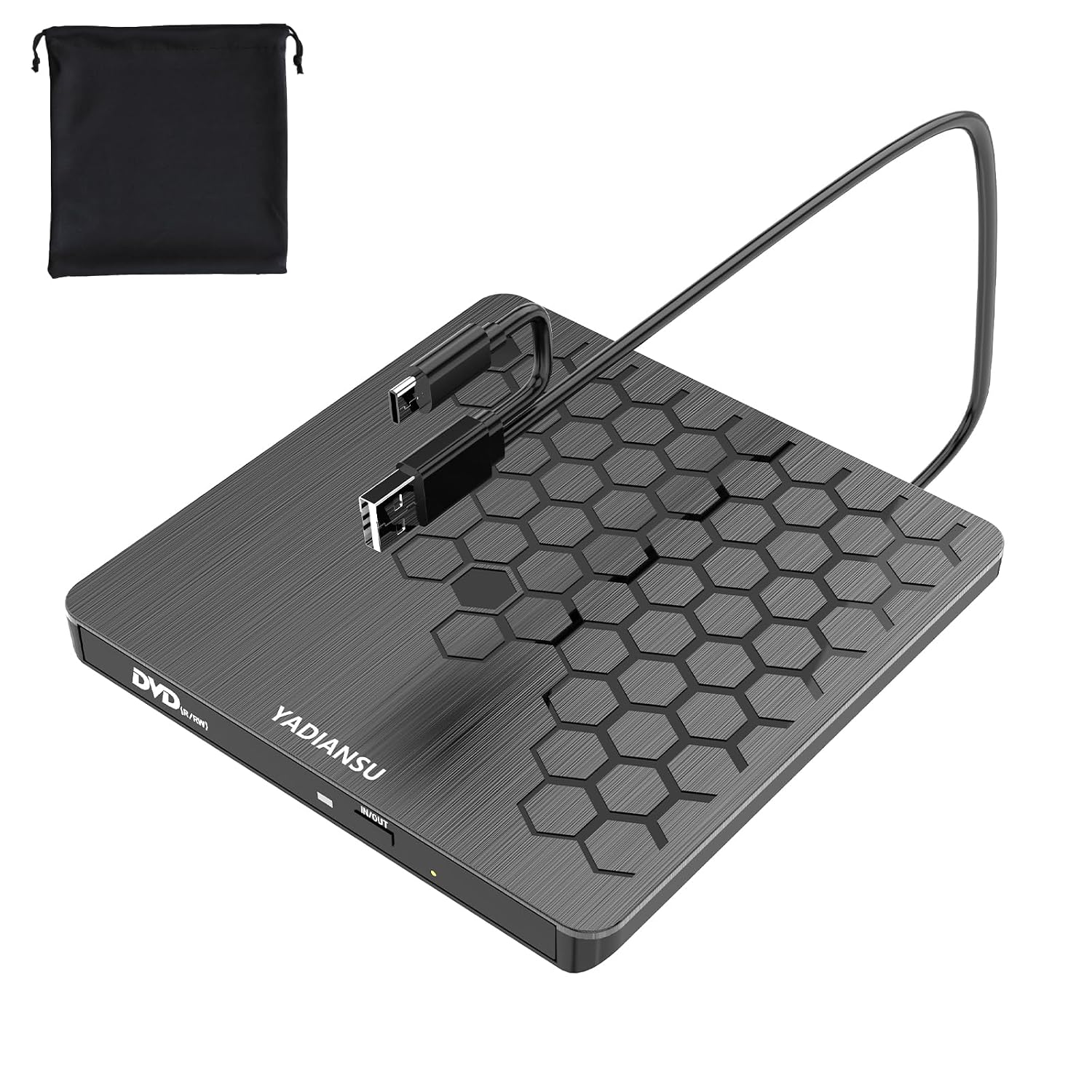 1 / 8
Prices are shown for browsing. Purchases are currently unavailable.
External CD DVD Drive 0 5 Ultra Slim USB 3 0 Type-C DVD Player CD DVD -RW Optical, $36.78, Availability unknown. Image 1 of 8.
- Selected option
- External CD DVD Drive 0 5 Ultra Slim USB 3 0 Type-C DVD Player CD DVD -RW Optical
- SKU
- JC25190
Source specifications
- Special Feature
- Error Correction, Lightscribe, Noise Reduction Technology, Plug & Play, USB 3.0
- Hardware Interface
- USB 3.0, USB 3.0 Type A, USB 3.0 Type C
- Brand
- YADIANSU
- Optical Storage Write Speed
- Max 24xCD / 8xDVD
- Optical Storage Read Speed
- Max 24xCD / 8xDVD
The details
About this item
Product description The video showcases the product in use. The video guides you through product setup. The video compares multiple products. The video shows the product being unpacked. Explore high speed and ultra slim dvd drive Merchant Video Previous page Next page 1 Super Speed 2 Powerful Performance 3 Wide Compatibility 4 Extra Power Supply Cord Previous page Next page 1 Office Assistant 2 Study Mate 3 Media Entertainment 4 Memory Keeper 5 Travel Why doesn't a Mac or MacBook show the DVD drive icon when you plug in the drive? The Mac won't show the drive icon until you insert a disc into the drive. Why does the eject button of the DVD drive fail to work when connected to a Mac or Macbook? After the Apple system reads the disc, the eject button of the external drive becomes 【Easy Plug & Play USB CD Drive】No additional drivers required! Simply connect via USB-A or USB-C, insert a disc, and let our external CD drive handle the rest. Enjoy seamless disc playback, burning, and ripping with this versatile usb cd drive.; 【Latest High Speed Tech】This CD burner delivers ultra-reliable performance and blazing-fast speeds with the latest USB 3.0 technology. Experience 8x DVD-R and 24x CD
- 【Easy Plug & Play USB CD Drive】No additional drivers required! Simply connect via USB-A or USB-C, insert a disc, and let our external CD drive handle the rest. Enjoy seamless disc playback, burning, and ripping with this versatile usb cd drive.
- 【Latest High Speed Tech】This CD burner delivers ultra-reliable performance and blazing-fast speeds with the latest USB 3.0 technology. Experience 8x DVD-R and 24x CD-R read/write speeds with this DVD burner, delivering ultra-efficient disc burning—smooth, distortion-free, and lag-free.
- 【Universal Compatibility】This USB external CD/DVD drive is compatible with Windows (11/ 10/ 8/ 7/ XP/ 98/ SE/ ME/ 2000/ Vista), Linux, and macOS (all versions). Perfect for a variety of laptops and desktops. (Important Note: NOT support for ChromeOS, Ubuntu, TV, Car, Projector, Phone, iPad/Tablet, PS4/5, Xbox and blu ray disk.)
- 【Ultra Slim & Portable】At just 0.5 inches thick - as slim as a pen - the YADIANSU DVD drive is the perfect on-the-go companion. Effortlessly slip it into your bag or even a large pocket for instant access to discs anywhere: at home, in the office, or while traveling.
- 【Multifunctional CD player】Enjoy seamless playback and burning with support for all major disc formats including DVD+R, DVD, CD-ROM, DVD-ROM, CD-R, and CD-RW. This DVD player for laptop is perfect for playing music & movies, burning custom discs, installing software/games/OS, and creating reliable data backups - all in one compact solution.
- 【What’s in the Box?】1 Ultra-slim USB CD Drive, 1 Drawstring Storage Pouch, 1 User Manual, 1 Extra Power Supply Cable.
- 【Reliable Support】Enjoy peace of mind with 24/7 customer assistance and comprehensive 90-day warranty protection. Our dedicated support team is always ready to help with any questions or needs.
From the manufacturer
Product details
Product description The video showcases the product in use. The video guides you through product setup. The video compares multiple products. The video shows the product being unpacked. Explore high speed and ultra slim dvd drive Merchant Video Previous page Next page 1 Super Speed 2 Powerful Performance 3 Wide Compatibility 4 Extra Power Supply Cord Previous page Next page 1 Office Assistant 2 Study Mate 3 Media Entertainment 4 Memory Keeper 5 Travel Why doesn't a Mac or MacBook show the DVD drive icon when you plug in the drive? The Mac won't show the drive icon until you insert a disc into the drive. Why does the eject button of the DVD drive fail to work when connected to a Mac or Macbook? After the Apple system reads the disc, the eject button of the external drive becomes invalid due to macOS limitations. Please right-click the icon on the desktop and select "Eject", or select "File" > "Eject" from the menu. Where is the USB C/A data cable for connecting to a computer? The USB-C /A data cable is fixed to the bottom of the external drive. Please turn the optical drive over, and you will find the data cable that connects to the computer. When and how to use the extra power cord? Use the extra power
Highlights: 【Easy Plug & Play USB CD Drive】No additional drivers required! Simply connect via USB-A or USB-C, insert a disc, and let our external CD drive handle the rest. Enjoy seamless disc playback, burning, and ripping with this versatile usb cd drive. 【Latest High Speed Tech】This CD burner delivers ultra-reliable performance and blazing-fast speeds with the latest USB 3.0 technology. Experience 8x DVD-R and 24x CD-R read/write speeds with this DVD burner, delivering ultra-efficient disc burning—smooth, distortion-free, and lag-free. 【Universal Compatibility】This USB external CD/DVD drive is compatible with Windows (11/ 10/ 8/ 7/ XP/ 98/ SE/ ME/ 2000/ Vista), Linux, and macOS (all versions). Perfect for a variety of laptops and desktops. (Important Note: NOT support for ChromeOS, Ubuntu, TV, Car, Projector, Phone, iPad/Tablet, PS4/5, Xbox and blu ray disk.) 【Ultra Slim & Portable】At just 0.5 inches thick - as slim as a pen - the YADIANSU DVD drive is the perfect on-the-go companion. Effortlessly slip it into your bag or even a large pocket for instant access to discs anywhere: at home, in the office, or while traveling. 【Multifunctional CD player】Enjoy seamless playback and burning with support for all major disc formats including DVD+R, DVD, CD-ROM, DVD-ROM, CD-R, and CD-RW. This DVD player for laptop is perfect for playing music & movies, burning custom discs, installing software/games/OS, and creating reliable
What you can expect: 【Easy Plug & Play USB CD Drive】No additional drivers required! Simply connect via USB-A or USB-C, insert a disc, and let our external CD drive handle the rest. Enjoy seamless disc playback, burning, and ripping with this versatile usb cd drive. 【Latest High Speed Tech】This CD burner delivers ultra-reliable performance and blazing-fast speeds with the latest USB 3.0 technology. Experience 8x DVD-R and 24x CD-R read/write speeds with this DVD burner, delivering ultra-efficient disc burning—smooth, distortion-free, and lag-free. 【Universal Compatibility】This USB external CD/DVD drive is compatible with Windows (11/ 10/ 8/ 7/ XP/ 98/ SE/ ME/ 2000/ Vista), Linux, and macOS (all versions). Perfect for a variety of laptops and desktops. (Important Note: NOT support for ChromeOS, Ubuntu, TV, Car, Projector, Phone, iPad/Tablet, PS4/5, Xbox and blu ray disk.) 【Ultra Slim & Portable】At just 0.5 inches thick - as slim as a pen - the YADIANSU DVD drive is the perfect on-the-go companion. Effortlessly slip it into your bag or even a large pocket for instant access to discs anywhere: at home, in the office, or while traveling. 【Multifunctional CD player】Enjoy seamless playback and burning with support for all major disc formats including DVD+R, DVD, CD-ROM, DVD-ROM, CD-R, and CD-RW. This DVD player for laptop is perfect for playing music & movies, burning custom discs, installing software/games/OS, and creating reliable data backups - all in one compact solution. 【What’s in the Box?】1 Ultra-slim USB CD Drive, 1 Drawstring Storage Pouch,
Customer feedback: 4.3/5 average rating.
Customers say: Customers find the external drive works perfectly with Windows 11 PCs and appreciate its high-quality performance without errors or lags.
Review snippets: To be honest, I didn’t have high expectations given the low price, but after several days of heavy use, I’m genuinely impressed - this product is a true game-changer. The first impression of the YADIANSU CD/DVD drive is its sleek / I bought this drive so I could read DVDs on my laptop and it works well on Windows 11. As advertised, this drive is truly PLUG-AND-PLAY, when I inserted the DVD, the drive started up by itself and played the
Product description The video showcases the product in use. The video guides you through product setup. The video compares multiple products. The video shows the product being unpacked. Explore high speed and ultra slim dvd drive Merchant Video Previous page Next page 1 Super Speed 2 Powerful Performance 3 Wide Compatibility 4 Extra Power Supply Cord Previous page Next page 1 Office Assistant 2 Study Mate 3 Media Entertainment 4 Memory Keeper 5 Travel Why doesn't a Mac or MacBook show the DVD drive icon when you plug in the drive? The Mac won't show the drive icon until you insert a disc into the drive. Why does the eject button of the DVD drive fail to work when connected to a Mac or Macbook? After the Apple system reads the disc, the eject button of the external drive becomes invalid due to macOS limitations. Please right-click the icon on the desktop and select "Eject", or select "File" > "Eject" from the menu. Where is the USB C/A data cable for connecting to a computer? The USB-C /A data cable is fixed to the bottom of the external drive. Please turn the optical drive over, and you will find the data cable that connects to the computer. When and how to use the extra power cord? Use the extra power cable if a computer (especially older models) lacks sufficient power. First, connect the built-in USB A/C data cable to your computer. Then, connect the power cord from the drive’s DC port to a power adapter or power bank.