Complete product information
{
  "id": "hosyond-3-5-inch-480x320-touch-screen-tft-lcd-spi-display-panel-for-raspberry-pi-b-b-2b",
  "handle": "hosyond-3-5-inch-480x320-touch-screen-tft-lcd-spi-display-panel-for-raspberry-pi-b-b-2b",
  "sku": "JC11494",
  "asin": "B0BJDTL9J3",
  "title": "Hosyond 3 5 Inch 480x320 Touch Screen TFT LCD SPI Display Panel for Raspberry Pi B B 2B",
  "title_original": "Hosyond 3.5 Inch 480x320 Touch Screen TFT LCD SPI Display Panel for Raspberry Pi B, B+, 2B, 3B, 3B+,4B, 5",
  "brand": "Hosyond",
  "price": 41.38,
  "social_proof": {
    "bought_past_month": 1056,
    "text": "1056+ bought in the past month"
  },
  "images": [
    "https://m.media-amazon.com/images/I/51StvNgglUL._SL1500_.jpg",
    "https://m.media-amazon.com/images/I/61iag6RK2oL._SL1500_.jpg",
    "https://m.media-amazon.com/images/I/61da3lSL+6L._SL1500_.jpg",
    "https://m.media-amazon.com/images/I/715wjsDU0bL._SL1500_.jpg",
    "https://m.media-amazon.com/images/I/61myl4sj4AL._SL1500_.jpg",
    "https://m.media-amazon.com/images/I/71GSYL1SnhL._SL1500_.jpg",
    "https://m.media-amazon.com/images/I/612EAZz6p+L._SL1500_.jpg",
    "https://m.media-amazon.com/images/I/61lnDrj6N0L._SL1500_.jpg"
  ],
  "aplus_images": [
    "https://m.media-amazon.com/images/S/aplus-media-library-service-media/05c4e97a-b11d-4d10-b67b-058ab39fc004.__CR0,0,300,300_PT0_SX300_V1___.jpg",
    "https://m.media-amazon.com/images/S/aplus-media-library-service-media/7c10810c-b47b-4dc3-8527-8b58e82d80ca.__CR0,0,1280,792_PT0_SX970_V1___.jpg",
    "https://m.media-amazon.com/images/S/aplus-media-library-service-media/195e6936-47b5-4e95-b200-63d9b4b36662.__CR0,0,970,600_PT0_SX970_V1___.jpg",
    "https://m.media-amazon.com/images/S/aplus-media-library-service-media/edaa522a-6b55-4040-99dc-d49427ba0ce7.__CR0,0,970,600_PT0_SX970_V1___.jpg",
    "https://m.media-amazon.com/images/S/aplus-media-library-service-media/96d22230-7f1e-4454-99c3-5911f51a82e6.__CR0,0,970,600_PT0_SX970_V1___.jpg",
    "https://m.media-amazon.com/images/S/aplus-media-library-service-media/4eda8116-86fa-4df2-8afe-272b992ced6b.__CR0,0,970,600_PT0_SX970_V1___.jpg",
    "https://m.media-amazon.com/images/S/aplus-media-library-service-media/bcd016e4-ccbc-47d8-bf55-00cf81e01162.__CR0,0,1464,625_PT0_SX1464_V1___.jpg",
    "https://m.media-amazon.com/images/S/aplus-media-library-service-media/fa7bbb84-f204-475b-9dfb-72958ce828b8.__CR0,0,315,145_PT0_SX315_V1___.jpg",
    "https://m.media-amazon.com/images/S/aplus-media-library-service-media/7abe846e-0003-4c02-b0fc-88ef347e718d.__AC_SR1200,1200___.jpg",
    "https://m.media-amazon.com/images/S/aplus-media-library-service-media/52fb6ccf-60bb-4688-8c4a-9e93ae05789a.__AC_SR1200,1200___.jpg",
    "https://m.media-amazon.com/images/S/aplus-media-library-service-media/acf931b5-c0c3-485b-ad8a-26aa8a59971e.__AC_SR1200,1200___.jpg",
    "https://m.media-amazon.com/images/S/aplus-media-library-service-media/8c5df3cd-0090-49f1-92f6-fe8f813a936f.__AC_SR1200,1200___.jpg",
    "https://m.media-amazon.com/images/S/aplus-media-library-service-media/5f3ed602-0fe6-4f6c-a5b7-f4cdc96ee172.__AC_SR1200,1200___.jpg",
    "https://m.media-amazon.com/images/S/aplus-media-library-service-media/e98122cc-d5d1-470f-b5ee-4d3e212cf79c.__AC_SR1200,1200___.jpg",
    "https://m.media-amazon.com/images/S/aplus-media-library-service-media/85bcd91d-443d-474d-8c7f-768653db934e.__AC_SR1200,1200___.jpg",
    "https://m.media-amazon.com/images/I/41ybMsl51HL._SL1500_.jpg",
    "https://m.media-amazon.com/images/S/aplus-media-library-service-media/c1f58394-fa09-4c5c-a080-33113629ca08.__AC_SR1200,1200___.jpg",
    "https://m.media-amazon.com/images/S/aplus-media-library-service-media/b1eec529-821f-4adf-8829-9ffb043b7777.__AC_SR1200,1200___.jpg",
    "https://m.media-amazon.com/images/S/aplus-media-library-service-media/a4d1e0b3-b9ec-43c2-ba7e-8562126863b6.__AC_SR1200,1200___.jpg",
    "https://m.media-amazon.com/images/S/aplus-media-library-service-media/eca923f4-13d2-49d1-9c23-b3bd53714b55.__AC_SR1200,1200___.jpg",
    "https://m.media-amazon.com/images/S/aplus-media-library-service-media/23ace73a-c005-4620-affc-b73566fd9d92.__AC_SR1200,1200___.jpg",
    "https://m.media-amazon.com/images/S/aplus-media-library-service-media/56e63c10-a33c-4d10-8bf3-2fb8cf0f8801.__AC_SR1200,1200___.jpg",
    "https://m.media-amazon.com/images/S/aplus-media-library-service-media/a687f480-c348-4bd4-b58c-74df5dafc01d.__AC_SR1200,1200___.jpg",
    "https://m.media-amazon.com/images/S/aplus-media-library-service-media/088f8b2a-9b79-4c17-963e-4110b8a97934.__AC_SR1200,1200___.jpg",
    "https://m.media-amazon.com/images/I/41%2BB9s%2BicHL._SL1500_.jpg",
    "https://m.media-amazon.com/images/I/41VkBzHXRYL._SL1500_.jpg",
    "https://m.media-amazon.com/images/I/31Hzb1jUESL._SL1500_.jpg",
    "https://m.media-amazon.com/images/I/41gFJB-AFIL._SL1500_.jpg"
  ],
  "bullets": [
    "3.5 inch, 320×480 resolution, TFT LCD resistive touch screen, clear display effect and using easily with a touch pen.",
    "No external power supply required.Just plug it into the Raspberry Pi board correctly and install the driver to use it. (Driver installation tutorial is provided)",
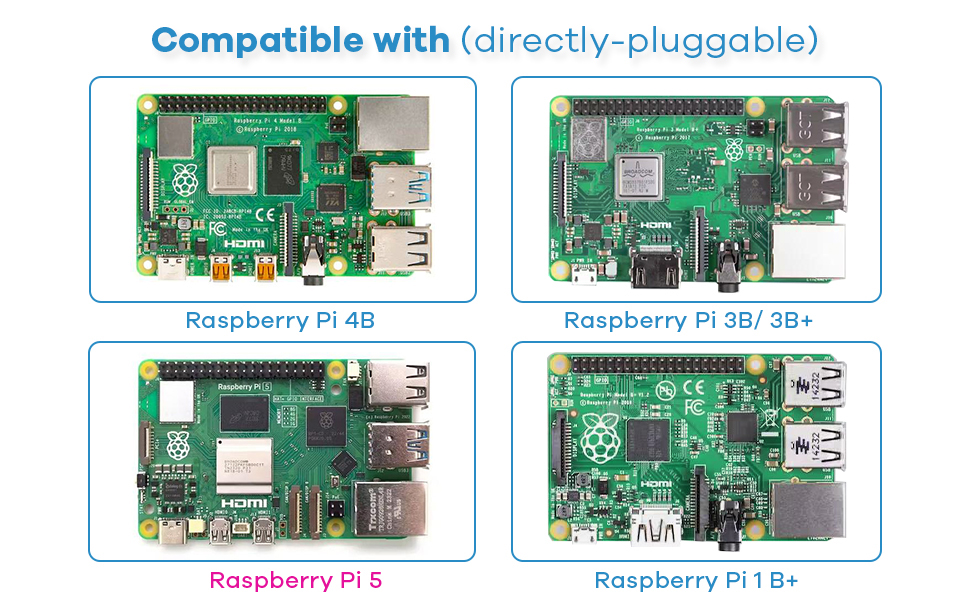
    "This 3.5 inch touch screen is specially designed for Raspberry Pi, perfectly suitable for Pi5, Pi4B, Pi3B+, Pi3B, Pi2B, Pi1B (directly-pluggable).",
    "Compatible with a variety of systems, such as for Raspbian system, ubuntu system, kali Linux system and so on.",
    "You can get one 3.5 inch raspberry pi touch screen and one touch pen, what the important things is that the project introduction, code and tutorial is provided.We provide technical support, If you encounter any difficulties during use, please contact us first to help you solve it."
  ],
  "specs": {},
  "category": "Industrial & Scientific > Industrial Electrical > Optoelectronic Products > Optoelectronic Displays > LCD Touch Panels",
  "category_path": [
    "Industrial & Scientific",
    "Industrial Electrical",
    "Optoelectronic Products",
    "Optoelectronic Displays",
    "LCD Touch Panels"
  ],
  "category_slug": "industrial-scientific/industrial-electrical/optoelectronic-products/optoelectronic-displays/lcd-touch-panels",
  "category_leaf": "LCD Touch Panels",
  "variations": {
    "sizes": [],
    "colors": [],
    "size_chart": null
  },
  "reviews": {
    "average_rating": 3.8,
    "customers_say": "Customers find the display monitor to be good value for money.",
    "items": [
      {
        "title": "5.0 out of 5 stars perfect",
        "body": "YT vid: \"How To Install 3.5 inch TFT LCD Display On Raspberry Pi (step-by-step guide with code)\" basically downloaded a thing, ran a script, and all of a sudden I have a live terminal on my rpi. Read more",
        "author": "Austin David",
        "rating": 5,
        "date": "March 2, 2026",
        "verified": true,
        "images": []
      },
      {
        "title": "1.0 out of 5 stars DONT BUY SAVE YOU MONEY",
        "body": "I bought this 3.5\" Hosyond display for my Raspberry Pi 3B, but it has been a nightmare to get working. The drivers are completely outdated, the installation instructions are confusing, and the GitHub repositories for framebuffer support won’t compile on modern Pi OS. SPI touchscreen and display support just don’t work reliably. Huge waste of money and time — I do not recommend this product. Read more",
        "author": "hondadx88",
        "rating": 1,
        "date": "December 3, 2025",
        "verified": true,
        "images": []
      },
      {
        "title": "5.0 out of 5 stars A Nice Little Screen to See whats going on while I Play",
        "body": "Some people were complaining about the install, but it was easy using the Raspian Pi 5 64 bit OS and following the instructions. Worked first try. I tried it with Kali Linux 64 bit, but it would not work. I didn't try any of the custom 32 bit OS images the seller advertised for download, but I bet they work. I recommend this screen if using any of the advertised custom images or the Rasbian Pi 5 64 Bit OS. Read more",
        "author": "Timothy Olsen",
        "rating": 5,
        "date": "May 3, 2025",
        "verified": true,
        "images": []
      },
      {
        "title": "4.0 out of 5 stars Very handy, but do your research",
        "body": "I've used several of these in different projects. They work great. That having been said, it's not always easy to get them working, depending on your board and distro. I some cases, it may not even be possible. I can tell you that it will work with raspberry pi os bookworm without too much trouble. Read more",
        "author": "Sumdude",
        "rating": 4,
        "date": "January 31, 2026",
        "verified": true,
        "images": []
      },
      {
        "title": "5.0 out of 5 stars This is a very nice little screen, I was amazed at the picture quality.",
        "body": "This is a very nice little screen, I was amazed at the picture quality. It's also amazing this comes with a touch screen and speakers for this price. My only complaint is I tried to use it as a virtual stream deck but wasn't able to get it to work easily and repurposed the monitor for a Raspberry Pi display, this wasn't a problem with the monitor but rather my laptop setup. Read more",
        "author": "David C. Frush",
        "rating": 5,
        "date": "June 19, 2025",
        "verified": true,
        "images": []
      },
      {
        "title": "3.0 out of 5 stars work fine on rpi2, cannot make it to work on rpi4",
        "body": "I initially set up the screen on a fresh Raspberry Pi OS (Raspbian) for my Raspberry Pi 2 and got the image working, although the touchscreen functionality was still elusive. However, on my Raspberry Pi 4, I encountered a persistent white screen, despite trying various drivers. My primary goal was to use it with MainsailOS (Klipper/3D Printing) on my Raspberry Pi 2, but it seems a desktop-based OS is required. I only encountered a \"low voltage\" message in the terminal. Overall, I'm not particularly satisfied with this purchase. Read more",
        "author": "Santiago M.",
        "rating": 3,
        "date": "February 28, 2024",
        "verified": true,
        "images": []
      },
      {
        "title": "5.0 out of 5 stars Small but useful for certain conditions",
        "body": "Way smaller than I thought (yes i can read the specs before buying) but still I can use for one of my RPis Read more",
        "author": "Jason Bourne",
        "rating": 5,
        "date": "January 17, 2026",
        "verified": true,
        "images": []
      },
      {
        "title": "1.0 out of 5 stars Find another product",
        "body": "I should have read other reviews and looked for their drivers myself before buying this. They don't list any place on this page that you can download drivers for this display and so far the only way I could get the thing working without contact from their support was installing their disk image, the link for which didn't even provide the right distro, and had graphical scaling errors. After reading other reviews that state that their support not only doesn't help but also uses drivers that don't work, I'll be skipping the headache. Maybe at some point I'll use this for something but it'll probably end up in the trash. Read more",
        "author": "VenerealGrizzlies",
        "rating": 1,
        "date": "March 23, 2026",
        "verified": true,
        "images": []
      }
    ]
  },
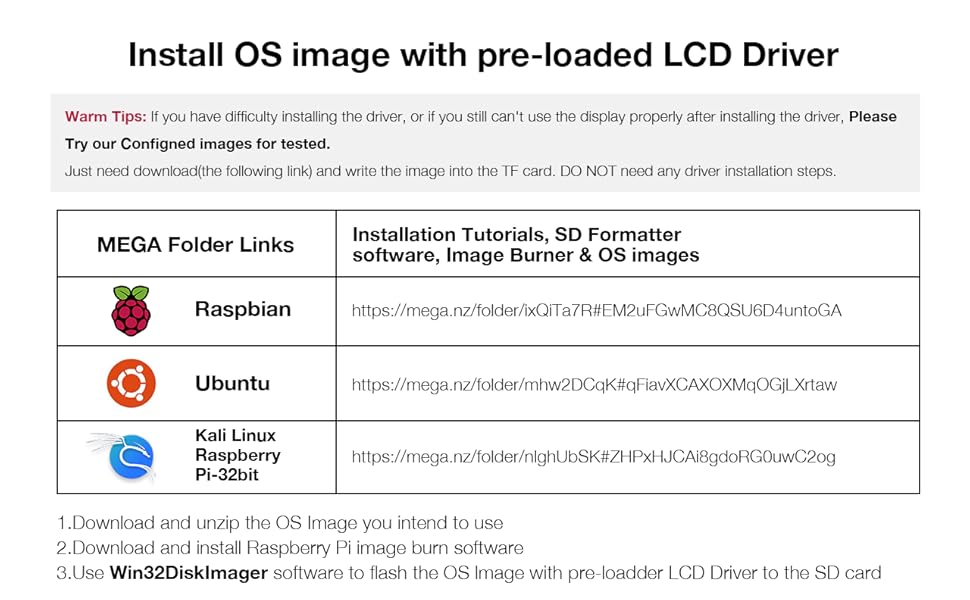
  "short_description": "Product description Features 320×480 resolution, LCD Interface: SPI(Fmax:32MHz) Resistive touch control, comes with touch pen Supports any revision of Raspberry Pi (directly-pluggable) Compatible with Raspberry Pi B, B+, 2B, 3B, 3B+, 4B, 5 Drivers provided (works with your own Raspbian/Ubuntu directly) GPIO physical interface, Size perfectly fits the Raspberry Pi Supports Raspbian system, ubuntu system ,kali Linux system Steps: Warm Tips: If you have difficulty installing the driver, or if you still can't use the display properly after installing the driver, Please Try our Configned images for tested . Just need download and write the image into the TF card. DO NOT need any driver installation steps. Download and unzip.",
  "about_this_item": "Product description Features 320×480 resolution, LCD Interface: SPI(Fmax:32MHz) Resistive touch control, comes with touch pen Supports any revision of Raspberry Pi (directly-pluggable) Compatible with Raspberry Pi B, B+, 2B, 3B, 3B+, 4B, 5 Drivers provided (works with your own Raspbian/Ubuntu directly) GPIO physical interface, Size perfectly fits the Raspberry Pi Supports Raspbian system, ubuntu system ,kali Linux system Steps: Warm Tips: If you have difficulty installing the driver, or if you still can't use the display properly after installing the driver, Please Try our Configned images for tested . Just need download and write the image into the TF card. DO NOT need any driver installation steps. Download and unzip the OS Image you intend to use Download and install Raspberry Pi image burn software Use Win32DiskImager software to flash the OS lmage with pre-loadder LCD Driver to the SD 3.5 inch, 320×480 resolution, TFT LCD resistive touch screen, clear display effect and using easily with a touch pen.; No external power supply required.Just plug it into the Raspberry Pi board correctly and install the driver to use it. (Driver installation tutorial is provided); This 3.5 inch t",
  "long_description": "Product description Features 320×480 resolution, LCD Interface: SPI(Fmax:32MHz) Resistive touch control, comes with touch pen Supports any revision of Raspberry Pi (directly-pluggable) Compatible with Raspberry Pi B, B+, 2B, 3B, 3B+, 4B, 5 Drivers provided (works with your own Raspbian/Ubuntu directly) GPIO physical interface, Size perfectly fits the Raspberry Pi Supports Raspbian system, ubuntu system ,kali Linux system Steps: Warm Tips: If you have difficulty installing the driver, or if you still can't use the display properly after installing the driver, Please Try our Configned images for tested . Just need download and write the image into the TF card. DO NOT need any driver installation steps. Download and unzip the OS Image you intend to use Download and install Raspberry Pi image burn software Use Win32DiskImager software to flash the OS lmage with pre-loadder LCD Driver to the SD card If you still keep getting the white screen issue, try the Raspbian Bullseye version at last or Please ask us for help first. Tips When using with the Raspberry Pi, you must first install the driver and write the code , otherwise the screen will only display white. It is recommended to use a power supply above 5V 2.5A , otherwise it may fail to start and the screen will only display white. Parameters\n\nHighlights: 3.5 inch, 320×480 resolution, TFT LCD resistive touch screen, clear display effect and using easily with a touch pen. No external power supply required.Just plug it into the Raspberry Pi board correctly and install the driver to use it. (Driver installation tutorial is provided) This 3.5 inch touch screen is specially designed for Raspberry Pi, perfectly suitable for Pi5, Pi4B, Pi3B+, Pi3B, Pi2B, Pi1B (directly-pluggable). Compatible with a variety of systems, such as for Raspbian system, ubuntu system, kali Linux system and so on. You can get one 3.5 inch raspberry pi touch screen and one touch pen, what the important things is that the project introduction, code and tutorial is provided.We provide technical support, If you encounter any difficulties during use, please contact us first to help you solve it.\n\nHow it fits your day: Use the key specs and highlights above to match it to your setup, space, or routine before you check out.\n\nCustomer feedback: 3.8/5 average rating.\n\nCustomers say: Customers find the display monitor to be good value for money.\n\nReview snippets: YT vid: \"How To Install 3.5 inch TFT LCD Display On Raspberry Pi (step-by-step guide with code)\" basically downloaded a thing, ran a script, and all of a sudden I have a live terminal on my rpi. Read more / I bought this 3.5\" Hosyond display for my Raspberry Pi 3B, but it has been a nightmare to get working. The drivers are completely outdated, the installation instructions are confusing, and the GitHub repositories for framebuffer support won’t compile on\n\nProduct description Features 320×480 resolution, LCD Interface: SPI(Fmax:32MHz) Resistive touch control, comes with touch pen Supports any revision of Raspberry Pi (directly-pluggable) Compatible with Raspberry Pi B, B+, 2B, 3B, 3B+, 4B, 5 Drivers provided (works with your own Raspbian/Ubuntu directly) GPIO physical interface, Size perfectly fits the Raspberry Pi Supports Raspbian system, ubuntu system ,kali Linux system Steps: Warm Tips: If you have difficulty installing the driver, or if you still can't use the display properly after installing the driver, Please Try our Configned images for tested . Just need download and write the image into the TF card. DO NOT need any driver installation steps. Download and unzip the OS Image you intend to use Download and install Raspberry Pi image burn software Use Win32DiskImager software to flash the OS lmage with pre-loadder LCD Driver to the SD card If you still keep getting the white screen issue, try the Raspbian Bullseye version at last or Please ask us for help first. Tips When using with the Raspberry Pi, you must first install the driver and write the code , otherwise the screen will only display white. It is recommended to use a power supply above 5V 2.5A , otherwise it may fail to start and the screen will only display white. Parameters",
  "long_description_blocks": [
    {
      "type": "p",
      "text": "Product description Features 320×480 resolution, LCD Interface: SPI(Fmax:32MHz) Resistive touch control, comes with touch pen Supports any revision of Raspberry Pi (directly-pluggable) Compatible with Raspberry Pi B, B+, 2B, 3B, 3B+, 4B, 5 Drivers provided (works with your own Raspbian/Ubuntu directly) GPIO physical interface, Size perfectly fits the Raspberry Pi Supports Raspbian system, ubuntu system ,kali Linux system Steps: Warm Tips: If you have difficulty installing the driver, or if you still can't use the display properly after installing the driver, Please Try our Configned images for tested . Just need download and write the image into the TF card. DO NOT need any driver installation steps. Download and unzip the OS Image you intend to use Download and install Raspberry Pi image burn software Use Win32DiskImager software to flash the OS lmage with pre-loadder LCD Driver to the SD card If you still keep getting the white screen issue, try the Raspbian Bullseye version at last or Please ask us for help first. Tips When using with the Raspberry Pi, you must first install the driver and write the code , otherwise the screen will only display white. It is recommended to use a power supply above 5V 2.5A , otherwise it may fail to start and the screen will only display white. Parameters"
    },
    {
      "type": "p",
      "text": "Highlights: 3.5 inch, 320×480 resolution, TFT LCD resistive touch screen, clear display effect and using easily with a touch pen. No external power supply required.Just plug it into the Raspberry Pi board correctly and install the driver to use it. (Driver installation tutorial is provided) This 3.5 inch touch screen is specially designed for Raspberry Pi, perfectly suitable for Pi5, Pi4B, Pi3B+, Pi3B, Pi2B, Pi1B (directly-pluggable). Compatible with a variety of systems, such as for Raspbian system, ubuntu system, kali Linux system and so on. You can get one 3.5 inch raspberry pi touch screen and one touch pen, what the important things is that the project introduction, code and tutorial is provided.We provide technical support, If you encounter any difficulties during use, please contact us first to help you solve it."
    },
    {
      "type": "p",
      "text": "How it fits your day: Use the key specs and highlights above to match it to your setup, space, or routine before you check out."
    },
    {
      "type": "p",
      "text": "Customer feedback: 3.8/5 average rating."
    },
    {
      "type": "p",
      "text": "Customers say: Customers find the display monitor to be good value for money."
    },
    {
      "type": "p",
      "text": "Review snippets: YT vid: \"How To Install 3.5 inch TFT LCD Display On Raspberry Pi (step-by-step guide with code)\" basically downloaded a thing, ran a script, and all of a sudden I have a live terminal on my rpi. Read more / I bought this 3.5\" Hosyond display for my Raspberry Pi 3B, but it has been a nightmare to get working. The drivers are completely outdated, the installation instructions are confusing, and the GitHub repositories for framebuffer support won’t compile on"
    },
    {
      "type": "p",
      "text": "Product description Features 320×480 resolution, LCD Interface: SPI(Fmax:32MHz) Resistive touch control, comes with touch pen Supports any revision of Raspberry Pi (directly-pluggable) Compatible with Raspberry Pi B, B+, 2B, 3B, 3B+, 4B, 5 Drivers provided (works with your own Raspbian/Ubuntu directly) GPIO physical interface, Size perfectly fits the Raspberry Pi Supports Raspbian system, ubuntu system ,kali Linux system Steps: Warm Tips: If you have difficulty installing the driver, or if you still can't use the display properly after installing the driver, Please Try our Configned images for tested . Just need download and write the image into the TF card. DO NOT need any driver installation steps. Download and unzip the OS Image you intend to use Download and install Raspberry Pi image burn software Use Win32DiskImager software to flash the OS lmage with pre-loadder LCD Driver to the SD card If you still keep getting the white screen issue, try the Raspbian Bullseye version at last or Please ask us for help first. Tips When using with the Raspberry Pi, you must first install the driver and write the code , otherwise the screen will only display white. It is recommended to use a power supply above 5V 2.5A , otherwise it may fail to start and the screen will only display white. Parameters"
    },
    {
      "type": "img",
      "src": "https://m.media-amazon.com/images/S/aplus-media-library-service-media/05c4e97a-b11d-4d10-b67b-058ab39fc004.__CR0,0,300,300_PT0_SX300_V1___.jpg",
      "alt": "Hosyond 3 5 Inch 480x320 Touch Screen TFT LCD SPI Display Panel for Raspberry Pi B B 2B details image 1"
    },
    {
      "type": "img",
      "src": "https://m.media-amazon.com/images/S/aplus-media-library-service-media/7c10810c-b47b-4dc3-8527-8b58e82d80ca.__CR0,0,1280,792_PT0_SX970_V1___.jpg",
      "alt": "Hosyond 3 5 Inch 480x320 Touch Screen TFT LCD SPI Display Panel for Raspberry Pi B B 2B details image 2"
    },
    {
      "type": "img",
      "src": "https://m.media-amazon.com/images/S/aplus-media-library-service-media/195e6936-47b5-4e95-b200-63d9b4b36662.__CR0,0,970,600_PT0_SX970_V1___.jpg",
      "alt": "Hosyond 3 5 Inch 480x320 Touch Screen TFT LCD SPI Display Panel for Raspberry Pi B B 2B details image 3"
    },
    {
      "type": "img",
      "src": "https://m.media-amazon.com/images/S/aplus-media-library-service-media/edaa522a-6b55-4040-99dc-d49427ba0ce7.__CR0,0,970,600_PT0_SX970_V1___.jpg",
      "alt": "Hosyond 3 5 Inch 480x320 Touch Screen TFT LCD SPI Display Panel for Raspberry Pi B B 2B details image 4"
    },
    {
      "type": "img",
      "src": "https://m.media-amazon.com/images/S/aplus-media-library-service-media/96d22230-7f1e-4454-99c3-5911f51a82e6.__CR0,0,970,600_PT0_SX970_V1___.jpg",
      "alt": "Hosyond 3 5 Inch 480x320 Touch Screen TFT LCD SPI Display Panel for Raspberry Pi B B 2B details image 5"
    },
    {
      "type": "img",
      "src": "https://m.media-amazon.com/images/S/aplus-media-library-service-media/4eda8116-86fa-4df2-8afe-272b992ced6b.__CR0,0,970,600_PT0_SX970_V1___.jpg",
      "alt": "Hosyond 3 5 Inch 480x320 Touch Screen TFT LCD SPI Display Panel for Raspberry Pi B B 2B details image 6"
    },
    {
      "type": "img",
      "src": "https://m.media-amazon.com/images/S/aplus-media-library-service-media/bcd016e4-ccbc-47d8-bf55-00cf81e01162.__CR0,0,1464,625_PT0_SX1464_V1___.jpg",
      "alt": "Hosyond 3 5 Inch 480x320 Touch Screen TFT LCD SPI Display Panel for Raspberry Pi B B 2B details image 7"
    },
    {
      "type": "img",
      "src": "https://m.media-amazon.com/images/S/aplus-media-library-service-media/fa7bbb84-f204-475b-9dfb-72958ce828b8.__CR0,0,315,145_PT0_SX315_V1___.jpg",
      "alt": "Hosyond 3 5 Inch 480x320 Touch Screen TFT LCD SPI Display Panel for Raspberry Pi B B 2B details image 8"
    },
    {
      "type": "img",
      "src": "https://m.media-amazon.com/images/S/aplus-media-library-service-media/7abe846e-0003-4c02-b0fc-88ef347e718d.__AC_SR1200,1200___.jpg",
      "alt": "Hosyond 3 5 Inch 480x320 Touch Screen TFT LCD SPI Display Panel for Raspberry Pi B B 2B details image 9"
    },
    {
      "type": "img",
      "src": "https://m.media-amazon.com/images/S/aplus-media-library-service-media/52fb6ccf-60bb-4688-8c4a-9e93ae05789a.__AC_SR1200,1200___.jpg",
      "alt": "Hosyond 3 5 Inch 480x320 Touch Screen TFT LCD SPI Display Panel for Raspberry Pi B B 2B details image 10"
    },
    {
      "type": "img",
      "src": "https://m.media-amazon.com/images/S/aplus-media-library-service-media/acf931b5-c0c3-485b-ad8a-26aa8a59971e.__AC_SR1200,1200___.jpg",
      "alt": "Hosyond 3 5 Inch 480x320 Touch Screen TFT LCD SPI Display Panel for Raspberry Pi B B 2B details image 11"
    },
    {
      "type": "img",
      "src": "https://m.media-amazon.com/images/S/aplus-media-library-service-media/8c5df3cd-0090-49f1-92f6-fe8f813a936f.__AC_SR1200,1200___.jpg",
      "alt": "Hosyond 3 5 Inch 480x320 Touch Screen TFT LCD SPI Display Panel for Raspberry Pi B B 2B details image 12"
    },
    {
      "type": "img",
      "src": "https://m.media-amazon.com/images/S/aplus-media-library-service-media/5f3ed602-0fe6-4f6c-a5b7-f4cdc96ee172.__AC_SR1200,1200___.jpg",
      "alt": "Hosyond 3 5 Inch 480x320 Touch Screen TFT LCD SPI Display Panel for Raspberry Pi B B 2B details image 13"
    },
    {
      "type": "img",
      "src": "https://m.media-amazon.com/images/S/aplus-media-library-service-media/e98122cc-d5d1-470f-b5ee-4d3e212cf79c.__AC_SR1200,1200___.jpg",
      "alt": "Hosyond 3 5 Inch 480x320 Touch Screen TFT LCD SPI Display Panel for Raspberry Pi B B 2B details image 14"
    },
    {
      "type": "img",
      "src": "https://m.media-amazon.com/images/S/aplus-media-library-service-media/85bcd91d-443d-474d-8c7f-768653db934e.__AC_SR1200,1200___.jpg",
      "alt": "Hosyond 3 5 Inch 480x320 Touch Screen TFT LCD SPI Display Panel for Raspberry Pi B B 2B details image 15"
    },
    {
      "type": "img",
      "src": "https://m.media-amazon.com/images/I/41ybMsl51HL._SL1500_.jpg",
      "alt": "Hosyond 3 5 Inch 480x320 Touch Screen TFT LCD SPI Display Panel for Raspberry Pi B B 2B details image 16"
    },
    {
      "type": "img",
      "src": "https://m.media-amazon.com/images/S/aplus-media-library-service-media/c1f58394-fa09-4c5c-a080-33113629ca08.__AC_SR1200,1200___.jpg",
      "alt": "Hosyond 3 5 Inch 480x320 Touch Screen TFT LCD SPI Display Panel for Raspberry Pi B B 2B details image 17"
    },
    {
      "type": "img",
      "src": "https://m.media-amazon.com/images/S/aplus-media-library-service-media/b1eec529-821f-4adf-8829-9ffb043b7777.__AC_SR1200,1200___.jpg",
      "alt": "Hosyond 3 5 Inch 480x320 Touch Screen TFT LCD SPI Display Panel for Raspberry Pi B B 2B details image 18"
    },
    {
      "type": "img",
      "src": "https://m.media-amazon.com/images/S/aplus-media-library-service-media/a4d1e0b3-b9ec-43c2-ba7e-8562126863b6.__AC_SR1200,1200___.jpg",
      "alt": "Hosyond 3 5 Inch 480x320 Touch Screen TFT LCD SPI Display Panel for Raspberry Pi B B 2B details image 19"
    },
    {
      "type": "img",
      "src": "https://m.media-amazon.com/images/S/aplus-media-library-service-media/eca923f4-13d2-49d1-9c23-b3bd53714b55.__AC_SR1200,1200___.jpg",
      "alt": "Hosyond 3 5 Inch 480x320 Touch Screen TFT LCD SPI Display Panel for Raspberry Pi B B 2B details image 20"
    },
    {
      "type": "img",
      "src": "https://m.media-amazon.com/images/S/aplus-media-library-service-media/23ace73a-c005-4620-affc-b73566fd9d92.__AC_SR1200,1200___.jpg",
      "alt": "Hosyond 3 5 Inch 480x320 Touch Screen TFT LCD SPI Display Panel for Raspberry Pi B B 2B details image 21"
    },
    {
      "type": "img",
      "src": "https://m.media-amazon.com/images/S/aplus-media-library-service-media/56e63c10-a33c-4d10-8bf3-2fb8cf0f8801.__AC_SR1200,1200___.jpg",
      "alt": "Hosyond 3 5 Inch 480x320 Touch Screen TFT LCD SPI Display Panel for Raspberry Pi B B 2B details image 22"
    },
    {
      "type": "img",
      "src": "https://m.media-amazon.com/images/S/aplus-media-library-service-media/a687f480-c348-4bd4-b58c-74df5dafc01d.__AC_SR1200,1200___.jpg",
      "alt": "Hosyond 3 5 Inch 480x320 Touch Screen TFT LCD SPI Display Panel for Raspberry Pi B B 2B details image 23"
    },
    {
      "type": "img",
      "src": "https://m.media-amazon.com/images/S/aplus-media-library-service-media/088f8b2a-9b79-4c17-963e-4110b8a97934.__AC_SR1200,1200___.jpg",
      "alt": "Hosyond 3 5 Inch 480x320 Touch Screen TFT LCD SPI Display Panel for Raspberry Pi B B 2B details image 24"
    },
    {
      "type": "img",
      "src": "https://m.media-amazon.com/images/I/41%2BB9s%2BicHL._SL1500_.jpg",
      "alt": "Hosyond 3 5 Inch 480x320 Touch Screen TFT LCD SPI Display Panel for Raspberry Pi B B 2B details image 25"
    },
    {
      "type": "img",
      "src": "https://m.media-amazon.com/images/I/41VkBzHXRYL._SL1500_.jpg",
      "alt": "Hosyond 3 5 Inch 480x320 Touch Screen TFT LCD SPI Display Panel for Raspberry Pi B B 2B details image 26"
    },
    {
      "type": "img",
      "src": "https://m.media-amazon.com/images/I/31Hzb1jUESL._SL1500_.jpg",
      "alt": "Hosyond 3 5 Inch 480x320 Touch Screen TFT LCD SPI Display Panel for Raspberry Pi B B 2B details image 27"
    },
    {
      "type": "img",
      "src": "https://m.media-amazon.com/images/I/41gFJB-AFIL._SL1500_.jpg",
      "alt": "Hosyond 3 5 Inch 480x320 Touch Screen TFT LCD SPI Display Panel for Raspberry Pi B B 2B details image 28"
    }
  ],
  "videos": [
    {
      "id": "ee311389-3c68-4663-97a5-eb770f80dcb5",
      "src": "https://m.media-amazon.com/images/S/vse-vms-transcoding-artifact-us-east-1-prod/ee311389-3c68-4663-97a5-eb770f80dcb5/default.jobtemplate.hls.m3u8",
      "sources": [
        {
          "type": "application/x-mpegURL",
          "src": "https://m.media-amazon.com/images/S/vse-vms-transcoding-artifact-us-east-1-prod/ee311389-3c68-4663-97a5-eb770f80dcb5/default.jobtemplate.hls.m3u8"
        }
      ],
      "poster": "https://m.media-amazon.com/images/S/al-na-9d5791cf-3faf/67bdfe20-fa7b-4924-b28e-80a664a1b9ee.mp4/r/THUMBNAIL_360P_FRAME_3_CAPTURE_2.JPG"
    },
    {
      "id": "b32cca5a-0902-43ee-9eca-cdd15f69a984",
      "src": "https://m.media-amazon.com/images/S/vse-vms-transcoding-artifact-us-east-1-prod/b32cca5a-0902-43ee-9eca-cdd15f69a984/default.jobtemplate.hls.m3u8",
      "sources": [
        {
          "type": "application/x-mpegURL",
          "src": "https://m.media-amazon.com/images/S/vse-vms-transcoding-artifact-us-east-1-prod/b32cca5a-0902-43ee-9eca-cdd15f69a984/default.jobtemplate.hls.m3u8"
        }
      ],
      "poster": "https://m.media-amazon.com/images/S/al-na-9d5791cf-3faf/67bdfe20-fa7b-4924-b28e-80a664a1b9ee.mp4/r/THUMBNAIL_360P_FRAME_3_CAPTURE_2.JPG"
    },
    {
      "id": "ac008021-0e9f-4fc2-99a7-dff31defaa43",
      "src": "https://m.media-amazon.com/images/S/vse-vms-transcoding-artifact-us-east-1-prod/ac008021-0e9f-4fc2-99a7-dff31defaa43/videopreview.jobtemplate.mp4.default.mp4",
      "sources": [
        {
          "type": "video/mp4",
          "src": "https://m.media-amazon.com/images/S/vse-vms-transcoding-artifact-us-east-1-prod/ac008021-0e9f-4fc2-99a7-dff31defaa43/videopreview.jobtemplate.mp4.default.mp4"
        }
      ],
      "poster": "https://m.media-amazon.com/images/S/al-na-9d5791cf-3faf/67bdfe20-fa7b-4924-b28e-80a664a1b9ee.mp4/r/THUMBNAIL_360P_FRAME_3_CAPTURE_2.JPG"
    },
    {
      "id": "682bad15-85df-4c6e-8e5e-9f2d6f19e06f",
      "src": "https://m.media-amazon.com/images/S/vse-vms-transcoding-artifact-us-east-1-prod/682bad15-85df-4c6e-8e5e-9f2d6f19e06f/videopreview.jobtemplate.mp4.default.mp4",
      "sources": [
        {
          "type": "video/mp4",
          "src": "https://m.media-amazon.com/images/S/vse-vms-transcoding-artifact-us-east-1-prod/682bad15-85df-4c6e-8e5e-9f2d6f19e06f/videopreview.jobtemplate.mp4.default.mp4"
        }
      ],
      "poster": "https://m.media-amazon.com/images/S/al-na-9d5791cf-3faf/67bdfe20-fa7b-4924-b28e-80a664a1b9ee.mp4/r/THUMBNAIL_360P_FRAME_3_CAPTURE_2.JPG"
    }
  ],
  "color_swatches": {},
  "color_image_key": {},
  "color_images": {},
  "description_sources": {
    "meta": "Amazon.com: Hosyond 3.5 Inch 480x320 Touch Screen TFT LCD SPI Display Panel for Raspberry Pi B, B+, 2B, 3B, 3B+,4B, 5 : Industrial & Scientific",
    "product": "Product description Features 320×480 resolution, LCD Interface: SPI(Fmax:32MHz) Resistive touch control, comes with touch pen Supports any revision of Raspberry Pi (directly-pluggable) Compatible with Raspberry Pi B, B+, 2B, 3B, 3B+, 4B, 5 Drivers provided (works with your own Raspbian/Ubuntu directly) GPIO physical interface, Size perfectly fits the Raspberry Pi Supports Raspbian system, ubuntu system ,kali Linux system Steps: Warm Tips: If you have difficulty installing the driver, or if you still can't use the display properly after installing the driver, Please Try our Configned images for tested . Just need download and write the image into the TF card. DO NOT need any driver installation steps. Download and unzip the OS Image you intend to use Download and install Raspberry Pi image burn software Use Win32DiskImager software to flash the OS lmage with pre-loadder LCD Driver to the SD card If you still keep getting the white screen issue, try the Raspbian Bullseye version at last or Please ask us for help first. Tips When using with the Raspberry Pi, you must first install the driver and write the code , otherwise the screen will only display white. It is recommended to use a power supply above 5V 2.5A , otherwise it may fail to start and the screen will only display white. Parameters",
    "aplus": "Product description Features 320×480 resolution, LCD Interface: SPI(Fmax:32MHz) Resistive touch control, comes with touch pen Supports any revision of Raspberry Pi (directly-pluggable) Compatible with Raspberry Pi B, B+, 2B, 3B, 3B+, 4B, 5 Drivers provided (works with your own Raspbian/Ubuntu directly) GPIO physical interface, Size perfectly fits the Raspberry Pi Supports Raspbian system, ubuntu system ,kali Linux system Steps: Warm Tips: If you have difficulty installing the driver, or if you still can't use the display properly after installing the driver, Please Try our Configned images for tested . Just need download and write the image into the TF card. DO NOT need any driver installation steps. Download and unzip the OS Image you intend to use Download and install Raspberry Pi image burn software Use Win32DiskImager software to flash the OS lmage with pre-loadder LCD Driver to the SD card If you still keep getting the white screen issue, try the Raspbian Bullseye version at last or Please ask us for help first. Tips When using with the Raspberry Pi, you must first install the driver and write the code , otherwise the screen will only display white. It is recommended to use a power supply above 5V 2.5A , otherwise it may fail to start and the screen will only display white. Parameters"
  },
  "variant_seo": {
    "variant_dimensions": [],
    "variant_current": {},
    "variant_options": {},
    "item_group_id_candidate": "B0BJDTL9J3",
    "unavailable_options": {}
  },
  "normalized_offer": {
    "price": 17.99,
    "currency": "USD",
    "list_price": 79.99,
    "sale_price": 17.99,
    "availability": "InStock",
    "condition": "New",
    "seller_raw": "HONGXINBAORUI",
    "shipping_raw": "FREE delivery Thursday, April 16 on orders shipped by Amazon over $35 Or Prime members get FREE delivery Today 6 PM - 11 PM on eligible orders. Order within 3 hrs 16 mins . Join Prime",
    "delivery_raw": "FREE delivery Thursday, April 16 on orders shipped by Amazon over $35 Or Prime members get FREE delivery Today 6 PM - 11 PM on eligible orders. Order within 3 hrs 16 mins . Join Prime"
  },
  "specs_raw": {},
  "specs_normalized": {},
  "attributes_normalized": {
    "material": null,
    "dimensions": null,
    "weight": null,
    "fabric": null,
    "closure": null,
    "care": null,
    "fit_type": null,
    "rise": null,
    "inseam": null,
    "sleeve": null,
    "neckline": null,
    "pattern": null,
    "color_spec": null
  },
  "product_overview_rows": [
    {
      "key": "Brand",
      "value": "Hosyond"
    },
    {
      "key": "Screen Size",
      "value": "3.5 Inches"
    },
    {
      "key": "Resolution",
      "value": "480 x 320 pixels"
    },
    {
      "key": "Aspect Ratio",
      "value": "16:9"
    },
    {
      "key": "Screen Surface Description",
      "value": "Glossy"
    },
    {
      "key": "Brand",
      "value": "Hosyond"
    },
    {
      "key": "Screen Size",
      "value": "3.5 Inches"
    },
    {
      "key": "Resolution",
      "value": "480 x 320 pixels"
    },
    {
      "key": "Aspect Ratio",
      "value": "16:9"
    },
    {
      "key": "Screen Surface Description",
      "value": "Glossy"
    }
  ],
  "breadcrumb_items": [
    {
      "text": "Industrial & Scientific",
      "href": "https://www.amazon.com/industrial-scientific-supplies/b/ref=dp_bc_1?ie=UTF8&node=16310091"
    },
    {
      "text": "Industrial Electrical",
      "href": "https://www.amazon.com/Electronic-Components/b/ref=dp_bc_2?ie=UTF8&node=306506011"
    },
    {
      "text": "Optoelectronic Products",
      "href": "https://www.amazon.com/Optoelectronic-Products/b/ref=dp_bc_3?ie=UTF8&node=306743011"
    },
    {
      "text": "Optoelectronic Displays",
      "href": "https://www.amazon.com/Optoelectronic-Displays/b/ref=dp_bc_4?ie=UTF8&node=306754011"
    },
    {
      "text": "LCD Touch Panels",
      "href": "https://www.amazon.com/LCD-Touch-Panels/b/ref=dp_bc_5?ie=UTF8&node=306758011"
    }
  ],
  "department_store": "Computers",
  "rating_average": 3.8,
  "rating_count": 315,
  "ratings_histogram": null,
  "review_summary_raw": "Customers find the display monitor to be good value for money.",
  "customers_say_raw": "Customers find the display monitor to be good value for money.",
  "media_seo": {
    "images_hero": "https://m.media-amazon.com/images/I/51StvNgglUL._SL1500_.jpg",
    "images_gallery": [
      "https://m.media-amazon.com/images/I/61iag6RK2oL._SL1500_.jpg",
      "https://m.media-amazon.com/images/I/61da3lSL+6L._SL1500_.jpg",
      "https://m.media-amazon.com/images/I/715wjsDU0bL._SL1500_.jpg",
      "https://m.media-amazon.com/images/I/61myl4sj4AL._SL1500_.jpg",
      "https://m.media-amazon.com/images/I/71GSYL1SnhL._SL1500_.jpg",
      "https://m.media-amazon.com/images/I/612EAZz6p+L._SL1500_.jpg",
      "https://m.media-amazon.com/images/I/61lnDrj6N0L._SL1500_.jpg"
    ],
    "images_variant_map": null,
    "images_aplus": [
      "https://m.media-amazon.com/images/S/aplus-media-library-service-media/05c4e97a-b11d-4d10-b67b-058ab39fc004.__CR0,0,300,300_PT0_SX300_V1___.jpg",
      "https://m.media-amazon.com/images/S/aplus-media-library-service-media/7c10810c-b47b-4dc3-8527-8b58e82d80ca.__CR0,0,1280,792_PT0_SX970_V1___.jpg",
      "https://m.media-amazon.com/images/S/aplus-media-library-service-media/195e6936-47b5-4e95-b200-63d9b4b36662.__CR0,0,970,600_PT0_SX970_V1___.jpg",
      "https://m.media-amazon.com/images/S/aplus-media-library-service-media/edaa522a-6b55-4040-99dc-d49427ba0ce7.__CR0,0,970,600_PT0_SX970_V1___.jpg",
      "https://m.media-amazon.com/images/S/aplus-media-library-service-media/96d22230-7f1e-4454-99c3-5911f51a82e6.__CR0,0,970,600_PT0_SX970_V1___.jpg",
      "https://m.media-amazon.com/images/S/aplus-media-library-service-media/4eda8116-86fa-4df2-8afe-272b992ced6b.__CR0,0,970,600_PT0_SX970_V1___.jpg",
      "https://m.media-amazon.com/images/S/aplus-media-library-service-media/bcd016e4-ccbc-47d8-bf55-00cf81e01162.__CR0,0,1464,625_PT0_SX1464_V1___.jpg",
      "https://m.media-amazon.com/images/S/aplus-media-library-service-media/fa7bbb84-f204-475b-9dfb-72958ce828b8.__CR0,0,315,145_PT0_SX315_V1___.jpg",
      "https://m.media-amazon.com/images/S/aplus-media-library-service-media/7abe846e-0003-4c02-b0fc-88ef347e718d.__AC_SR1200,1200___.jpg",
      "https://m.media-amazon.com/images/S/aplus-media-library-service-media/52fb6ccf-60bb-4688-8c4a-9e93ae05789a.__AC_SR1200,1200___.jpg",
      "https://m.media-amazon.com/images/S/aplus-media-library-service-media/acf931b5-c0c3-485b-ad8a-26aa8a59971e.__AC_SR1200,1200___.jpg",
      "https://m.media-amazon.com/images/S/aplus-media-library-service-media/8c5df3cd-0090-49f1-92f6-fe8f813a936f.__AC_SR1200,1200___.jpg",
      "https://m.media-amazon.com/images/S/aplus-media-library-service-media/5f3ed602-0fe6-4f6c-a5b7-f4cdc96ee172.__AC_SR1200,1200___.jpg",
      "https://m.media-amazon.com/images/S/aplus-media-library-service-media/e98122cc-d5d1-470f-b5ee-4d3e212cf79c.__AC_SR1200,1200___.jpg",
      "https://m.media-amazon.com/images/S/aplus-media-library-service-media/85bcd91d-443d-474d-8c7f-768653db934e.__AC_SR1200,1200___.jpg",
      "https://m.media-amazon.com/images/I/41ybMsl51HL._SL1500_.jpg",
      "https://m.media-amazon.com/images/S/aplus-media-library-service-media/c1f58394-fa09-4c5c-a080-33113629ca08.__AC_SR1200,1200___.jpg",
      "https://m.media-amazon.com/images/S/aplus-media-library-service-media/b1eec529-821f-4adf-8829-9ffb043b7777.__AC_SR1200,1200___.jpg",
      "https://m.media-amazon.com/images/S/aplus-media-library-service-media/a4d1e0b3-b9ec-43c2-ba7e-8562126863b6.__AC_SR1200,1200___.jpg",
      "https://m.media-amazon.com/images/S/aplus-media-library-service-media/eca923f4-13d2-49d1-9c23-b3bd53714b55.__AC_SR1200,1200___.jpg",
      "https://m.media-amazon.com/images/S/aplus-media-library-service-media/23ace73a-c005-4620-affc-b73566fd9d92.__AC_SR1200,1200___.jpg",
      "https://m.media-amazon.com/images/S/aplus-media-library-service-media/56e63c10-a33c-4d10-8bf3-2fb8cf0f8801.__AC_SR1200,1200___.jpg",
      "https://m.media-amazon.com/images/S/aplus-media-library-service-media/a687f480-c348-4bd4-b58c-74df5dafc01d.__AC_SR1200,1200___.jpg",
      "https://m.media-amazon.com/images/S/aplus-media-library-service-media/088f8b2a-9b79-4c17-963e-4110b8a97934.__AC_SR1200,1200___.jpg",
      "https://m.media-amazon.com/images/I/41%2BB9s%2BicHL._SL1500_.jpg",
      "https://m.media-amazon.com/images/I/41VkBzHXRYL._SL1500_.jpg",
      "https://m.media-amazon.com/images/I/31Hzb1jUESL._SL1500_.jpg",
      "https://m.media-amazon.com/images/I/41gFJB-AFIL._SL1500_.jpg"
    ],
    "videos": [
      "https://m.media-amazon.com/images/S/vse-vms-transcoding-artifact-us-east-1-prod/ee311389-3c68-4663-97a5-eb770f80dcb5/default.jobtemplate.hls.m3u8",
      "https://m.media-amazon.com/images/S/vse-vms-transcoding-artifact-us-east-1-prod/b32cca5a-0902-43ee-9eca-cdd15f69a984/default.jobtemplate.hls.m3u8",
      "https://m.media-amazon.com/images/S/vse-vms-transcoding-artifact-us-east-1-prod/ac008021-0e9f-4fc2-99a7-dff31defaa43/videopreview.jobtemplate.mp4.default.mp4",
      "https://m.media-amazon.com/images/S/vse-vms-transcoding-artifact-us-east-1-prod/682bad15-85df-4c6e-8e5e-9f2d6f19e06f/videopreview.jobtemplate.mp4.default.mp4"
    ],
    "media_counts": {
      "gallery": 8,
      "aplus": 28,
      "variant_colors_with_images": 0,
      "videos": 4
    }
  },
  "page_metadata": {
    "canonical_url": "https://www.amazon.com/Hosyond-480x320-Screen-Display-Raspberry/dp/B0BJDTL9J3",
    "meta_title_raw": "Amazon.com: Hosyond 3.5 Inch 480x320 Touch Screen TFT LCD SPI Display Panel for Raspberry Pi B, B+, 2B, 3B, 3B+,4B, 5 : Industrial & Scientific",
    "meta_description_raw": "Amazon.com: Hosyond 3.5 Inch 480x320 Touch Screen TFT LCD SPI Display Panel for Raspberry Pi B, B+, 2B, 3B, 3B+,4B, 5 : Industrial & Scientific",
    "og_title": null,
    "og_description": null,
    "og_image": null,
    "robots_meta": null
  },
  "schema_inputs": {
    "name_candidate": "Hosyond 3.5 Inch 480x320 Touch Screen TFT LCD SPI Display Panel for Raspberry Pi B, B+, 2B, 3B, 3B+,4B, 5",
    "brand": "Hosyond",
    "sku": "B0BJDTL9J3",
    "identifiers": {
      "asin": "B0BJDTL9J3",
      "upc": null,
      "ean": null,
      "gtin": null,
      "mpn": null,
      "isbn": null
    },
    "image_urls": [
      "https://m.media-amazon.com/images/I/51StvNgglUL._SL1500_.jpg",
      "https://m.media-amazon.com/images/I/61iag6RK2oL._SL1500_.jpg",
      "https://m.media-amazon.com/images/I/61da3lSL+6L._SL1500_.jpg",
      "https://m.media-amazon.com/images/I/715wjsDU0bL._SL1500_.jpg",
      "https://m.media-amazon.com/images/I/61myl4sj4AL._SL1500_.jpg"
    ],
    "offer": {
      "price": 17.99,
      "currency": "USD",
      "availability": "InStock"
    },
    "aggregate_rating": {
      "rating_value": 3.8,
      "review_count": 315
    },
    "variant_candidates": {}
  },
  "merchant_inputs": {
    "title_parts": {
      "brand": "Hosyond",
      "product_type": "LCD Touch Panels",
      "model": null
    },
    "description_facts": [
      "3.5 inch, 320×480 resolution, TFT LCD resistive touch screen, clear display effect and using easily with a touch pen.",
      "No external power supply required.Just plug it into the Raspberry Pi board correctly and install the driver to use it. (Driver installation tutorial is provided)",
      "This 3.5 inch touch screen is specially designed for Raspberry Pi, perfectly suitable for Pi5, Pi4B, Pi3B+, Pi3B, Pi2B, Pi1B (directly-pluggable).",
      "Compatible with a variety of systems, such as for Raspbian system, ubuntu system, kali Linux system and so on.",
      "You can get one 3.5 inch raspberry pi touch screen and one touch pen, what the important things is that the project introduction, code and tutorial is provided.We provide technical support, If you encounter any difficulties during use, please contact us first to help you solve it."
    ],
    "color": null,
    "size": null,
    "material": null,
    "pattern": null,
    "gender": null,
    "age_group": "adult",
    "item_group_id_candidate": "B0BJDTL9J3",
    "image_link": "https://m.media-amazon.com/images/I/51StvNgglUL._SL1500_.jpg",
    "additional_image_links": [
      "https://m.media-amazon.com/images/I/61iag6RK2oL._SL1500_.jpg",
      "https://m.media-amazon.com/images/I/61da3lSL+6L._SL1500_.jpg",
      "https://m.media-amazon.com/images/I/715wjsDU0bL._SL1500_.jpg",
      "https://m.media-amazon.com/images/I/61myl4sj4AL._SL1500_.jpg"
    ],
    "price": 17.99,
    "availability": "InStock"
  },
  "qa": {
    "asin_filename": "B0BJDTL9J3",
    "asin_html_detected": "B0BJDTL9J3",
    "asin_match": true,
    "qa_flags": [],
    "qa_score": 100,
    "parse_warnings": [],
    "identity_warnings": [],
    "field_sources": {
      "title": "og:title",
      "review_avg": "acrPopover"
    },
    "field_confidence": {
      "title": "high",
      "brand": "high",
      "price": "high",
      "images": "high",
      "reviews": "high"
    }
  },
  "brand_info": {
    "brand": "Hosyond",
    "brand_raw": "Hosyond",
    "creator_raw": null,
    "author_raw": null,
    "format_raw": null,
    "brand_confidence": "high",
    "brand_qa_flags": []
  },
  "related": [
    {
      "id": "adcraft-liic-2h-ct-lunar-ice-commercial-countertop-soft-serve-ice-cream-machine-50-7-quarts-hour-220v",
      "title": "Adcraft LIIC-2H CT Lunar Ice Commercial Countertop Soft Serve Ice Cream Machine 50 7-Quarts Hour 220v",
      "price": 10919.99,
      "category": "Home & Kitchen > Kitchen & Dining > Small Appliances > Ice Cream Machines",
      "images": [
        "https://m.media-amazon.com/images/I/41q4FRhX4aL._SL1500_.jpg"
      ]
    },
    {
      "id": "longking-balaclava-ski-mask-balaclava-face-mask-for-men-and-women-pooh-shiesty-mask",
      "title": "LONGKING Balaclava Ski Mask Balaclava Face Mask for Men and Women Pooh Shiesty Mask",
      "price": 9.99,
      "category": "Clothing, Shoes & Jewelry > Men > Accessories > Hats & Caps > Balaclavas",
      "images": [
        "https://m.media-amazon.com/images/I/619HqdXHOEL._SL1500_.jpg"
      ]
    },
    {
      "id": "anker-25w-usb-c-charger-block-compact-and-foldable-supports-pps-fast-charging-for-galaxy-s24-z-fold-2",
      "title": "Anker 25W USB C Charger Block Compact and Foldable Supports PPS Fast Charging for Galaxy S24 Z Fold",
      "price": 12.99,
      "category": "Cell Phones & Accessories > Accessories > Chargers & Power Adapters > Wall Chargers",
      "images": [
        "https://m.media-amazon.com/images/I/61xuWwZhzxL._SL1500_.jpg"
      ]
    },
    {
      "id": "1pc-336mm-stainless-steel-metal-mixer-scrapers-compatible-for-guangshen-ice-cream-machine-commercial-accessories",
      "title": "1pc 336mm Stainless Steel Metal Mixer Scrapers Compatible For Guangshen Ice Cream Machine Commercial Accessories",
      "price": 23.08,
      "category": "Home & Kitchen > Kitchen & Dining > Small Appliances > Ice Cream Machines",
      "images": [
        "https://m.media-amazon.com/images/I/31aK+ka+ZTL._SL1500_.jpg"
      ]
    },
    {
      "id": "puffs-plus-lotion-facial-tissue-old",
      "title": "Puffs Plus Lotion Facial Tissue Old",
      "price": 24.28,
      "category": "Health & Household > Household Supplies > Tissues, Toilet Paper & Sprays > Facial Tissues > Box Tissues",
      "images": [
        "https://m.media-amazon.com/images/I/81CB7uJW-PL._SL1500_.jpg"
      ]
    }
  ],
  "customer_also_viewed": [
    {
      "id": "sg-sugu-small-quilted-crossbody-bag-trendy-designer-mini-shoulder-bag-phone-wallet-purse-for-women",
      "title": "SG SUGU Small Quilted Crossbody Bag Trendy Designer Mini Shoulder Bag Phone Wallet Purse for Women",
      "price": 22.99,
      "category": "Clothing, Shoes & Jewelry > Women > Handbags & Wallets > Shoulder Bags",
      "images": [
        "https://m.media-amazon.com/images/I/81poiWkWQFL._SL1500_.jpg"
      ]
    },
    {
      "id": "tempered-glass-chair-mat-for-carpet-hard-floor-42x48-office-chair-mat-heavy-duty-scratch-resistant-non-slip",
      "title": "Tempered Glass Chair Mat for Carpet Hard Floor 42x48 Office Chair Mat - Heavy Duty Scratch Resistant Non-Slip",
      "price": 158.59,
      "category": "Office Products > Office Furniture & Lighting > Furniture Accessories > Chair Mats > Hard-Floor Chair Mats",
      "images": [
        "https://m.media-amazon.com/images/I/91oUicXgPEL._SL1500_.jpg"
      ]
    },
    {
      "id": "spray-can-wide-mouth-tips-car-wash-foamer-nozzles-automotive-cleaning-maintenance-parts-flowering-sprayers",
      "title": "Spray Can Wide Mouth Tips - Car Wash Foamer Nozzles - Automotive Cleaning Maintenance Parts - Flowering Sprayers",
      "price": null,
      "category": "",
      "images": [
        "https://m.media-amazon.com/images/I/51Wacs4eMAL._SL1500_.jpg"
      ]
    },
    {
      "id": "disney-boys-nightmare-before-christmas-7-pack-exclusive-athletic-boxer-brief-in-sizes-4-12",
      "title": "Disney Boys Nightmare Before Christmas 7-pack Exclusive Athletic Boxer Brief in Sizes 4-12",
      "price": 19.64,
      "category": "Clothing, Shoes & Jewelry > Boys > Clothing > Underwear > Boxer Briefs",
      "images": [
        "https://m.media-amazon.com/images/I/91T41LAmwQL._SL1500_.jpg"
      ]
    },
    {
      "id": "merryhapy-computer-monitor-riser-stand-desk-accessory-for-monitor-organizers-laptop-holder",
      "title": "MERRYHAPY Computer Monitor Riser Stand Desk Accessory for Monitor Organizers Laptop Holder",
      "price": 28.69,
      "category": "Electronics > Computers & Accessories > Computer Accessories & Peripherals > Monitor Accessories > Monitor Stands",
      "images": [
        "https://m.media-amazon.com/images/I/41K59yLkgVL._SL1500_.jpg"
      ]
    },
    {
      "id": "electric-shaver-for-men-2026-new-painless-portable-dual-head-pocket-travel-electric-shavers-waterproof-wet-dry-cordless",
      "title": "Electric Shaver for Men 2026 New Painless Portable Dual Head Pocket Travel Electric Shavers Waterproof Wet Dry Cordless",
      "price": 9.99,
      "category": "Beauty & Personal Care > Shave & Hair Removal > Men's > Electric Shavers > Rotary Shavers",
      "images": [
        "https://m.media-amazon.com/images/I/61J+XgY8MpL._SL1500_.jpg"
      ]
    },
    {
      "id": "hych-chair-mat-pvc-transparent-plastic-carpet-household-office-hard-floor-protection-non-slip-wearablesoft-glass-mat-2mm-160x230cm",
      "title": "HYCH-Chair Mat PVC Transparent Plastic Carpet Household Office Hard Floor Protection Non-Slip WearableSoft Glass mat 2mm 160x230cm",
      "price": 522.44,
      "category": "Office Products > Office Furniture & Lighting > Furniture Accessories > Chair Mats > Carpet Chair Mats",
      "images": [
        "https://m.media-amazon.com/images/I/51Z-xeX24mL._SL1500_.jpg"
      ]
    },
    {
      "id": "zipper-tool-pouches-multi-purpose-utility-tool-bags-organizer-for-small-hand-tools-screws-nails-hardware-pliers-wrenches-storage",
      "title": "Zipper Tool Pouches Multi-Purpose Utility Tool Bags Organizer for Small Hand Tools Screws Nails Hardware Pliers Wrenches Storage",
      "price": 7.97,
      "category": "Tools & Home Improvement > Power & Hand Tools > Tool Organizers > Tool Pouches",
      "images": [
        "https://m.media-amazon.com/images/I/71Qh557pDCL._SL1500_.jpg"
      ]
    }
  ],
  "title_seo": "Lcd Touch Panels Hosyond 3.5 Inch 480X320 Touch Screen Tft Lcd Spi Display Panel For Raspberry Pi B 2B 3B 4B",
  "title_seo_family": "tools_auto",
  "title_seo_product_type": "Lcd Touch Panels",
  "title_seo_type_source": "fallback"
}