IWGAME / Controllers
IWGAME Controller for PlayStation-5 Compatible with PS-5 PS-5 Pro PS-4 PC Wireless Controllers Supports Adjustable Turbo Remap Hall
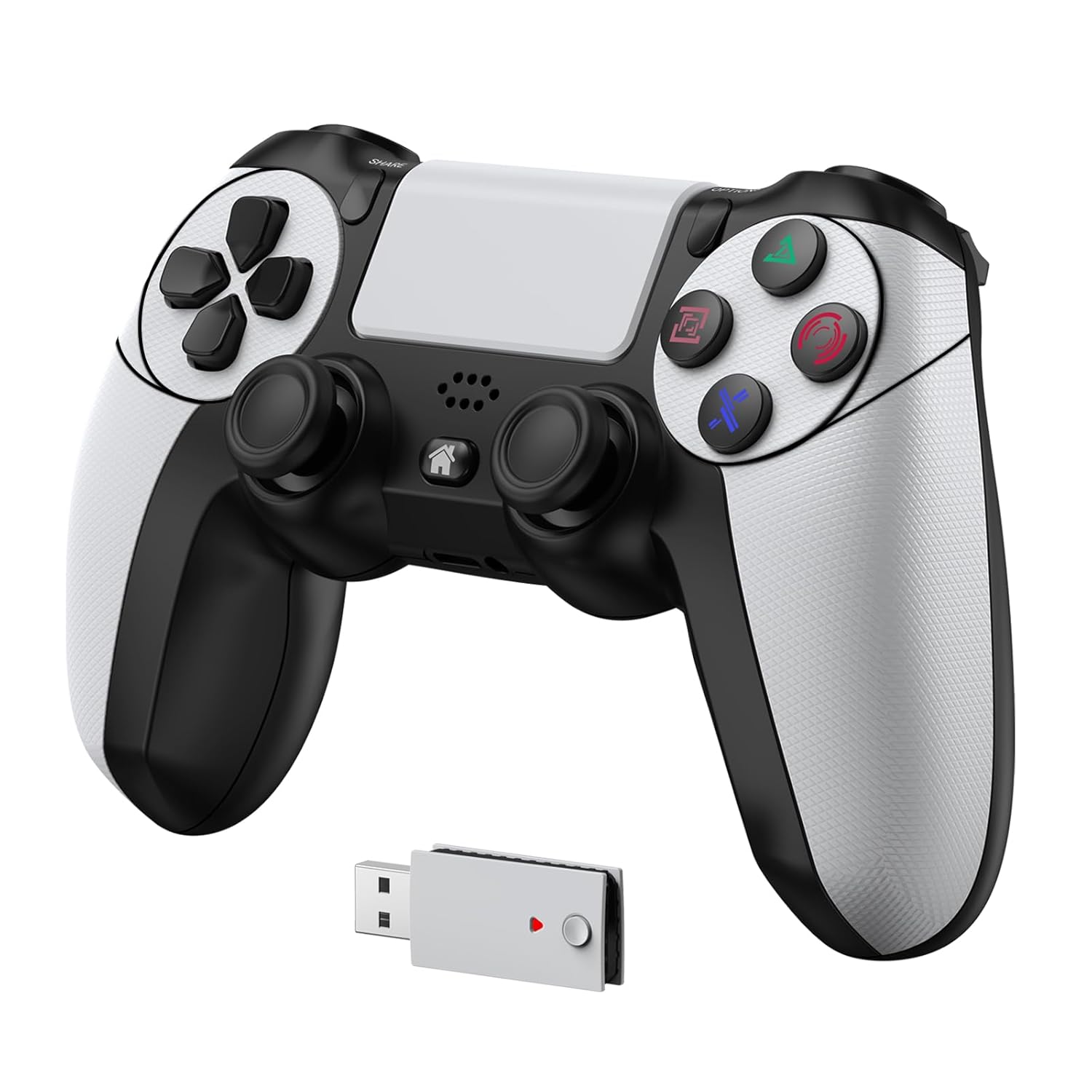 1 / 9
Prices are shown for browsing. Purchases are currently unavailable.
IWGAME Controller for PlayStation-5 Compatible with PS-5 PS-5 Pro PS-4 PC Wireless Controllers Supports Adjustable Turbo Remap Hall, $79.96, Availability unknown. Image 1 of 9.
- Selected option
- IWGAME Controller for PlayStation-5 Compatible with PS-5 PS-5 Pro PS-4 PC Wireless Controllers Supports Adjustable Turbo Remap Hall
- SKU
- JC7840
Source specifications
- Release date
- December 5, 2024
- Product Dimensions
- 4.3 x 2.4 x 6.5 inches; 10.86 ounces
- Type of item
- Video Game
- Language
- English
- Item model number
- JYCM048FDR400
- Item Weight
- 10.8 ounces
- Manufacturer
- IWGAME
- Batteries
- 1 Lithium Ion batteries required. (included)
The details
About this item
Product description How to Connect the PS-5 Console by Adapter The video showcases the product in use. The video guides you through product setup. The video compares multiple products. The video shows the product being unpacked. How to connect the PS-5 by adapter Merchant Video Previous page Next page 1 Turbo Rapid Fire 2 one key combo 3 Audio&Speaker 4 Full functionality Why does the console display “Cannot use the PS-4 wireless controller to play PS-5 games”? How to fix it 1. The PS-5 needs set to USB mode. Settings > Accessories > Controller (General) > Communication Metho > Use USB Cable. 2. The USB adapter needs to be paired with the controller. Please refer to the tutorial video for proper operation. Why is the 2.4G controller not working after using another controller? Unplug and reinsert the 2.4G adapter, then [Upgrade Notice] This product requires a firmware upgrade to function properly. Please contact customer support to receive the upgrade package.; 𝗕𝗲𝗳𝗼𝗿𝗲 𝗨𝘀𝗲 𝟭: 𝗚𝗼 𝘁𝗼 𝘁𝗵𝗲 𝗣𝗦-𝟱 𝗦𝘆𝘀𝘁𝗲𝗺 𝗦𝗲𝘁𝘁𝗶𝗻𝗴𝘀 𝗜𝗻𝘁𝗲𝗿𝗳𝗮𝗰𝗲 𝗮𝗻𝗱 𝗖𝗵𝗮𝗻𝗴𝗲 𝘁𝗵𝗲 𝗖𝗼𝗺𝗺𝘂𝗻𝗶𝗰𝗮𝘁𝗶𝗼𝗻 𝗠𝗲𝘁𝗵𝗼𝗱 𝘁𝗼 "𝗨𝘀𝗲 𝗨𝗦𝗕 𝗖𝗮𝗯𝗹𝗲", otherwise the Adapter will not be recognized.(Settings> Accessories>Controller (General)>Communication Method>Sele
- [Upgrade Notice] This product requires a firmware upgrade to function properly. Please contact customer support to receive the upgrade package.
- 𝗕𝗲𝗳𝗼𝗿𝗲 𝗨𝘀𝗲 𝟭: 𝗚𝗼 𝘁𝗼 𝘁𝗵𝗲 𝗣𝗦-𝟱 𝗦𝘆𝘀𝘁𝗲𝗺 𝗦𝗲𝘁𝘁𝗶𝗻𝗴𝘀 𝗜𝗻𝘁𝗲𝗿𝗳𝗮𝗰𝗲 𝗮𝗻𝗱 𝗖𝗵𝗮𝗻𝗴𝗲 𝘁𝗵𝗲 𝗖𝗼𝗺𝗺𝘂𝗻𝗶𝗰𝗮𝘁𝗶𝗼𝗻 𝗠𝗲𝘁𝗵𝗼𝗱 𝘁𝗼 "𝗨𝘀𝗲 𝗨𝗦𝗕 𝗖𝗮𝗯𝗹𝗲", otherwise the Adapter will not be recognized.(Settings> Accessories>Controller (General)>Communication Method>Select “Use USB Cable”)
- 𝗕𝗲𝗳𝗼𝗿𝗲 𝗨𝘀𝗲 𝟮: 𝗨𝗦𝗕 𝗔𝗱𝗮𝗽𝘁𝗲𝗿 𝗥𝗲𝗾𝘂𝗶𝗿𝗲𝗱: PS-5 games are playable with the adapter. Without it, controller works as a PS-4 controller. Please refer to the tutorial video or instruction manual
- Multi-Platform - In 2.4G mode, the gaming controllers are compatible with PS-5/PS-5 Pro/PS-5 Slim and Windows (PC), offering driver-free and plug-and-play capability.In Bluetooth mode, the new controller supports PS-4, Android, and iOS
- Rapid Fire - the controller for ps-5 pro with 2.4G not only features 3 adjustable turbo speeds—3Hz, 6Hz, 12Hz—but also allows you to customize , which makes it easier to win in FPS games
- Programmable Function - The mappable gamepad for PS-5 with 2.4G supports key swap, one-key combo functions, ensuring game-altering moves and crucial controls are constantly within your reach
- Adaptive triggers & Audio - The controllers for ps five feature adaptive triggers that provide varying force and tension in supported games, as well as vibration motors, a touchpad, speakers, and a 3.5mm headphone jack that enhance the gaming audio experience
From the manufacturer
Product details
Product description How to Connect the PS-5 Console by Adapter The video showcases the product in use. The video guides you through product setup. The video compares multiple products. The video shows the product being unpacked. How to connect the PS-5 by adapter Merchant Video Previous page Next page 1 Turbo Rapid Fire 2 one key combo 3 Audio&Speaker 4 Full functionality Why does the console display “Cannot use the PS-4 wireless controller to play PS-5 games”? How to fix it 1. The PS-5 needs set to USB mode. Settings > Accessories > Controller (General) > Communication Metho > Use USB Cable. 2. The USB adapter needs to be paired with the controller. Please refer to the tutorial video for proper operation. Why is the 2.4G controller not working after using another controller? Unplug and reinsert the 2.4G adapter, then restart the controller to reconnect. If I want to use the original PS-5 controller wirelessly, do I need to switch the connection mode to Bluetooth? No, the original controller supports both wireless and wired connections. Setting the USB mode will not affect its wireless connection. Simply turn on the original controller, and it will reconnect automatically. Why does the PS-5 console prompt for an update after inserting the 2.4G adapter? Please ensure the PS-5 console is configured to USB connection
Highlights: [Upgrade Notice] This product requires a firmware upgrade to function properly. Please contact customer support to receive the upgrade package. 𝗕𝗲𝗳𝗼𝗿𝗲 𝗨𝘀𝗲 𝟭: 𝗚𝗼 𝘁𝗼 𝘁𝗵𝗲 𝗣𝗦-𝟱 𝗦𝘆𝘀𝘁𝗲𝗺 𝗦𝗲𝘁𝘁𝗶𝗻𝗴𝘀 𝗜𝗻𝘁𝗲𝗿𝗳𝗮𝗰𝗲 𝗮𝗻𝗱 𝗖𝗵𝗮𝗻𝗴𝗲 𝘁𝗵𝗲 𝗖𝗼𝗺𝗺𝘂𝗻𝗶𝗰𝗮𝘁𝗶𝗼𝗻 𝗠𝗲𝘁𝗵𝗼𝗱 𝘁𝗼 "𝗨𝘀𝗲 𝗨𝗦𝗕 𝗖𝗮𝗯𝗹𝗲", otherwise the Adapter will not be recognized.(Settings> Accessories>Controller (General)>Communication Method>Select “Use USB Cable”) 𝗕𝗲𝗳𝗼𝗿𝗲 𝗨𝘀𝗲 𝟮: 𝗨𝗦𝗕 𝗔𝗱𝗮𝗽𝘁𝗲𝗿 𝗥𝗲𝗾𝘂𝗶𝗿𝗲𝗱: PS-5 games are playable with the adapter. Without it, controller works as a PS-4 controller. Please refer to the tutorial video or instruction manual Multi-Platform - In 2.4G mode, the gaming controllers are compatible with PS-5/PS-5 Pro/PS-5 Slim and Windows (PC), offering driver-free and plug-and-play capability.In Bluetooth mode, the new controller supports PS-4, Android, and iOS Rapid Fire - the controller for ps-5 pro with 2.4G not only features 3 adjustable turbo speeds—3Hz, 6Hz, 12Hz—but also allows you to customize , which makes it easier to win in FPS games Programmable Function - The mappable gamepad for PS-5 with 2.4G supports key swap, one-key combo functions, ensuring game-altering moves and crucial controls are constantly within your reach Adaptive triggers & Audio - The controllers for ps five feature adaptive triggers that provide varying force and tension in supported games, as well as vibration motors, a touchpad, speakers, and a 3.5mm headphone jack that enhance the gaming audio experience
Key details: Release date: December 5, 2024 | Customer Reviews: 3.5 3.5 out of 5 stars (205) 3.5 out of 5 stars | Product Dimensions: 4.3 x 2.4 x 6.5 inches; 10.86 ounces | Type of item: Video Game | Language: English | Item Weight: 10.8 ounces | Batteries: 1 Lithium Ion batteries required. (included)
What you can expect: [Upgrade Notice] This product requires a firmware upgrade to function properly. Please contact customer support to receive the upgrade package. 𝗕𝗲𝗳𝗼𝗿𝗲 𝗨𝘀𝗲 𝟭: 𝗚𝗼 𝘁𝗼 𝘁𝗵𝗲 𝗣𝗦-𝟱 𝗦𝘆𝘀𝘁𝗲𝗺 𝗦𝗲𝘁𝘁𝗶𝗻𝗴𝘀 𝗜𝗻𝘁𝗲𝗿𝗳𝗮𝗰𝗲 𝗮𝗻𝗱 𝗖𝗵𝗮𝗻𝗴𝗲 𝘁𝗵𝗲 𝗖𝗼𝗺𝗺𝘂𝗻𝗶𝗰𝗮𝘁𝗶𝗼𝗻 𝗠𝗲𝘁𝗵𝗼𝗱 𝘁𝗼 "𝗨𝘀𝗲 𝗨𝗦𝗕 𝗖𝗮𝗯𝗹𝗲", otherwise the Adapter will not be recognized.(Settings> Accessories>Controller (General)>Communication Method>Select “Use USB Cable”) 𝗕𝗲𝗳𝗼𝗿𝗲 𝗨𝘀𝗲 𝟮: 𝗨𝗦𝗕 𝗔𝗱𝗮𝗽𝘁𝗲𝗿 𝗥𝗲𝗾𝘂𝗶𝗿𝗲𝗱: PS-5 games are playable with the adapter. Without it, controller works as a PS-4 controller. Please refer to the tutorial video or instruction manual Multi-Platform - In 2.4G mode, the gaming controllers are compatible with PS-5/PS-5 Pro/PS-5 Slim and Windows (PC), offering driver-free and plug-and-play capability.In Bluetooth mode, the new controller supports PS-4, Android, and iOS Rapid Fire - the controller for ps-5 pro with 2.4G not only features 3 adjustable turbo speeds—3Hz, 6Hz, 12Hz—but also allows you to customize , which makes it easier to win in FPS games Programmable Function - The mappable gamepad for PS-5 with 2.4G supports key swap, one-key combo functions, ensuring game-altering moves and crucial controls are constantly within your reach Adaptive triggers & Audio - The controllers for ps five feature adaptive triggers that provide varying force and tension in supported games, as well as vibration motors, a touchpad, speakers, and a 3.5mm headphone jack that enhance the gaming audio experience
Customer feedback: 3.5/5 average rating.
Customers say: Customers find the controller comfortable and easy to use, and consider it good value for money. However, the functionality and compatibility receive mixed reviews - while some say it works fine with PS5 games, others report it doesn't work properly or connect to their PS5. Additionally, the battery life is problematic, with multiple customers reporting that the battery won't take a charge.
Review snippets: Not sure what the Chad was doing in the other review here. This controller has worked on all the PS5 games I have tried so far. You must follow then instructions right or it won't work as a pS5 controll... / Controller was working fine when I got it in April 2025 as of today (sept 17th 2025) the light turned green and the ps5 doesnt respond to button presses from the controller anymore. There was a ps5 software update so
Product description How to Connect the PS-5 Console by Adapter The video showcases the product in use. The video guides you through product setup. The video compares multiple products. The video shows the product being unpacked. How to connect the PS-5 by adapter Merchant Video Previous page Next page 1 Turbo Rapid Fire 2 one key combo 3 Audio&Speaker 4 Full functionality Why does the console display “Cannot use the PS-4 wireless controller to play PS-5 games”? How to fix it 1. The PS-5 needs set to USB mode. Settings > Accessories > Controller (General) > Communication Metho > Use USB Cable. 2. The USB adapter needs to be paired with the controller. Please refer to the tutorial video for proper operation. Why is the 2.4G controller not working after using another controller? Unplug and reinsert the 2.4G adapter, then restart the controller to reconnect. If I want to use the original PS-5 controller wirelessly, do I need to switch the connection mode to Bluetooth? No, the original controller supports both wireless and wired connections. Setting the USB mode will not affect its wireless connection. Simply turn on the original controller, and it will reconnect automatically. Why does the PS-5 console prompt for an update after inserting the 2.4G adapter? Please ensure the PS-5 console is configured to USB connection mode in the settings. After charging the PS-5 controller using the ps-5console, the system displays that not support PS5 games? 1. Do not use cable to conmect to the ps-5 console. 2. lf you are using a cable to connect