JOUNIVO / Computer Microphones
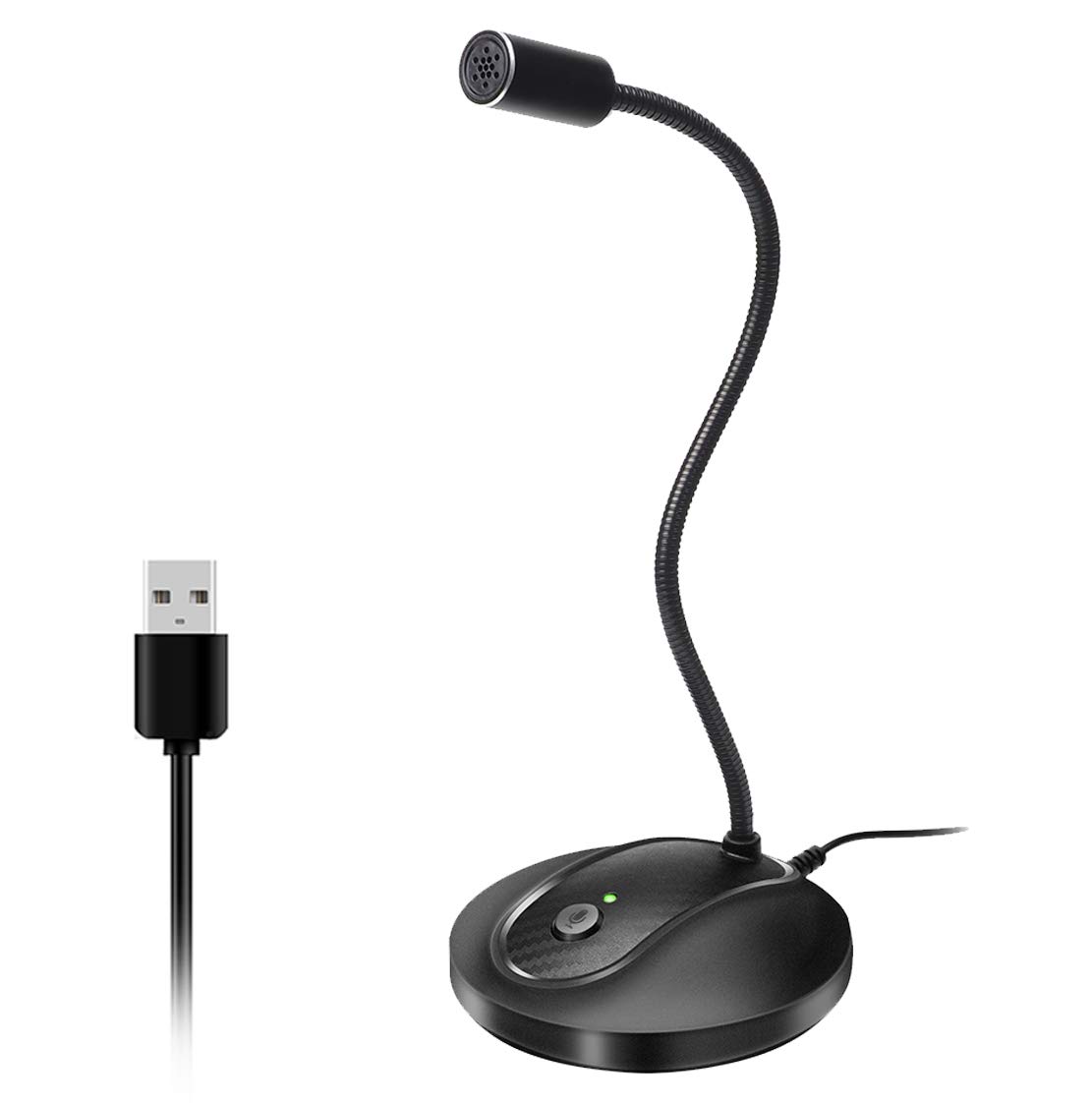
JOUNIVO USB Microphone 360 Degree Adjustable Gooseneck Design Mute Button LED Indicator Noise-Canceling Technology Plug Play Compatible with
 1 / 6
Prices are shown for browsing. Purchases are currently unavailable.
JOUNIVO USB Microphone 360 Degree Adjustable Gooseneck Design Mute Button LED Indicator Noise-Canceling Technology Plug Play Compatible with, $41.38, Availability unknown. Image 1 of 6.
- Selected option
- JOUNIVO USB Microphone 360 Degree Adjustable Gooseneck Design Mute Button LED Indicator Noise-Canceling Technology Plug Play Compatible with
- SKU
- JC5271
Source specifications
- Recommended Uses For Product
- Video Conference
- Brand
- JOUNIVO
- Model Name
- JV-601
- Connectivity Technology
- USB
- Connector Type
- USB
- Special Feature
- Volume Control
- Compatible Devices
- Laptop, Personal Computer
- Color
- JV-601
- Included Components
- microphone
- Polar Pattern
- Omnidirectional
The details
About this item
Product description Why Choose JV601 Desktop Microphone? Mute Switch with LED Indicator: For a clear indication of the PC microphone status. 360°Flexible Gooseneck Design: The gooseneck laptop microphone allows you to adjust the perfect angle, height or swivel to show your charming voice. Best Choice for Podcast: USB microphone picks up is very crisp and very clear, fast and accurate recognition. Plug & Play for Win/Mac Computer and PS4: USB desktop microphone with plug & play compatible with Win 7/8/10/11, Mac, and PS4. Professional in recording, dictation, YouTube, Skype, gaming, streaming, podcast, etc. Desktop Base: Gaming microphone with heavy-duty housing ensures firm support for the long gooseneck. Clear Sound with Noise Reduction Tech Intelligent noise-canceling tech not only can pick up your smooth and accurate voice but also can reduce background noise and echo Omnidirectional Polar Pattern Omnidirectional microphone pickup 360 Degree Position Adjustable Gooseneck Design --Plug and play USB microphone Pick up the sound from 360-degree with high sensitivity, in the best possible location for sound to your PC gaming, dragon voice dictation, and talk to Cortana; Mute Button
- 360 Degree Position Adjustable Gooseneck Design --Plug and play USB microphone Pick up the sound from 360-degree with high sensitivity, in the best possible location for sound to your PC gaming, dragon voice dictation, and talk to Cortana
- Mute Button & LED Indicator --One-click to mute/unmute your microphone for pc, Build-in LED indicator tells you the working status at any time
- Intelligent Noise-Canceling Tech --Premium omnidirectional condenser microphone with noise-canceling technology can pick up your clear voice and reduce background noise and echo
- USB Plug&Play(1.8/6ft USB Cable) -- No driver required. Just need to plug & play for the microphone to start recording, well compatible with Windows(7, 8, 10 and 11) and macOS. (NOT compatible with Xbox/Raspberry Pi/Android)
- Solid Construction--Adopting premium metal pipe and heavy-duty ABS stand to make sure that you will be satisfied with our computer mic quality
From the manufacturer
Product details
Product description Why Choose JV601 Desktop Microphone? Mute Switch with LED Indicator: For a clear indication of the PC microphone status. 360°Flexible Gooseneck Design: The gooseneck laptop microphone allows you to adjust the perfect angle, height or swivel to show your charming voice. Best Choice for Podcast: USB microphone picks up is very crisp and very clear, fast and accurate recognition. Plug & Play for Win/Mac Computer and PS4: USB desktop microphone with plug & play compatible with Win 7/8/10/11, Mac, and PS4. Professional in recording, dictation, YouTube, Skype, gaming, streaming, podcast, etc. Desktop Base: Gaming microphone with heavy-duty housing ensures firm support for the long gooseneck. Clear Sound with Noise Reduction Tech Intelligent noise-canceling tech not only can pick up your smooth and accurate voice but also can reduce background noise and echo Omnidirectional Polar Pattern Omnidirectional microphone pickup the sound from 360-degree with high sensitivity Built-in JOUNIVO Upgrade Chip Built-in JOUNIVO's upgrade chip make sure to pick up the high-quality sound when gaming Perfect for Recording, Gaming, Live Chating, Video Conference ,etc. What can I do when the microphone cannot be used? Few ways for troubleshooting: A.You need to disable the computer's onboard mic by accessing your sound devices in the hardware section of the control panel. And choose the mic (JV601) B.Check whether the "mic mute" of
Highlights: 360 Degree Position Adjustable Gooseneck Design --Plug and play USB microphone Pick up the sound from 360-degree with high sensitivity, in the best possible location for sound to your PC gaming, dragon voice dictation, and talk to Cortana Mute Button & LED Indicator --One-click to mute/unmute your microphone for pc, Build-in LED indicator tells you the working status at any time Intelligent Noise-Canceling Tech --Premium omnidirectional condenser microphone with noise-canceling technology can pick up your clear voice and reduce background noise and echo USB Plug&Play(1.8/6ft USB Cable) -- No driver required. Just need to plug & play for the microphone to start recording, well compatible with Windows(7, 8, 10 and 11) and macOS. (NOT compatible with Xbox/Raspberry Pi/Android) Solid Construction--Adopting premium metal pipe and heavy-duty ABS stand to make sure that you will be satisfied with our computer mic quality
What you can expect: 360 Degree Position Adjustable Gooseneck Design --Plug and play USB microphone Pick up the sound from 360-degree with high sensitivity, in the best possible location for sound to your PC gaming, dragon voice dictation, and talk to Cortana Mute Button & LED Indicator --One-click to mute/unmute your microphone for pc, Build-in LED indicator tells you the working status at any time Intelligent Noise-Canceling Tech --Premium omnidirectional condenser microphone with noise-canceling technology can pick up your clear voice and reduce background noise and echo USB Plug&Play(1.8/6ft USB Cable) -- No driver required. Just need to plug & play for the microphone to start recording, well compatible with Windows(7, 8, 10 and 11) and macOS. (NOT compatible with Xbox/Raspberry Pi/Android) Solid Construction--Adopting premium metal pipe and heavy-duty ABS stand to make sure that you will be satisfied with our computer mic quality
Customer feedback: 4.4/5 average rating.
Customers say: Customers find the microphone works as soon as they plug it in, with clear sound quality that picks up everything well.
Review snippets: Reliable, convenient, high sound quality, and great price. My mic is very reliable: works consistently without needing drivers or setup; and no failures of any kind in the 5 years I've been using it on a daily basis. The sound / I've spent quite a bit of time messing around with PC microphones and such over the years, and after trying, using, trying other microphones, going back to this one, I can feel confident is the statement that this is the
Product description Why Choose JV601 Desktop Microphone? Mute Switch with LED Indicator: For a clear indication of the PC microphone status. 360°Flexible Gooseneck Design: The gooseneck laptop microphone allows you to adjust the perfect angle, height or swivel to show your charming voice. Best Choice for Podcast: USB microphone picks up is very crisp and very clear, fast and accurate recognition. Plug & Play for Win/Mac Computer and PS4: USB desktop microphone with plug & play compatible with Win 7/8/10/11, Mac, and PS4. Professional in recording, dictation, YouTube, Skype, gaming, streaming, podcast, etc. Desktop Base: Gaming microphone with heavy-duty housing ensures firm support for the long gooseneck. Clear Sound with Noise Reduction Tech Intelligent noise-canceling tech not only can pick up your smooth and accurate voice but also can reduce background noise and echo Omnidirectional Polar Pattern Omnidirectional microphone pickup the sound from 360-degree with high sensitivity Built-in JOUNIVO Upgrade Chip Built-in JOUNIVO's upgrade chip make sure to pick up the high-quality sound when gaming Perfect for Recording, Gaming, Live Chating, Video Conference ,etc. What can I do when the microphone cannot be used? Few ways for troubleshooting: A.You need to disable the computer's onboard mic by accessing your sound devices in the hardware section of the control panel. And choose the mic (JV601) B.Check whether the "mic mute" of the online control is open or not. When the "mic mute" is open, the light will turn red. C.Please don't connect the microphone to an extension adapter(includes USB hub), or it will weaken the signal sent from devices. The cable