Lepro / Outlet Switches
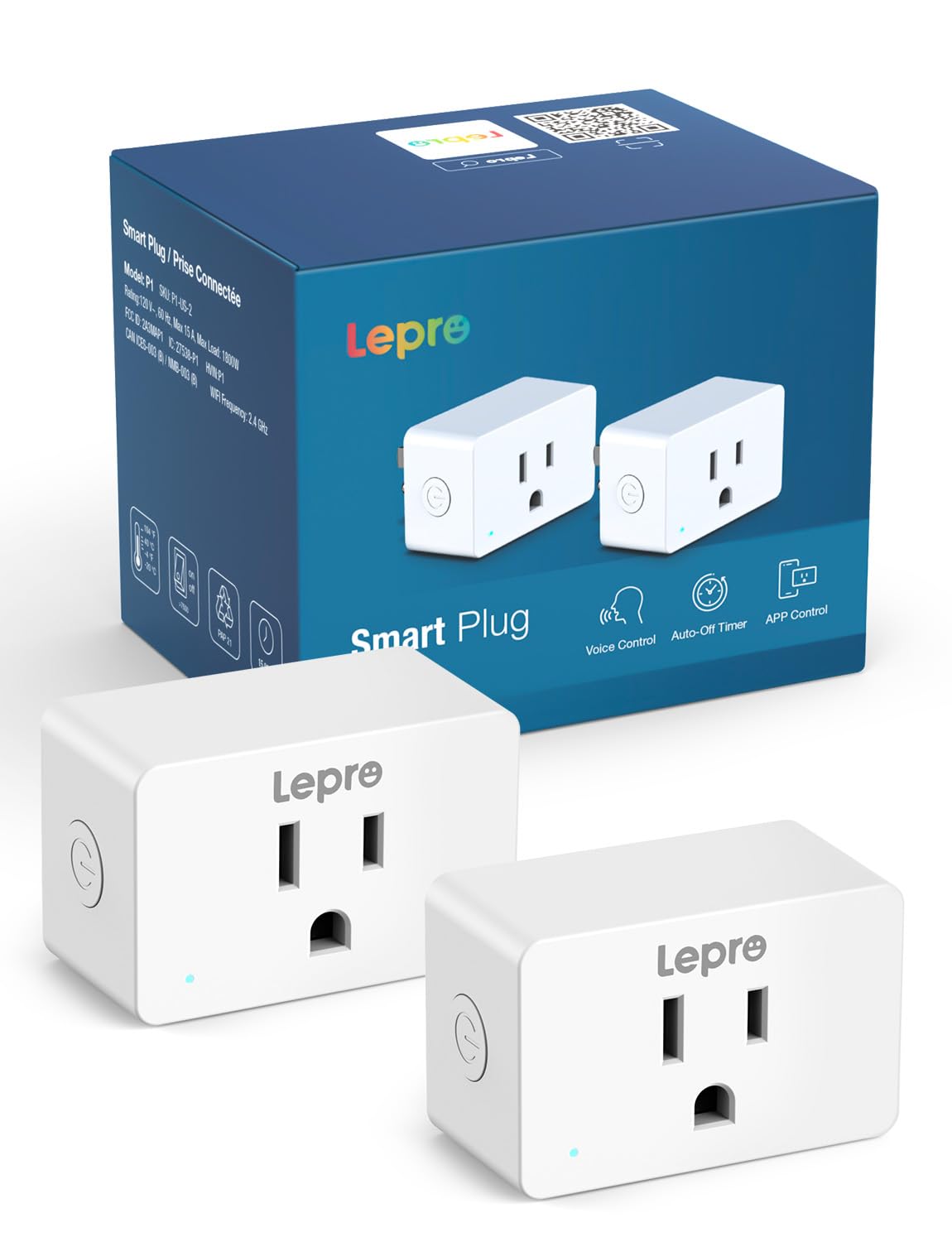
Lepro P1 Smart Plug Mini 15A Smart Home Wi-Fi Outlet Plug Compatible with Alexa Google Assistant APP Control
 1 / 9
Prices are shown for browsing. Purchases are currently unavailable.
Lepro P1 Smart Plug Mini 15A Smart Home Wi-Fi Outlet Plug Compatible with Alexa Google Assistant APP Control, $46.99, Availability unknown. Image 1 of 9.
- Selected option
- Lepro P1 Smart Plug Mini 15A Smart Home Wi-Fi Outlet Plug Compatible with Alexa Google Assistant APP Control
- SKU
- JC8478
Source specifications
- Operation Mode
- ON-OFF-ON
- Current Rating
- 15 Amps
- Operating Voltage
- 120 Volts (AC)
- Contact Type
- 1 Pdt
- Connector Type
- Plug In
- Brand
- Lepro
- Switch Type
- Decorator
- Terminal
- Screw
- Material
- Plastic
- Item dimensions L x W x H
- 2.32 x 1.5 x 1.14 inches
- Circuit Type
- 1-way
- Contact Material
- Plastic
- International Protection Rating
- IP40
- Number of Positions
- 2
- Control Method
- App, Voice
- Connectivity Protocol
- Bluetooth, Wi-Fi
- Color
- White
- Wattage
- 1800 watts
- Unit Count
- 2.0 Count
- Number of Items
- 2
- Manufacturer
- Lepro
- Control Type
- user
- Compatible Devices
- Lamps, fans, humidifiers, coffee makers, decor lights, Alexa, Google Assistant
- UPC
- 810168790664
- Product Dimensions
- 2.32 x 1.5 x 1.14 inches
- Item Weight
- 2.11 ounces
- Item model number
- P1
The details
About this item
Product description Previous page Next page Previous page Next page 1 Smart Voice Control 2 APP Control 3 Group Control Previous page Next page 1 Lepro APP Needed First 2 How to Connect 3 Link to Alexa & Google Previous page Next page 1 Space Saving 2 Schedule & Timer 3 Family Shares 4 Good for Rest Can I control the smart plug via the Smart Life/SmartThings APP/Tuya APP? No, only the Lepro APP is supported. How to connect to P1 smart plug? 1.Turn on your phone's Bluetooth and connect to 2.4GHz WiFi network 2.Download and register the Lepro APP 3.Click "Add Device" and "+" in the top right corner, select the P1 model Plug in the list and wait for connection Please note: Only 2.4Ghz WiFi How to connect to Alexa & Google Assistant? 1.Select "Me" in your lepro 【Smart Voice Control】Lepro smart plugs work with Alexa and Google Home Assistant, allowing for hands-free control. No Hub is required, but need to connect to the Lepro APP first. Once connected to P1 smart outlet, associate your Alexa & Google account in the Lepro app. Then, Say goodbye to the troublesome manual operation with just one sentence. (e.g. Alexa, dim the bedroom lights); 【APP Control from Anywhere】 Turn the home devi
- 【Smart Voice Control】Lepro smart plugs work with Alexa and Google Home Assistant, allowing for hands-free control. No Hub is required, but need to connect to the Lepro APP first. Once connected to P1 smart outlet, associate your Alexa & Google account in the Lepro app. Then, Say goodbye to the troublesome manual operation with just one sentence. (e.g. Alexa, dim the bedroom lights)
- 【APP Control from Anywhere】 Turn the home devices on or off via Lepro APP remote control, whether you’re at home, at work, or on a trip. Forgot to turn off the lights before leaving? No problem — just grab your phone and switch them off with a single tap.
- 【Easy Connection and Use】Supports both Bluetooth and 2.4GHz WiFi connections, offering a more stable and user-friendly experience than WiFi-only plugs. 15A max, 1800W, suitable for a wide range of home appliances, such as lamps, fans, humidifier, coffee makers, decor lights, etc.
- 【Personalized Scheduling】Easily set timers and routines for your WiFi plugs to automate your smart home. Make your life more organized and help to save energy.
- 【Home Safety & Power Outage Memory】Designed with a physical safety lock to prevent curious kids from playing with it. The fire-resistant casing adds extra protection, and the power outage memory automatically restores your settings after a blackout — no need to reset.
Product information
Materials and care
- Material
- Plastic
- Contact Material
- Plastic
From the manufacturer
Product details
Product description Previous page Next page Previous page Next page 1 Smart Voice Control 2 APP Control 3 Group Control Previous page Next page 1 Lepro APP Needed First 2 How to Connect 3 Link to Alexa & Google Previous page Next page 1 Space Saving 2 Schedule & Timer 3 Family Shares 4 Good for Rest Can I control the smart plug via the Smart Life/SmartThings APP/Tuya APP? No, only the Lepro APP is supported. How to connect to P1 smart plug? 1.Turn on your phone's Bluetooth and connect to 2.4GHz WiFi network 2.Download and register the Lepro APP 3.Click "Add Device" and "+" in the top right corner, select the P1 model Plug in the list and wait for connection Please note: Only 2.4Ghz WiFi How to connect to Alexa & Google Assistant? 1.Select "Me" in your lepro APP then choose Alexa or Google Home 2.Enter your Alexa or Google Home username and password 3.Click "Link" and "connect" to connect 2 accounts 4.The plug can now be controlled using Alexa or Google Home
Highlights: 【Smart Voice Control】Lepro smart plugs work with Alexa and Google Home Assistant, allowing for hands-free control. No Hub is required, but need to connect to the Lepro APP first. Once connected to P1 smart outlet, associate your Alexa & Google account in the Lepro app. Then, Say goodbye to the troublesome manual operation with just one sentence. (e.g. Alexa, dim the bedroom lights) 【APP Control from Anywhere】 Turn the home devices on or off via Lepro APP remote control, whether you’re at home, at work, or on a trip. Forgot to turn off the lights before leaving? No problem — just grab your phone and switch them off with a single tap. 【Easy Connection and Use】Supports both Bluetooth and 2.4GHz WiFi connections, offering a more stable and user-friendly experience than WiFi-only plugs. 15A max, 1800W, suitable for a wide range of home appliances, such as lamps, fans, humidifier, coffee makers, decor lights, etc. 【Personalized Scheduling】Easily set timers and routines for your WiFi plugs to automate your smart home. Make your life more organized and help to save energy. 【Home Safety & Power Outage Memory】Designed with a physical safety lock to prevent curious kids from playing with it. The fire-resistant casing adds extra protection, and the power outage memory automatically restores your settings after a blackout — no need to reset.
Key details: Operation Mode: ON-OFF-ON | Current Rating: 15 Amps | Operating Voltage: 120 Volts (AC) | Contact Type: 1 Pdt | Connector Type: Plug In | Brand: Lepro | Terminal: Screw | Item dimensions L x W x H: 2.32 x 1.5 x 1.14 inches | Circuit Type: 1-way | Contact Material: Plastic
What you can expect: 【Smart Voice Control】Lepro smart plugs work with Alexa and Google Home Assistant, allowing for hands-free control. No Hub is required, but need to connect to the Lepro APP first. Once connected to P1 smart outlet, associate your Alexa & Google account in the Lepro app. Then, Say goodbye to the troublesome manual operation with just one sentence. (e.g. Alexa, dim the bedroom lights) 【APP Control from Anywhere】 Turn the home devices on or off via Lepro APP remote control, whether you’re at home, at work, or on a trip. Forgot to turn off the lights before leaving? No problem — just grab your phone and switch them off with a single tap. 【Easy Connection and Use】Supports both Bluetooth and 2.4GHz WiFi connections, offering a more stable and user-friendly experience than WiFi-only plugs. 15A max, 1800W, suitable for a wide range of home appliances, such as lamps, fans, humidifier, coffee makers, decor lights, etc. 【Personalized Scheduling】Easily set timers and routines for your WiFi plugs to automate your smart home. Make your life more organized and help to save energy. 【Home Safety & Power Outage Memory】Designed with a physical safety lock to prevent curious kids from playing with it. The fire-resistant casing adds extra protection, and the power outage memory automatically restores your settings after a blackout — no need to reset.
Customer feedback: 4.1/5 average rating.
Review snippets: Good smart plug in outlets, easy to set up and nice control features, and good integration with other assistants, good cost! Read more / I love smart plugs and this one has some pros and cons. Pros are it works well with Alexa and I can turn on and off different lights within my house or program them on a timer. Worked well for
Product description Previous page Next page Previous page Next page 1 Smart Voice Control 2 APP Control 3 Group Control Previous page Next page 1 Lepro APP Needed First 2 How to Connect 3 Link to Alexa & Google Previous page Next page 1 Space Saving 2 Schedule & Timer 3 Family Shares 4 Good for Rest Can I control the smart plug via the Smart Life/SmartThings APP/Tuya APP? No, only the Lepro APP is supported. How to connect to P1 smart plug? 1.Turn on your phone's Bluetooth and connect to 2.4GHz WiFi network 2.Download and register the Lepro APP 3.Click "Add Device" and "+" in the top right corner, select the P1 model Plug in the list and wait for connection Please note: Only 2.4Ghz WiFi How to connect to Alexa & Google Assistant? 1.Select "Me" in your lepro APP then choose Alexa or Google Home 2.Enter your Alexa or Google Home username and password 3.Click "Link" and "connect" to connect 2 accounts 4.The plug can now be controlled using Alexa or Google Home