JUN-ELECTRON / Monitors
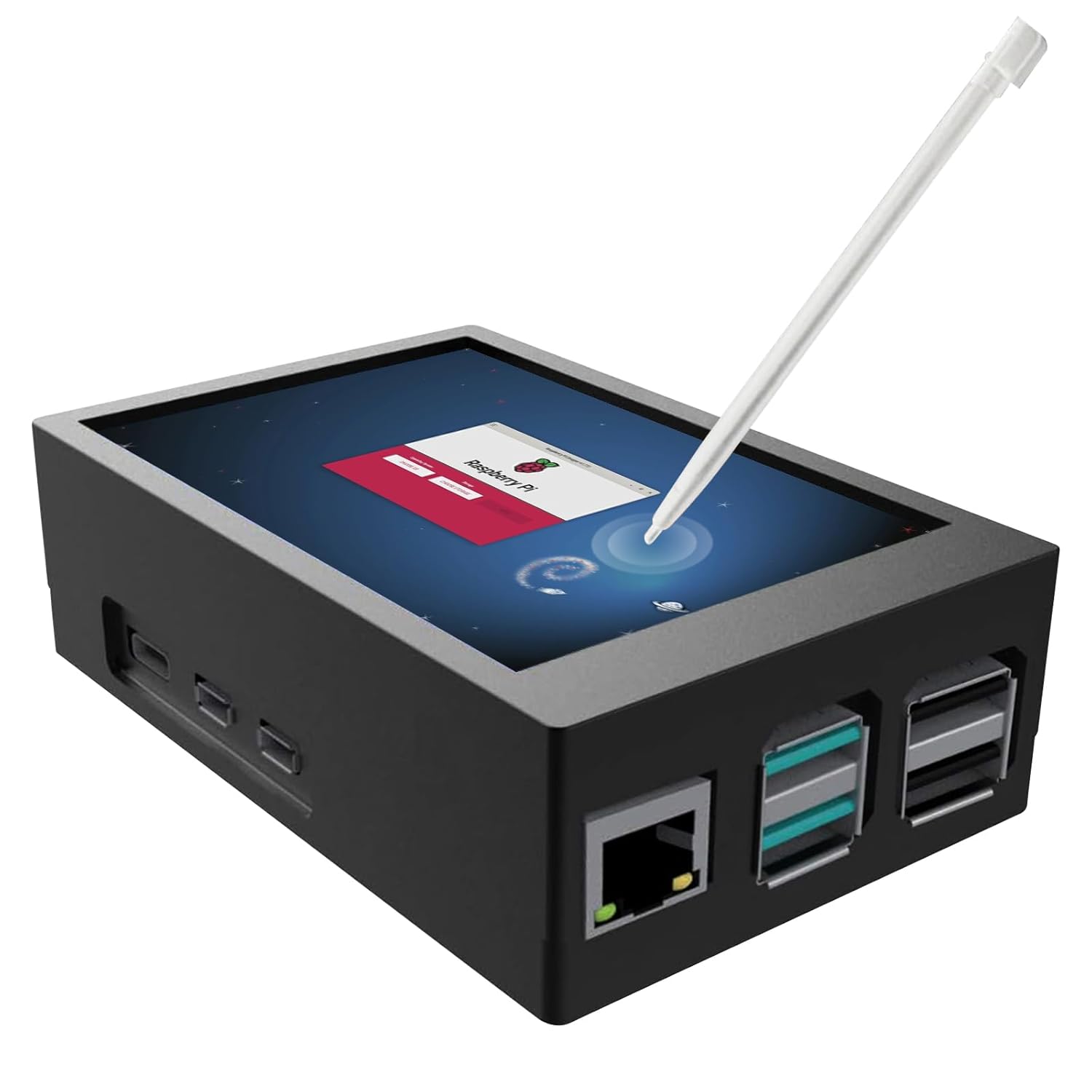
Mini Monitor for Raspberry Pi 5 3 5 Inch Monitor with Metal Case and Cooling Fan 320 x
 1 / 6
Prices are shown for browsing. Purchases are currently unavailable.
Mini Monitor for Raspberry Pi 5 3 5 Inch Monitor with Metal Case and Cooling Fan 320 x, $45.98, Availability unknown. Image 1 of 6.
- Selected option
- Mini Monitor for Raspberry Pi 5 3 5 Inch Monitor with Metal Case and Cooling Fan 320 x
- SKU
- JC15558
Source specifications
- Brand
- JUN-ELECTRON
- Screen Size
- 3.5 Inches
- Resolution
- HD
- Aspect Ratio
- Unknown
- Screen Surface Description
- Glossy
- Item Weight
- 2.72 ounces
- Manufacturer
- JUN-ELECTRON
- Item model number
- Jun_5B 3.5Inch Screen-New
- Standing screen display size
- 3.5 Inches
- Resolution
- 480x320 Pixels
The details
About this item
Product description Product Advantages Powered via GPIO interface. Refresh rate up to 50 fps, 125 MHz signal input, stable and flicker-free. Fits the Pi 5 screen and main unit's protective cover for easy installation. Connecting a fan for cooling of Raspberry Pi with heats. The case is designed to protect the Raspberry Pi 5 along with the screen as a touchscreen for better human-computer interaction. Caution After the screen is cover, GPIO cannot be used. And Don't have backlight ON/Off Key Need to install the driver, customers often say that after the driver is installed, the system crashes or can display nothing on the screen after installation The resolution is small, only 320*480 P, the screen often cannot display the complete interface GPIO connection method, customers often have wrong connection, Led to the touch function can not be used . 【Touchscreen Monitor】3.5 inch touchscreen display designed for Raspberry Pi 5, with sensitive resistive touch. The screen is directly connected to SPI. It supports 125 MHz SPI signal input.; 【Display】480 x 320 pixels, 50 fps rates, stable signal, no flickering of the screen. It is able to play videos and games.; 【Cooling Fan】The touchscreen
- 【Touchscreen Monitor】3.5 inch touchscreen display designed for Raspberry Pi 5, with sensitive resistive touch. The screen is directly connected to SPI. It supports 125 MHz SPI signal input.
- 【Display】480 x 320 pixels, 50 fps rates, stable signal, no flickering of the screen. It is able to play videos and games.
- 【Cooling Fan】The touchscreen has a built-in fan to keep the Raspberry Pi from getting too hot. There is a install-able brass pillar to prevent the screen from tilting.
- 【Case】Screen case fits in your hand. Bottom corners with rubberized non-slip feet and can be cushioned. Cooling holes at the bottom. Supplied with a cover to be installed when screen is removed. Note: If the screen and Raspberry Pi are connected in the wrong position, the case will not close. Please correct this immediately to avoid damaging the screen.
- 【Driver Must】The driver must be installed on the screen, otherwise ONLY white is displayed. Please find the installation steps from the video and from the following information.
- 【OS Support】Currently only the Raspbian operating system is supported.
From the manufacturer
Product details
Product description Product Advantages Powered via GPIO interface. Refresh rate up to 50 fps, 125 MHz signal input, stable and flicker-free. Fits the Pi 5 screen and main unit's protective cover for easy installation. Connecting a fan for cooling of Raspberry Pi with heats. The case is designed to protect the Raspberry Pi 5 along with the screen as a touchscreen for better human-computer interaction. Caution After the screen is cover, GPIO cannot be used. And Don't have backlight ON/Off Key Need to install the driver, customers often say that after the driver is installed, the system crashes or can display nothing on the screen after installation The resolution is small, only 320*480 P, the screen often cannot display the complete interface GPIO connection method, customers often have wrong connection, Led to the touch function can not be used . It's not IPS screen, The best viewable is in the vertical position Currently only the Raspbian OS System is supported. Kali,Ubuntu and Retropie driver still need upated. Previous page learning DIY Next page First Way: We provide a Raspbian OS system with drivers, which can be installed directly into the Raspberry Pi 5. The video showcases the product in use. The video guides you through product setup. The video compares multiple products. The video shows the product being unpacked. The
Highlights: 【Touchscreen Monitor】3.5 inch touchscreen display designed for Raspberry Pi 5, with sensitive resistive touch. The screen is directly connected to SPI. It supports 125 MHz SPI signal input. 【Display】480 x 320 pixels, 50 fps rates, stable signal, no flickering of the screen. It is able to play videos and games. 【Cooling Fan】The touchscreen has a built-in fan to keep the Raspberry Pi from getting too hot. There is a install-able brass pillar to prevent the screen from tilting. 【Case】Screen case fits in your hand. Bottom corners with rubberized non-slip feet and can be cushioned. Cooling holes at the bottom. Supplied with a cover to be installed when screen is removed. Note: If the screen and Raspberry Pi are connected in the wrong position, the case will not close. Please correct this immediately to avoid damaging the screen. 【Driver Must】The driver must be installed on the screen, otherwise ONLY white is displayed. Please find the installation steps from the video and from the following information. 【OS Support】Currently only the Raspbian operating system is supported.
Key details: Item Weight: 2.72 ounces | Customer Reviews: 4.0 4.0 out of 5 stars (2) 4.0 out of 5 stars | Standing screen display size: 3.5 Inches | Aspect Ratio: Unknown | Resolution: 480x320 Pixels
What you can expect: 【Touchscreen Monitor】3.5 inch touchscreen display designed for Raspberry Pi 5, with sensitive resistive touch. The screen is directly connected to SPI. It supports 125 MHz SPI signal input. 【Display】480 x 320 pixels, 50 fps rates, stable signal, no flickering of the screen. It is able to play videos and games. 【Cooling Fan】The touchscreen has a built-in fan to keep the Raspberry Pi from getting too hot. There is a install-able brass pillar to prevent the screen from tilting. 【Case】Screen case fits in your hand. Bottom corners with rubberized non-slip feet and can be cushioned. Cooling holes at the bottom. Supplied with a cover to be installed when screen is removed. Note: If the screen and Raspberry Pi are connected in the wrong position, the case will not close. Please correct this immediately to avoid damaging the screen. 【Driver Must】The driver must be installed on the screen, otherwise ONLY white is displayed. Please find the installation steps from the video and from the following information. 【OS Support】Currently only the Raspbian operating system is supported.
Customer feedback: 4.0/5 average rating.
Review snippets: This 3.5 inch monitor works very well with the Raspberry Pi 5 and is a nice option when you want a compact, handheld display. The resistive touch is responsive once the driver is installed, and the image quality is clear / The media could not be loaded. I really want to make it work with the touch screen but there just have so many things to sacrifice: Pros: -Great quality and reasonable durable with the plastic case that comes with all
Product description Product Advantages Powered via GPIO interface. Refresh rate up to 50 fps, 125 MHz signal input, stable and flicker-free. Fits the Pi 5 screen and main unit's protective cover for easy installation. Connecting a fan for cooling of Raspberry Pi with heats. The case is designed to protect the Raspberry Pi 5 along with the screen as a touchscreen for better human-computer interaction. Caution After the screen is cover, GPIO cannot be used. And Don't have backlight ON/Off Key Need to install the driver, customers often say that after the driver is installed, the system crashes or can display nothing on the screen after installation The resolution is small, only 320*480 P, the screen often cannot display the complete interface GPIO connection method, customers often have wrong connection, Led to the touch function can not be used . It's not IPS screen, The best viewable is in the vertical position Currently only the Raspbian OS System is supported. Kali,Ubuntu and Retropie driver still need upated. Previous page learning DIY Next page First Way: We provide a Raspbian OS system with drivers, which can be installed directly into the Raspberry Pi 5. The video showcases the product in use. The video guides you through product setup. The video compares multiple products. The video shows the product being unpacked. The first video Merchant Video The Second Method Step 1: install the latest official RASPBIAN image of system Step 2: Plug-in Micro SD Card, Connect network, keyboard, mouse and computer screen. Step 3: Install the Driver. A:Login to the Raspberry Pi