Plugable / Docking Stations
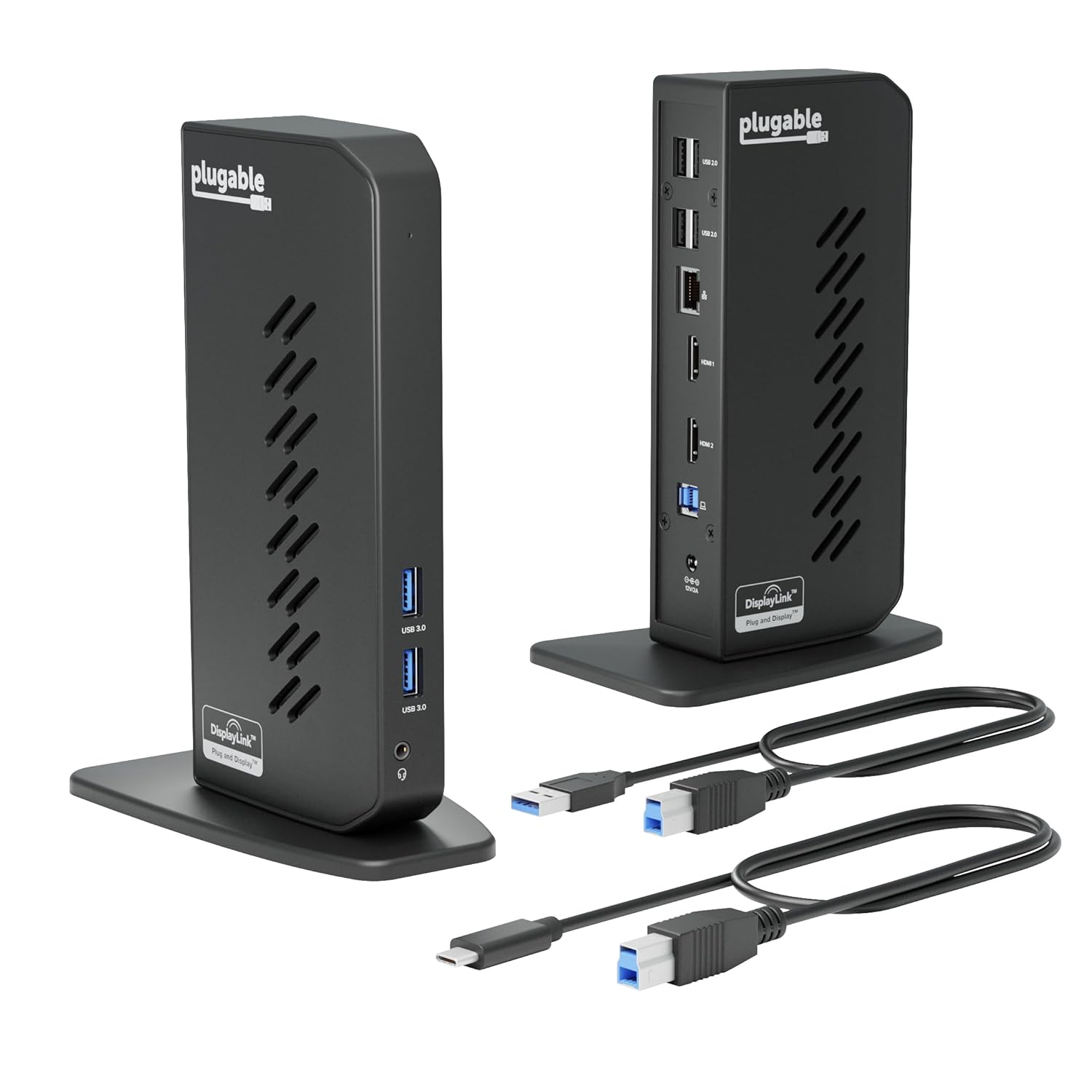
Plugable USB 3 0 and USB-C Universal Laptop Docking Station with 2 HDMI Ports for Windows Mac Driver
 1 / 9
Prices are shown for browsing. Purchases are currently unavailable.
Plugable USB 3 0 and USB-C Universal Laptop Docking Station with 2 HDMI Ports for Windows Mac Driver, $138.99, Availability unknown. Image 1 of 9.
- Selected option
- Plugable USB 3 0 and USB-C Universal Laptop Docking Station with 2 HDMI Ports for Windows Mac Driver
- SKU
- JC10224
Source specifications
- Brand
- Plugable
- Color
- Black
- Hardware Interface
- USB 3.1 Type A, USB 3.1 Type C, USB Docking Station, USB Type C
- Compatible Devices
- macOS (with DisplayLink driver installation) 10.14 / 10.15 / 11 / 12 / 13 / 14 / 15, Windows 7 / 8 / 8.1 / 10 / 11, and ChromeOS 100+ systems including: Apple MacBook, MacBook Air, MacBook Pro (Intel / M1 / M1 Pro / M1 Max / M2 / M2 Pro / M2 Max / M3 / M3 Pro / M3 Max / M4 / M4 Pro / M4 Max), HP Spectre x360 / Pavilion / Envy, Dell XPS / Precision / Latitude, Lenovo ThinkPad / IdeaPad / Yoga / Flex, Surface Pro 7 / 7+ / 8 / 9, Surface Laptop 3 / 4 / 5 / Go / Go 2 / Studio / SE, Surface Go / Go 2 / Go 3, Surface Book / Book 2 / Book 3, LG Gram, Acer Aspire / Swift / Spin, ASUS Zenbook / Vivobook, & thousands of other laptops See more
- Total USB Ports
- 6
- Product Dimensions
- 5.31"L x 2.76"W x 7.48"H
- Number of Ports
- 12
- Item Weight
- 333 Grams
- Total HDMI Ports
- 2
- Wattage
- 24
- Product Dimensions
- 5.31 x 2.76 x 7.48 inches
- Item Weight
- 11.7 ounces
- Item model number
- UD-3900Z
- Manufacturer
- Plugable
The details
About this item
Product description The video showcases the product in use. The video guides you through product setup. The video compares multiple products. The video shows the product being unpacked. UD-3900Z Merchant Video Previous page Crisp and Clear 2K 60Hz Multitask across two extended HD screens at up to 2K 60Hz DisplayLink Compatibility Built on DisplayLink for better compatibility. Even extends screens on M1, M2, M3, M4 MacBooks. 2x HDMI 2x USB 3.0 (5Gbps) 4x USB 2.0 (480Mbps) Audio Jack & Gigabit Ethernet Next page 1 HD 2 DisplayLink 3 10 Powerful Ports 4 Callout Graphic How to Install DisplayLink Driver for macOS The UD-3900Z docking station uses DisplayLink technology to enable dual HDMI displays (up to 1920x1080 @ 60Hz) on macOS, including M1, M2, and newer Mac models that normally support only one external display. Note - macOS requires ‘ Screen Flexible Expandability - This USB 3.0 laptop docking station provides dual HD HDMI video outputs, wired Gigabit Ethernet, a 3.5mm combination audio jack, two USB 3.0 ports, and four USB 2.0 ports. Includes both USB 3.0 and USB-C cables for flexible host connectivity. Please note: this dock does not charge the connected computer; Docking Stat
- Flexible Expandability - This USB 3.0 laptop docking station provides dual HD HDMI video outputs, wired Gigabit Ethernet, a 3.5mm combination audio jack, two USB 3.0 ports, and four USB 2.0 ports. Includes both USB 3.0 and USB-C cables for flexible host connectivity. Please note: this dock does not charge the connected computer
- Docking Station Dual Monitor - 2x HDMI ports let you easily connect two HDMI monitors, even if your computer only supports one output like an M1, M2, or M3 Mac. Supports resolutions up to 1920x1200; lower resolutions such 1080p (1920x1080) are also supported
- Compatibility - Universal docking station for laptop compatible with Windows 11, 10, 8.x, and 7 systems, macOS 10.14+ (Driver Required), and ChromeOS 100+. Plug and play driver installation via Windows Update. On macOS, the DisplayLink driver must be manually installed for displays to work Linux not supported
- Recommended Use - For use with web and productivity software at home or the office. Not recommended for gaming. DisplayPort connections not supported. This USB C dock does not support HDCP, will not playback encrypted or copy-protected content
- 2-Year Coverage, Lifetime Support - Every Plugable product, including this docking station, is covered against defects for 2 years and comes with lifetime support. If you ever have questions, contact our North American-based team - even before purchase
From the manufacturer
Product details
Product description The video showcases the product in use. The video guides you through product setup. The video compares multiple products. The video shows the product being unpacked. UD-3900Z Merchant Video Previous page Crisp and Clear 2K 60Hz Multitask across two extended HD screens at up to 2K 60Hz DisplayLink Compatibility Built on DisplayLink for better compatibility. Even extends screens on M1, M2, M3, M4 MacBooks. 2x HDMI 2x USB 3.0 (5Gbps) 4x USB 2.0 (480Mbps) Audio Jack & Gigabit Ethernet Next page 1 HD 2 DisplayLink 3 10 Powerful Ports 4 Callout Graphic How to Install DisplayLink Driver for macOS The UD-3900Z docking station uses DisplayLink technology to enable dual HDMI displays (up to 1920x1080 @ 60Hz) on macOS, including M1, M2, and newer Mac models that normally support only one external display. Note - macOS requires ‘ Screen Recording’ permission for the DisplayLink software to work. Granting this permission enables sending data from your computer over USB to the HDMI outputs. No data, images, or pixels are being stored or recorded. The video showcases the product in use. The video guides you through product setup. The video compares multiple products. The video shows the product being unpacked. UD-3900Z Divers for Mac OS Merchant Video Previous page Next page 1 Compatibility 2 DisplayLink Installation Will this docking station (UD-3900Z)
Highlights: Flexible Expandability - This USB 3.0 laptop docking station provides dual HD HDMI video outputs, wired Gigabit Ethernet, a 3.5mm combination audio jack, two USB 3.0 ports, and four USB 2.0 ports. Includes both USB 3.0 and USB-C cables for flexible host connectivity. Please note: this dock does not charge the connected computer Docking Station Dual Monitor - 2x HDMI ports let you easily connect two HDMI monitors, even if your computer only supports one output like an M1, M2, or M3 Mac. Supports resolutions up to 1920x1200; lower resolutions such 1080p (1920x1080) are also supported Compatibility - Universal docking station for laptop compatible with Windows 11, 10, 8.x, and 7 systems, macOS 10.14+ (Driver Required), and ChromeOS 100+. Plug and play driver installation via Windows Update. On macOS, the DisplayLink driver must be manually installed for displays to work Linux not supported Recommended Use - For use with web and productivity software at home or the office. Not recommended for gaming. DisplayPort connections not supported. This USB C dock does not support HDCP, will not playback encrypted or copy-protected content 2-Year Coverage, Lifetime Support - Every Plugable product, including this docking station, is covered against defects for 2 years and comes with lifetime support. If you ever have questions, contact our North American-based team - even before purchase
Key details: Product Dimensions: 5.31 x 2.76 x 7.48 inches | Item Weight: 11.7 ounces | Customer Reviews: 4.5 4.5 out of 5 stars (1,943) 4.5 out of 5 stars | Is Discontinued By Manufacturer: No
How it fits your day: Use the key specs and highlights above to match it to your setup, space, or routine before you check out.
Customer feedback: 4.5/5 average rating.
Customers say: Customers find the docking station works well, particularly with M1 Apple MacBook Air, and appreciate its ease of setup, with one customer noting it works right out of the box. Customers consider it good value for money, with one mentioning it's a great alternative to pricier Dell docking stations, and they find it easy to use with clear instructions.
Review snippets: I got a plugable docking station 1 year ago and it was easy to setup and worked wonderful Then a year later it stopped working not to worry plugable has a two year warranty. I emailed them and the next / Works perfect. Easy to install, good price. This allows me to have multiple monitors even though my Laptop’s USB-C port doesn’t support DisplayPort nor Thunderbolt. This adapter uses DisplayLink technology to make it work. Fast and great resolution. No extra
From the brand Previous page Find Your Docking Station Visit the Store Shop for Mac Visit the Store Shop for Windows Visit the Store Shop Universal Compatability Visit the Store Shop for Business Next page