Redragon / Gaming Keyboards
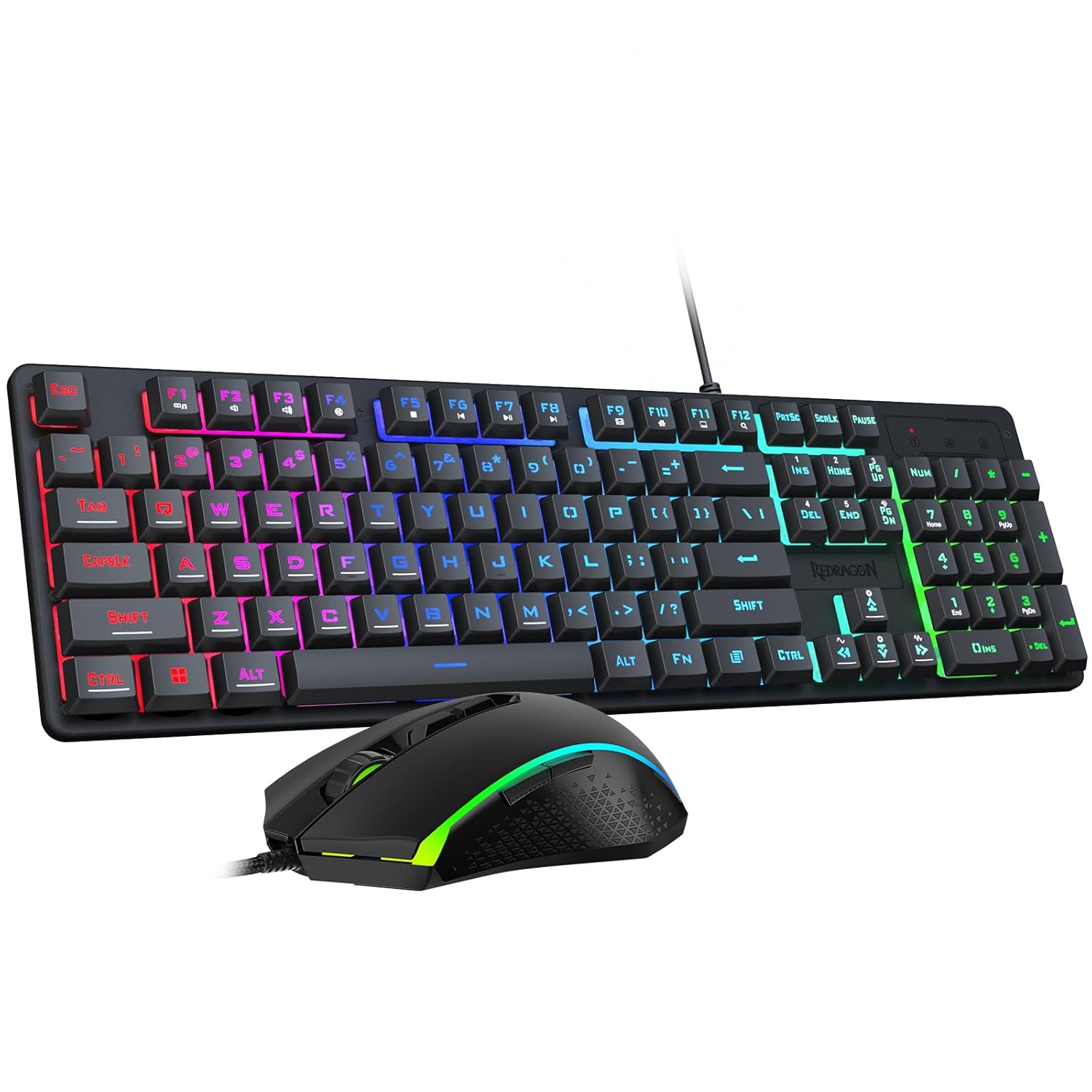
Redragon Updated S107 Gaming Keyboard and Mouse RGB Gaming Keyboard and 10000 DPI Mouse Combo with 25-Key Anti-Ghosting
 1 / 8
Prices are shown for browsing. Purchases are currently unavailable.
Redragon Updated S107 Gaming Keyboard and Mouse RGB Gaming Keyboard and 10000 DPI Mouse Combo with 25-Key Anti-Ghosting, $65.98, Availability unknown. Image 1 of 8.
- Selected option
- Redragon Updated S107 Gaming Keyboard and Mouse RGB Gaming Keyboard and 10000 DPI Mouse Combo with 25-Key Anti-Ghosting
- SKU
- JC19523
Source specifications
- Brand
- Redragon
- Color
- Black
- Connectivity Technology
- Wired
- Special Feature
- Backlit, RGB
- Compatible Devices
- Personal Computer
- Package Dimensions
- 17.87 x 8.5 x 2.05 inches
- Item Weight
- 2.05 pounds
- Manufacturer
- Redragon
- Item model number
- S107-RGB-BA
The details
About this item
Product description Previous page Next page Previous page Next page Previous page Next page Where can I download the S107 driver software? 1. Visit the official Red Dragon website (Redragon.com) 2. Click the “Download” module, then click “Gaming Combo,” search for model “S107-RGB-BA,” and download the driver software. Please note that only mouse drivers are supported for download. How to adjust mouse DPI to 10,000 DPI? Adjusting DPI via the mouse's physical buttons only allows adjustment within the 400-5000 DPI range. By downloading the mouse driver software, you can freely adjust the mouse DPI up to a maximum of 10000 DPI. How to adjust keyboard/mouse lighting? 1. Keyboard lighting can be configured using FN + DEL/INS/END/HOME shortcut keys. 2. Mouse lighting can be adjusted by modifying DPI speed settings. 【RGB Gaming Keyboard and Mouse】The gaming keyboard has 6 RGB lighting modes to choose from & the gaming mouse has 8 lighting effects to switch between, and the keyboard and mouse set can be adjusted for speed and brightness to suit your preference. Whether it's a single light, changing light effects or no light at all, the Redragon gaming keyboard and mouse will meet your needs
- 【RGB Gaming Keyboard and Mouse】The gaming keyboard has 6 RGB lighting modes to choose from & the gaming mouse has 8 lighting effects to switch between, and the keyboard and mouse set can be adjusted for speed and brightness to suit your preference. Whether it's a single light, changing light effects or no light at all, the Redragon gaming keyboard and mouse will meet your needs!
- 【DPI Adjustable Gaming Mouse】You can adjust the DPI up to 5000 via the DPI button, or adjust it up to 10000 via the software driver to easily meet your different needs in gaming or work. (The software also supports adjusting the mouse polling rate up to 1000Hz)
- 【Professional Customised Software Support】S107BA Gaming Mouse is equipped with professional Redragon customization software support, where you can freely adjust the DPI, Report rate, and RGB lighting effects and customize the 7 buttons to meet your customization needs (Mouse support software driver only) (redragon.com)
- 【Efficient & Convenient】This gaming keyboard and mouse combo is equipped with 12 Multimedia Function Keys, simple and convenient to operate. It not only improves efficiency but also makes your gaming process more convenient and faster
- 【Comfortable Gaming】The keyboard's foldable stand, skin-friendly coating, and floating Keycaps increase typing comfort. This keyboard and mouse are dedicated to providing an efficient gaming experience while ensuring maximum comfort
- 【25 Keys Anti-ghosting】Anti-ghosting ensures every button can be triggered. This allows you to accurately trigger key combinations in the game, and each skill can be accurately released to increase your winning rate. Upgrade Redragon S107-BA combo will be your perfect partner
- 【Plug & Play】No driver or software needed, plug and play, easy to use. Widely compatible with PC, laptop, computer, windows, etc. Redragon provides you with a 36-month warranty and a professional 24-hour after-sales and technical team
From the manufacturer
Product details
Product description Previous page Next page Previous page Next page Previous page Next page Where can I download the S107 driver software? 1. Visit the official Red Dragon website (Redragon.com) 2. Click the “Download” module, then click “Gaming Combo,” search for model “S107-RGB-BA,” and download the driver software. Please note that only mouse drivers are supported for download. How to adjust mouse DPI to 10,000 DPI? Adjusting DPI via the mouse's physical buttons only allows adjustment within the 400-5000 DPI range. By downloading the mouse driver software, you can freely adjust the mouse DPI up to a maximum of 10000 DPI. How to adjust keyboard/mouse lighting? 1. Keyboard lighting can be configured using FN + DEL/INS/END/HOME shortcut keys. 2. Mouse lighting can be adjusted by modifying DPI speed settings.
Highlights: 【RGB Gaming Keyboard and Mouse】The gaming keyboard has 6 RGB lighting modes to choose from & the gaming mouse has 8 lighting effects to switch between, and the keyboard and mouse set can be adjusted for speed and brightness to suit your preference. Whether it's a single light, changing light effects or no light at all, the Redragon gaming keyboard and mouse will meet your needs! 【DPI Adjustable Gaming Mouse】You can adjust the DPI up to 5000 via the DPI button, or adjust it up to 10000 via the software driver to easily meet your different needs in gaming or work. (The software also supports adjusting the mouse polling rate up to 1000Hz) 【Professional Customised Software Support】S107BA Gaming Mouse is equipped with professional Redragon customization software support, where you can freely adjust the DPI, Report rate, and RGB lighting effects and customize the 7 buttons to meet your customization needs (Mouse support software driver only) (redragon.com) 【Efficient & Convenient】This gaming keyboard and mouse combo is equipped with 12 Multimedia Function Keys, simple and convenient to operate. It not only improves efficiency but also makes your gaming process more convenient and faster 【Comfortable Gaming】The keyboard's foldable stand, skin-friendly coating, and floating Keycaps increase typing comfort. This keyboard and mouse are dedicated to providing an efficient gaming experience while ensuring maximum comfort
Key details: Package Dimensions: 17.87 x 8.5 x 2.05 inches | Item Weight: 2.05 pounds | Customer Reviews: 4.5 4.5 out of 5 stars (6,087) 4.5 out of 5 stars
What you can expect: 【RGB Gaming Keyboard and Mouse】The gaming keyboard has 6 RGB lighting modes to choose from & the gaming mouse has 8 lighting effects to switch between, and the keyboard and mouse set can be adjusted for speed and brightness to suit your preference. Whether it's a single light, changing light effects or no light at all, the Redragon gaming keyboard and mouse will meet your needs! 【DPI Adjustable Gaming Mouse】You can adjust the DPI up to 5000 via the DPI button, or adjust it up to 10000 via the software driver to easily meet your different needs in gaming or work. (The software also supports adjusting the mouse polling rate up to 1000Hz) 【Professional Customised Software Support】S107BA Gaming Mouse is equipped with professional Redragon customization software support, where you can freely adjust the DPI, Report rate, and RGB lighting effects and customize the 7 buttons to meet your customization needs (Mouse support software driver only) (redragon.com) 【Efficient & Convenient】This gaming keyboard and mouse combo is equipped with 12 Multimedia Function Keys, simple and convenient to operate. It not only improves efficiency but also makes your gaming process more convenient and faster 【Comfortable Gaming】The keyboard's foldable stand, skin-friendly coating, and floating Keycaps increase typing comfort. This keyboard and mouse are dedicated to providing an efficient gaming experience while ensuring maximum comfort 【25 Keys Anti-ghosting】Anti-ghosting ensures every button can be triggered. This allows you to accurately trigger key combinations in the game,
Customer feedback: 4.5/5 average rating.
Customers say: Customers find the keyboard and mouse set to be a great gaming bundle that offers good value for money, with a silky smooth feel and sturdy keys.
Review snippets: The media could not be loaded. This is my first gaming Mech Keyboard from Redragon, and so far this being my first, this is the best gaming keyboard I have ever owned. Weight is great. No lag when I game. / Works perfectly for my Xbox Series X using the included receiver. I got it for 7 Days to Die because controller on that game is awful. I've had issues with wireless keyboards having bad input lag, but with this keyboard
Product description Previous page Next page Previous page Next page Previous page Next page Where can I download the S107 driver software? 1. Visit the official Red Dragon website (Redragon.com) 2. Click the “Download” module, then click “Gaming Combo,” search for model “S107-RGB-BA,” and download the driver software. Please note that only mouse drivers are supported for download. How to adjust mouse DPI to 10,000 DPI? Adjusting DPI via the mouse's physical buttons only allows adjustment within the 400-5000 DPI range. By downloading the mouse driver software, you can freely adjust the mouse DPI up to a maximum of 10000 DPI. How to adjust keyboard/mouse lighting? 1. Keyboard lighting can be configured using FN + DEL/INS/END/HOME shortcut keys. 2. Mouse lighting can be adjusted by modifying DPI speed settings.