Satechi / Keyboards
Satechi SM3 Mechanical Keyboard for Mac and Windows 108 Keys Full Size with White LED Backlit Wired and
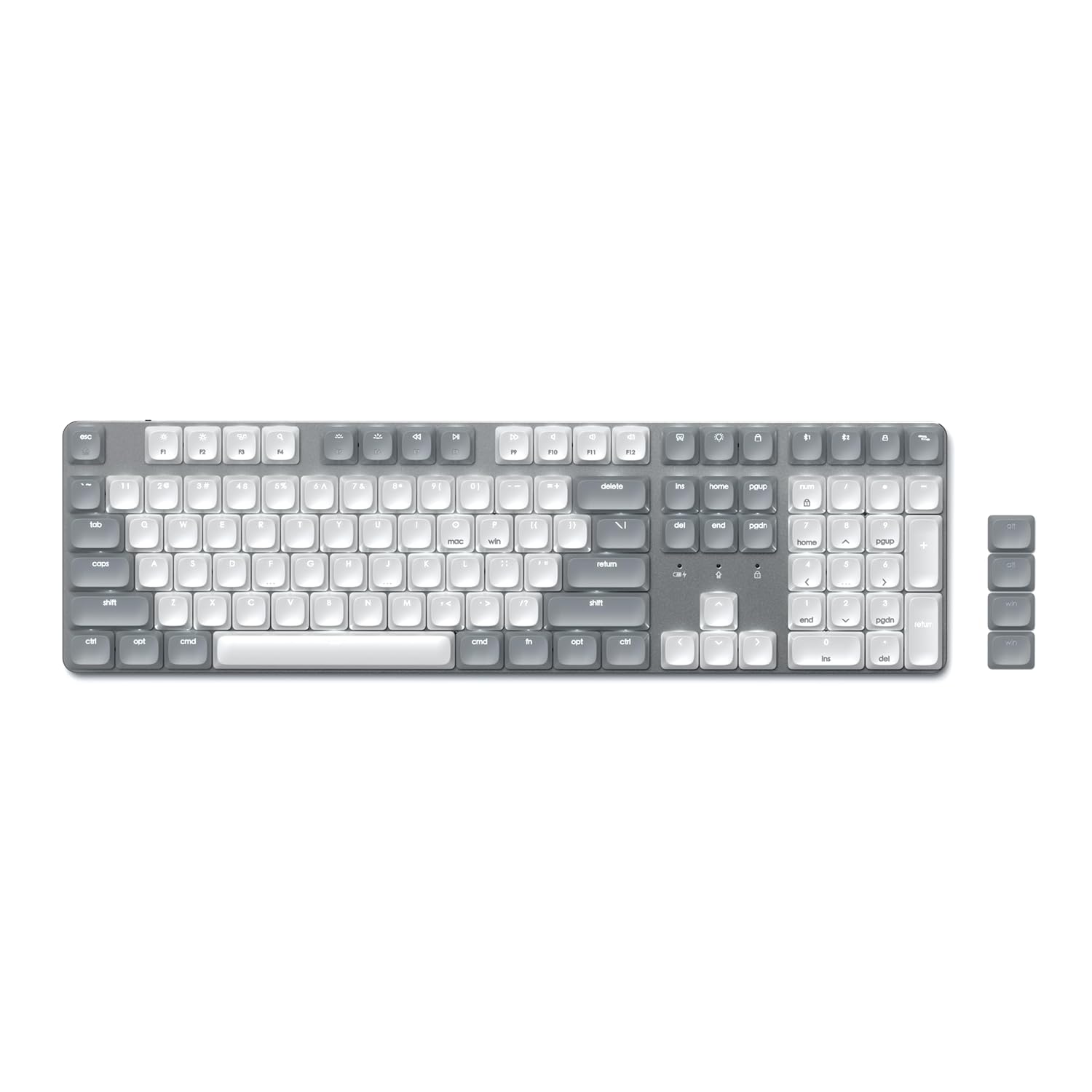 1 / 9
Prices are shown for browsing. Purchases are currently unavailable.
Satechi SM3 Mechanical Keyboard for Mac and Windows 108 Keys Full Size with White LED Backlit Wired and, $191.98, Availability unknown. Image 1 of 9.
- Selected option
- Satechi SM3 Mechanical Keyboard for Mac and Windows 108 Keys Full Size with White LED Backlit Wired and
- SKU
- JC20422
Source specifications
- Brand
- Satechi
- Compatible Devices
- MacBook Pro 14/16-inch (2025 M5/M4/M3/M2/M1), MacBook Air 13/15-inch (2025 M4/M3/M2/M1), iPad Pro 11/13-inch (2025 M5/M4/M2/M1), iPad Air 11/13-inch (2025 M3/M2/M1), iPad Mini (2024 A17/6th Gen), iPhone 17, iPhone Air, iPhone 17 Pro, iPhone 17 Pro Max, iPhone 16/15/14/13/12 Series, Mac Mini (2024 M4/M2/M1), iMac (2024 M4/M3/M1), Mac Studio (2025 M4/M3/M2/M1), Lenovo ThinkPad, Microsoft Surface, Google Pixelbook, Google Pixel Pro 8/9, Samsung S24/Z Flip 5 See more
- Connectivity Technology
- 2.4GHz USB Receiver, Bluetooth, USB-C
- Keyboard Description
- Mechanical
- Recommended Uses For Product
- Gaming, Office
- Special Feature
- Backlit, Ergonomic, Low-Profile Key, Portable, Rechargeable
- Color
- Light Gray/White
- Style
- Music
- Product Dimensions
- 16.9"L x 4.69"W x 0.6"H
- Material
- Aluminum
- Product Dimensions
- 16.89 x 4.69 x 0.6 inches
- Item Weight
- 1.43 pounds
- Manufacturer
- Satechi
- Language
- English
- Item model number
- 108 Touches -Clair/Blanc
- Batteries
- 1 A batteries required. (included)
The details
About this item
Product description The video showcases the product in use. The video guides you through product setup. The video compares multiple products. The video shows the product being unpacked. Satechi SM3 Mechanical Keyboard for Mac & Windows Merchant Video Previous page Next page 1 4 Device Connectivity 2 Rechargeable Battery 3 Backlight Previous page Next page Previous page Next page 1 For Laptops 2 For Tablets & Phones Previous page Next page How do I pair the keyboard with Windows/macOS devices via Bluetooth? Turn on your Bluetooth, place the keyboard into pairing mode pressing and holding the pairing key for 3sec until it begins to flash. Choose the device "SM3 Slim keyboard”. Are the mechanical switches hot-swappable? The switches are soldered and not replaceable, only keycaps are swappable. You can purchase or use your own keycaps for a more customized look. Advanced Connectivity – Connect up to 4 devices simultaneously with our wireless mechanical keyboard, and instantly switch between them with the versatility of dual Bluetooth 5.0 channels, a 2.4 GHz USB receiver, and a reliable wired connection. Satechi SM3 mechanical keyboard wireless is compatible with most type c devices lik
- Advanced Connectivity – Connect up to 4 devices simultaneously with our wireless mechanical keyboard, and instantly switch between them with the versatility of dual Bluetooth 5.0 channels, a 2.4 GHz USB receiver, and a reliable wired connection. Satechi SM3 mechanical keyboard wireless is compatible with most type c devices like Mac, iPad, Windows, and Chromebooks and pairs perfectly with your laptop computer
- 108 Keys Low Profile Keyboard – The Satechi full size mechanical keyboard features low-profile brown switches, providing unmatched tactile feedback and faster actuation, and removable keycaps that make it easy to clean and customize your keyboard. Designed to strike the perfect balance between typing and gaming, the keyboard’s quieter operation is ideal for office environments or shared spaces
- 14 LED Backlit Patterns – The SM3 backlit keyboard comes with a white backlight that can be increased and decreased using the F5 and F6 shortcut keys. The keyboard supports 14 different patterns with three brightness levels and four LED speeds. Users can turn the backlight and patterns on and off by holding down the lightbulb key for five seconds. This full size mechanical keyboard features a rechargeable 2500mAh battery with a future-proof USB-C port that can be used for both charging and wired mode
- Ergonomic Design – Our wireless keyboard boasts a full numeric keypad, making it the perfect choice for business and office professionals whose tasks require extensive numerical input. The low-profile design reduces hand fatigue and promotes a comfortable typing experience
- What You Get – With your purchase you will receive 2 Windows keycaps, 2 Alt Keycaps (left and right), a usb-c to usb-c cable (1.2m/ 3.2ft), a 2.4GHz USB receiver (attached to the bottom of the keyboard), and a user manual for your convenience. Satechi products are covered by a 2-year limited warranty against defects in materials and workmanship under normal use
Product information
Materials and care
- Material
- Aluminum
From the manufacturer
Product details
Product description The video showcases the product in use. The video guides you through product setup. The video compares multiple products. The video shows the product being unpacked. Satechi SM3 Mechanical Keyboard for Mac & Windows Merchant Video Previous page Next page 1 4 Device Connectivity 2 Rechargeable Battery 3 Backlight Previous page Next page Previous page Next page 1 For Laptops 2 For Tablets & Phones Previous page Next page How do I pair the keyboard with Windows/macOS devices via Bluetooth? Turn on your Bluetooth, place the keyboard into pairing mode pressing and holding the pairing key for 3sec until it begins to flash. Choose the device "SM3 Slim keyboard”. Are the mechanical switches hot-swappable? The switches are soldered and not replaceable, only keycaps are swappable. You can purchase or use your own keycaps for a more customized look. Just make sure to use Low Profile MX style keycaps. How do I reset the SM3 Slim Mechanical Backlit Bluetooth Keyboard? Turned on the keyboard, press and hold the FN + DEL+ END keys for 3-5 seconds - The backlight will flash 3 times confirming a successful reset. How do I know If the keyboard is charging? When the keyboard is charging, the LED will illuminate. Once fully charged, the light will turn off. Can I purchase or use my
Highlights: Advanced Connectivity – Connect up to 4 devices simultaneously with our wireless mechanical keyboard, and instantly switch between them with the versatility of dual Bluetooth 5.0 channels, a 2.4 GHz USB receiver, and a reliable wired connection. Satechi SM3 mechanical keyboard wireless is compatible with most type c devices like Mac, iPad, Windows, and Chromebooks and pairs perfectly with your laptop computer 108 Keys Low Profile Keyboard – The Satechi full size mechanical keyboard features low-profile brown switches, providing unmatched tactile feedback and faster actuation, and removable keycaps that make it easy to clean and customize your keyboard. Designed to strike the perfect balance between typing and gaming, the keyboard’s quieter operation is ideal for office environments or shared spaces 14 LED Backlit Patterns – The SM3 backlit keyboard comes with a white backlight that can be increased and decreased using the F5 and F6 shortcut keys. The keyboard supports 14 different patterns with three brightness levels and four LED speeds. Users can turn the backlight and patterns on and off by holding down the lightbulb key for five seconds. This full size mechanical keyboard features a rechargeable 2500mAh battery with a future-proof USB-C port that can be used for both charging and wired mode Ergonomic Design – Our wireless keyboard boasts a full numeric keypad, making it the perfect
Key details: Product Dimensions: 16.89 x 4.69 x 0.6 inches | Item Weight: 1.43 pounds | Language: English | Batteries: 1 A batteries required. (included) | Customer Reviews: 4.5 4.5 out of 5 stars (376) 4.5 out of 5 stars
What you can expect: Advanced Connectivity – Connect up to 4 devices simultaneously with our wireless mechanical keyboard, and instantly switch between them with the versatility of dual Bluetooth 5.0 channels, a 2.4 GHz USB receiver, and a reliable wired connection. Satechi SM3 mechanical keyboard wireless is compatible with most type c devices like Mac, iPad, Windows, and Chromebooks and pairs perfectly with your laptop computer 108 Keys Low Profile Keyboard – The Satechi full size mechanical keyboard features low-profile brown switches, providing unmatched tactile feedback and faster actuation, and removable keycaps that make it easy to clean and customize your keyboard. Designed to strike the perfect balance between typing and gaming, the keyboard’s quieter operation is ideal for office environments or shared spaces 14 LED Backlit Patterns – The SM3 backlit keyboard comes with a white backlight that can be increased and decreased using the F5 and F6 shortcut keys. The keyboard supports 14 different patterns with three brightness levels and four LED speeds. Users can turn the backlight and patterns on and off by holding down the lightbulb key for five seconds. This full size mechanical keyboard features a rechargeable 2500mAh battery with a future-proof USB-C port that can be used for both charging and wired mode Ergonomic Design – Our wireless keyboard boasts a full numeric keypad, making it the perfect choice for business and office professionals whose tasks require extensive numerical input. The low-profile design reduces hand fatigue and promotes
Customer feedback: 4.5/5 average rating.
Customers say: Customers praise the keyboard's build quality, feel, and sound, noting its not-too-loud sound and distinct clicking mechanism.
Review snippets: This keyboard is not fancy; not a lot of bells and whistles, but it is also not basic. Just an amazingly functional and comfortable everyday driver. It is attractive in a minimalistic sort of way, including excellent WHITE backlighting that / Awesome quality keyboard. The build feels premium, has a nice weight to it. Also the backlighting is a nice touch. Battery life is good. The actual sound of the key switches is nice not to loud. All in all great
Product description The video showcases the product in use. The video guides you through product setup. The video compares multiple products. The video shows the product being unpacked. Satechi SM3 Mechanical Keyboard for Mac & Windows Merchant Video Previous page Next page 1 4 Device Connectivity 2 Rechargeable Battery 3 Backlight Previous page Next page Previous page Next page 1 For Laptops 2 For Tablets & Phones Previous page Next page How do I pair the keyboard with Windows/macOS devices via Bluetooth? Turn on your Bluetooth, place the keyboard into pairing mode pressing and holding the pairing key for 3sec until it begins to flash. Choose the device "SM3 Slim keyboard”. Are the mechanical switches hot-swappable? The switches are soldered and not replaceable, only keycaps are swappable. You can purchase or use your own keycaps for a more customized look. Just make sure to use Low Profile MX style keycaps. How do I reset the SM3 Slim Mechanical Backlit Bluetooth Keyboard? Turned on the keyboard, press and hold the FN + DEL+ END keys for 3-5 seconds - The backlight will flash 3 times confirming a successful reset. How do I know If the keyboard is charging? When the keyboard is charging, the LED will illuminate. Once fully charged, the light will turn off. Can I purchase or use my own keycaps on the SM3 Slim Mechanical Backlit Bluetooth Keyboard? Yes. You can for a customized look that suits your taste as the SM3 keyboard supports 100% keyboard layout keycaps. To match the original keycaps, make sure to use Low