Complete product information
{
  "id": "wireless-adapter-compatible-with-xbox-one-controller-for-windows-10-8-1-8-7",
  "handle": "wireless-adapter-compatible-with-xbox-one-controller-for-windows-10-8-1-8-7",
  "sku": "JC6939",
  "asin": "B08CY14VGD",
  "title": "Wireless Adapter Compatible with Xbox One Controller for Windows 10 8 1 8 7",
  "title_original": "Wireless Adapter Compatible with Xbox One Controller for Windows 10/8.1/8/7",
  "brand": "Cipon",
  "price": 29.99,
  "social_proof": {
    "bought_past_month": 290,
    "text": "290+ bought in the past month"
  },
  "images": [
    "https://m.media-amazon.com/images/I/51FkZgGZb0L._SL1500_.jpg",
    "https://m.media-amazon.com/images/I/61XbSfW29xL._SL1500_.jpg",
    "https://m.media-amazon.com/images/I/71I-vMkkrFL._SL1500_.jpg",
    "https://m.media-amazon.com/images/I/61oih0aotgL._SL1500_.jpg",
    "https://m.media-amazon.com/images/I/61-C4RRrT4L._SL1500_.jpg",
    "https://m.media-amazon.com/images/I/71RsFPXiiKL._SL1500_.jpg",
    "https://m.media-amazon.com/images/I/61Hb7JVQoXL._SL1500_.jpg"
  ],
  "aplus_images": [
    "https://m.media-amazon.com/images/S/aplus-media-library-service-media/81edef64-e8b0-4ca8-8ece-6428bc401c02.__CR0,0,600,180_PT0_SX600_V1___.jpg",
    "https://m.media-amazon.com/images/S/aplus-media-library-service-media/43c5d752-ea47-401b-85cc-7046cd888ddf.__CR0,0,970,600_PT0_SX970_V1___.jpg",
    "https://m.media-amazon.com/images/S/aplus-media-library-service-media/c31cc327-3d94-42f4-add1-a9d8dd284ed3.__CR0,0,970,600_PT0_SX970_V1___.jpg",
    "https://m.media-amazon.com/images/S/aplus-media-library-service-media/a2d3263e-d114-423e-8e96-0ab31c27e88c.__CR0,0,970,600_PT0_SX970_V1___.jpg"
  ],
  "bullets": [
    "Manufactured by CIPON: This Wireless Adapter manufactured by a third-party company , not by Microsoft; Our Adapter chip and program is the same as official, and quality as good as official",
    "Widely Compatibility: For use with X One Wireless Controller on PCs and Tablets running Windows 7/8/8.1/10 with USB 2.0/3.0; Not compatible with Xbox 360 controllers; (Note: You may need to download a driver for the first use)",
    "Play with Others: Supports up to 8 wireless controllers; Also supports the use of wired chat headsets on the controllerr (Note: The headsets only supported under WIN10 system, and not supports wireless connection headsets)",
    "Designed for PC: Play your Wireless Controller on Windows/ laptops/ tablets; Simply bind the Adapter to your Wireless Controller to enable the same gaming experience you are used to on Xb One, including in-game chat and high quality stereo audio",
    "What You Will Get: 1 x Wireless adapter, 1 x User manual, 1 x Elegant packaging"
  ],
  "specs": {},
  "category": "Video Games > Xbox One > Accessories > Cables & Adapters > Adapters",
  "category_path": [
    "Video Games",
    "Xbox One",
    "Accessories",
    "Cables & Adapters",
    "Adapters"
  ],
  "category_slug": "video-games/xbox-one/accessories/cables-adapters/adapters",
  "category_leaf": "Adapters",
  "variations": {
    "sizes": [],
    "colors": [],
    "size_chart": null
  },
  "reviews": {
    "average_rating": 4.2,
    "customers_say": "Customers report that the wireless adapter works right out of the box and is easy to set up and use, with automatic driver installation on Windows 11 systems. Customers disagree on the value for money, with some finding it great for the price while others say it's not worth the cost.",
    "items": [
      {
        "title": "5.0 out of 5 stars It is a Cheap Knock Off, but it Works!",
        "body": "TL;DR: This is Definitely a Cheap knock off Product, but it works well for normal gaming scenarios where you are in the same room as the PC you are plugging it into. Make sure you have an internet connection so you can allow Windows Updates to install Drivers for it. 4 out of 5 stars, will be buying again. Long Form Review: I was extremely skeptical about this product, but at the time all of the Official XBox Wireless Dongles were either outrageously priced, or going to take weeks to be delivered, and I needed something within 2 days, so that a client could use the PC I just built to play games. They already had an XBox Controller, but at the last minute when I reminded them that he would need the Dongle to use his Controller on the PC wirelessly (Their Controllers were all lacking Bluetooth Support) they asked me to please get one for them. I unfortunately don't have any extra in my stock, and I wasn't about to give away the ones I use. So I went on Amazon to buy one, and found people asking outrageous prices for something that is normally a $20 Purchase. Of course the client doesn't know that, so I still would have paid $60 for it, if it meant I could get it in a day or 2, but there were no options at the time that could get the official one to me in 2 days. So I took a chance on this Knock off one. It has no branding, and is DEFINITELY NOT the Legitimate Microsoft Dongle. This is a cheap Chinese Knock off, and I was able to confirm this by taking my 2nd one apart and comparing it to the one I bought at Best Buy a year ago that got killed by a Coolant Leak I had (Long Story). However that said, what matters is whether or not it works. And I am happy to say that it works perfectly. There are 2 differences (other than the missing Logo and slightly different components inside) that I can find. 1) The Official XBox Dongle is always detected right away on a Windows 10 Machine, there is no need for a drivers update, you just plug it in, its detected and it works. With this one, your machine is unlikely to detect it right away. For most people this is a non issue, because most people don't know how to disable Windows Update, so Windows Update will automatically launch in the background and download the correct drivers, and you are up in running in minutes without having to do anything, so for most people they won't even notice this difference. However for some of us, we like to control the Updates our Machines get, and may be blocking WU by default, in which case this will not work. You have to connect to the internet and allow Windows Update to communicate with Microsoft's Server and allow it to download the Update before it will be recognized. This also may be an issue for those of you whom are in are in areas with bad internet coverage, and can't always connect to the internet. For those of you, just keep in mind that you will have to connect your PC to the internet for just a few minutes while it downloads and installs the driver. (Its literally less then half a megabyte, so it won't eat up any bandwidth, and even on the slowest internet connection that will only take a few seconds to a few minutes tops, but it is something to keep in mind for all you Offline Gamers). 2) The Second difference is the strength of the Wireless Radio. I did some Frequency and Wireless Strength Analysis verses the Official Xbox Dongle, and the strength of the signal is about 15% less on average. It also seems to have trouble traveling through obstacles, and also has more issues with Interference. This again will be a non issue for most of you gamers that are in the same room as your Gaming PC. But if you are one of those gamers whom has your PC in one Room and Your TV that you are playing on in another, this does not have the same strength as the official XBox Dongle, especially if you have more than One Wall Between you and the Dongle. The Xbox One is strong enough for me to have my Gaming PC in my Gaming Room Upstairs, but to be playing Via Steamlink on my NVidia Shield Downstairs, using the Controller that is paired to that Dongle Upstairs. This new one is not strong enough for that, and has frequent drop outs that make it a frustrating experience in that particular scenario. However my sample size was only 2, so your mileage may vary there. All In all However, I am still giving this product 4 stars. I am only taking away 1 star, and that is mainly because they are not very honest about it being a cheap clone. If people aren't paying attention they could think they are buying the official XBox Controller Dongle, and never know that they actually just got a chinese Knockoff of that Dongle. And if you are buying it to use in one of the edge cases I listed above, then you may end up being disappointed, so I do think that is worth the reduction of a star. But In Good Conscious I can't dock this product any more than that, because at the end of the day, for the majority of people who buy this, as long as the Product is not Dead on Arrival (Both of mine were ordered about 3 weeks apart from each other and both arrived in perfect working condition, I just noticed some comments of people saying theirs was dead on arrival, but take that with a grain of salt because some people might not realize they need to plug the dongle into a powered port and then assume the product is dead, when really its just their own lack of knowledge), then You will have a great experience with this. I did pretty in-depth testing on both of my units, I had to make sure that I wouldn't regret reselling this to my Client, and I am happy to say it is working perfectly for them, and they have had no issues with it. Further more the one I bought for myself I had to destroy the outer shell to open it up, but I was able to keep the PCB in tact, and it is also working great for me. Controllers Pair Just fine, I have 5 Controllers in my Gaming Room, and was able to pair all 5 at the same time without any issues. Unfortunately I do not have the high speed camera yet that I would like to do latency testing, so I can't tell if their is a latency penalty for going with this option using empirical data. But using my own senses and jumping back and forth between the 2, I am not personally able to detect a difference there. The Product does work great for normal Use cases though, so 4 out of 5 stars! Read more",
        "author": "MattTheTechLV",
        "rating": 5,
        "date": "September 14, 2020",
        "verified": true,
        "images": []
      },
      {
        "title": "5.0 out of 5 stars Solid Wireless Adapter – Plug & Play and Reliable",
        "body": "I bought this CIPON wireless adapter as a simple upgrade for my PC, and it’s been doing exactly what it’s supposed to do. Setup was extremely easy — plugged it in, drivers installed automatically, and I was connected within minutes. No headaches, no extra software required. Connection has been stable so far. I use it for gaming, streaming, and general browsing, and I haven’t experienced random drops or lag spikes. Speeds are solid for its size, and latency feels noticeably better than my previous cheap adapter. The compact design is a plus. It doesn’t stick out awkwardly from the USB port and doesn’t block nearby ports. Build quality feels decent, especially for the price. If you’re looking for an affordable, no-nonsense wireless adapter that just works, this is a good buy. I’d recommend it for anyone who wants a quick and reliable Wi-Fi solution without spending extra money on big-name brands. ✔ Easy setup ✔ Stable connection ✔ Compact design ✔ Good value for the price Would definitely buy again. Read more",
        "author": "Yunior",
        "rating": 5,
        "date": "January 1, 2026",
        "verified": true,
        "images": [
          "https://m.media-amazon.com/images/I/61MNBmxdGWL._SY88._SL1500_.jpg",
          "https://m.media-amazon.com/images/I/61ENxcRBZwL._SY88._SL1500_.jpg"
        ]
      },
      {
        "title": "4.0 out of 5 stars Works well with Windows 7",
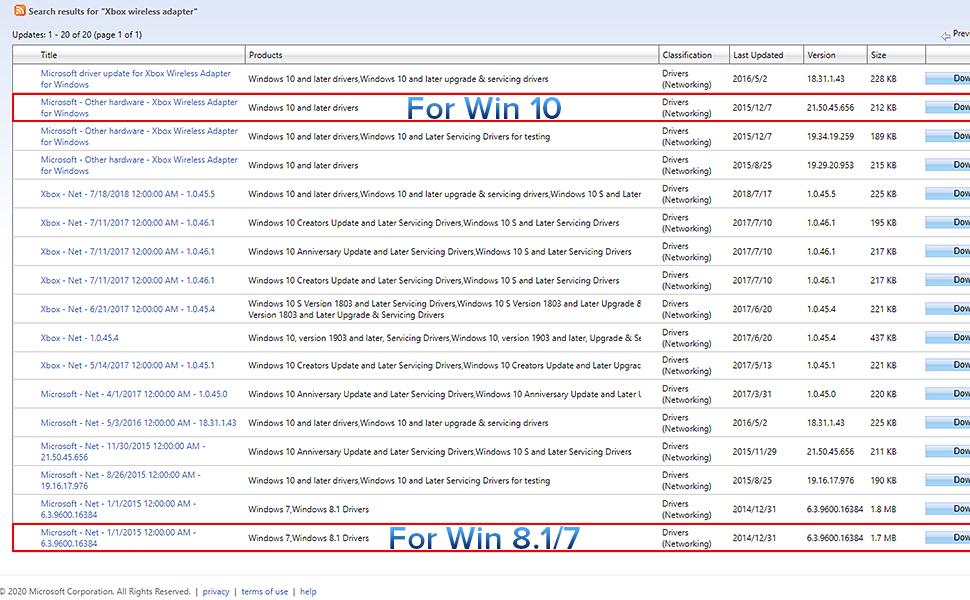
        "body": "This review is for the Cipon Wireless Adapter: This adapter is indeed compatible with Windows 7 and works quite well with an Xbox 1 controller. There are however a few things to note that have either changed, or don't appear in the otherwise comprehensive description. Searching for \"Xb Wireless Adapter\" no longer brings up relevant results for the Windows 7 driver. Search for \"Microsoft - Net - 1/1/2015 12:00:00 AM - 6.3.9600.16384\" instead, and download either the X86 or X64 update that matches the operating system on your computer and install it per the directions in the description. When installed correctly and operating wirelessly, only the wireless adapter, and not the Xbox controller will appear in Devices and Printers, however the receiver is functioning correctly and you can verify if the controller is working properly by using the test setting of the built in \"Set up USB Controllers\" Windows 7 program. The adapter is much larger than it appears in the picture (about 4 times the size of a typical flash drive) and at least on the computers available to me, installs with the Bluetooth connection button facing down and the connection light behind adjacent cables making it hard to access. Overall the Cipon Wireless Adapter is definitely worth getting if you want to use an Xbox controller with Windows 7. P.S. Make sure your controller has batteries installed before you start cussing out the Cipon receiver for not working. :-) Read more",
        "author": "S.D.",
        "rating": 4,
        "date": "October 4, 2024",
        "verified": true,
        "images": []
      }
    ]
  },
  "short_description": "Product description CIPON's Wireless Adapter Designed for the Official XB Controllers CIPON adapter chip and program is the same as official, and quality is as good as official, but the cost of choosing a CIPON adapter is much lower. With CIPON wireless adapter, you only need an x one wireless controller to enjoy x one games on your computer, without the need to buy expensive consoles. Note: Not compatible with Xb 360 controllers. Not support third-party controllers. Not supports wireless connection headsets. For computers that have disabled windows automatic update, you need to manually download a driver to use this adapter. In view of the complicated steps to update the.",
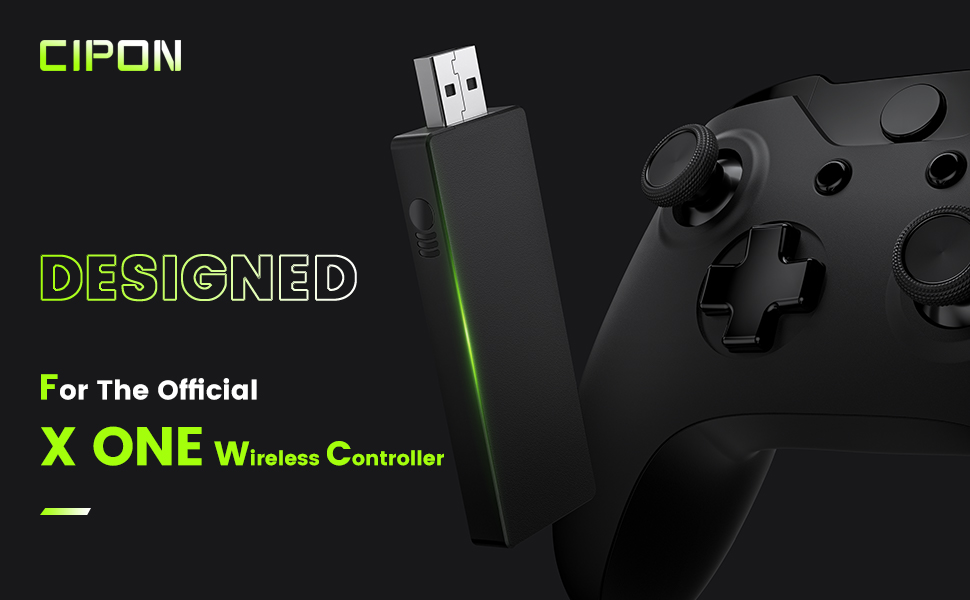
  "about_this_item": "Product description CIPON's Wireless Adapter Designed for the Official XB Controllers CIPON adapter chip and program is the same as official, and quality is as good as official, but the cost of choosing a CIPON adapter is much lower. With CIPON wireless adapter, you only need an x one wireless controller to enjoy x one games on your computer, without the need to buy expensive consoles. Note: Not compatible with Xb 360 controllers. Not support third-party controllers. Not supports wireless connection headsets. For computers that have disabled windows automatic update, you need to manually download a driver to use this adapter. In view of the complicated steps to update the driver, we recommend that you use win10 system and turn on windows automatic update. How to Connect the XB Wireless Controller to the PC? Detaill Steps For Pairing 1. Please Manufactured by CIPON: This Wireless Adapter manufactured by a third-party company , not by Microsoft; Our Adapter chip and program is the same as official, and quality as good as official; Widely Compatibility: For use with X One Wireless Controller on PCs and Tablets running Windows 7/8/8.1/10 with USB 2.0/3.0; Not compatible with Xbox 360 c",
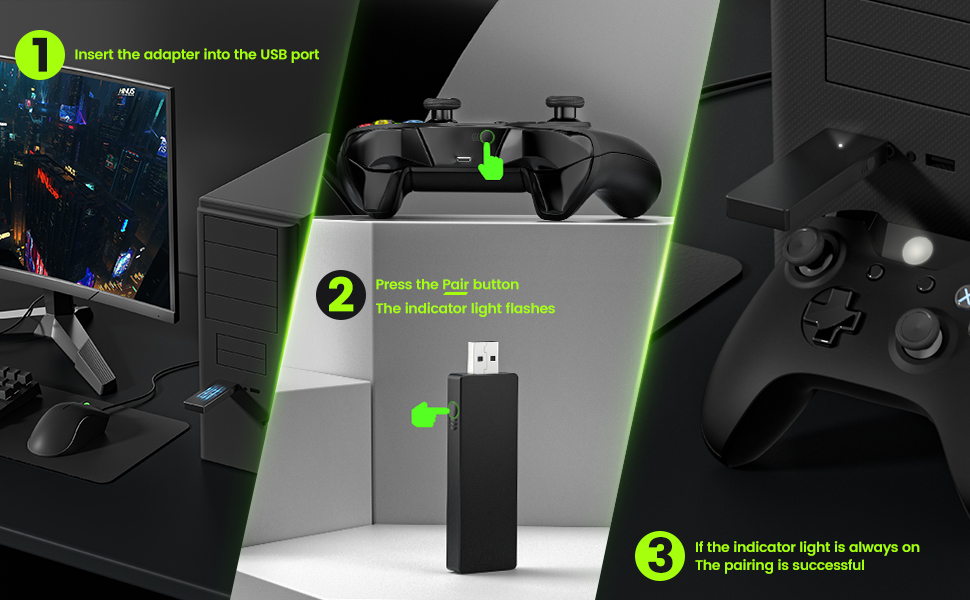
  "long_description": "Product description CIPON's Wireless Adapter Designed for the Official XB Controllers CIPON adapter chip and program is the same as official, and quality is as good as official, but the cost of choosing a CIPON adapter is much lower. With CIPON wireless adapter, you only need an x one wireless controller to enjoy x one games on your computer, without the need to buy expensive consoles. Note: Not compatible with Xb 360 controllers. Not support third-party controllers. Not supports wireless connection headsets. For computers that have disabled windows automatic update, you need to manually download a driver to use this adapter. In view of the complicated steps to update the driver, we recommend that you use win10 system and turn on windows automatic update. How to Connect the XB Wireless Controller to the PC? Detaill Steps For Pairing 1. Please make sure the Driver on PC has been Updated . 2. Turn on your PC and sign in. 3. Plug the wireless adapter into the USB slot on pc. 4. Press and hold Pair button on the adapter for 2-3s, and the light of adapter starts to flash slowly. (If it does not flash, you may need to install a driver for your PC.) 5. Press the HOME button on the controller. 6. The light of the HOME button will\n\nHighlights: Manufactured by CIPON: This Wireless Adapter manufactured by a third-party company , not by Microsoft; Our Adapter chip and program is the same as official, and quality as good as official Widely Compatibility: For use with X One Wireless Controller on PCs and Tablets running Windows 7/8/8.1/10 with USB 2.0/3.0; Not compatible with Xbox 360 controllers; (Note: You may need to download a driver for the first use) Play with Others: Supports up to 8 wireless controllers; Also supports the use of wired chat headsets on the controllerr (Note: The headsets only supported under WIN10 system, and not supports wireless connection headsets) Designed for PC: Play your Wireless Controller on Windows/ laptops/ tablets; Simply bind the Adapter to your Wireless Controller to enable the same gaming experience you are used to on Xb One, including in-game chat and high quality stereo audio What You Will Get: 1 x Wireless adapter, 1 x User manual, 1 x Elegant packaging\n\nWhat you can expect: Manufactured by CIPON: This Wireless Adapter manufactured by a third-party company , not by Microsoft; Our Adapter chip and program is the same as official, and quality as good as official Widely Compatibility: For use with X One Wireless Controller on PCs and Tablets running Windows 7/8/8.1/10 with USB 2.0/3.0; Not compatible with Xbox 360 controllers; (Note: You may need to download a driver for the first use) Play with Others: Supports up to 8 wireless controllers; Also supports the use of wired chat headsets on the controllerr (Note: The headsets only supported under WIN10 system, and not supports wireless connection headsets) Designed for PC: Play your Wireless Controller on Windows/ laptops/ tablets; Simply bind the Adapter to your Wireless Controller to enable the same gaming experience you are used to on Xb One, including in-game chat and high quality stereo audio What You Will Get: 1 x Wireless adapter, 1 x User manual, 1 x Elegant packaging\n\nCustomer feedback: 4.2/5 average rating.\n\nCustomers say: Customers report that the wireless adapter works right out of the box and is easy to set up and use, with automatic driver installation on Windows 11 systems. Customers disagree on the value for money, with some finding it great for the price while others say it's not worth the cost.\n\nReview snippets: TL;DR: This is Definitely a Cheap knock off Product, but it works well for normal gaming scenarios where you are in the same room as the PC you are plugging it into. Make sure you have an internet connection so / I bought this CIPON wireless adapter as a simple upgrade for my PC, and it’s been doing exactly what it’s supposed to do. Setup was extremely easy — plugged it in, drivers installed automatically, and I was connected within minutes.\n\nProduct description CIPON's Wireless Adapter Designed for the Official XB Controllers CIPON adapter chip and program is the same as official, and quality is as good as official, but the cost of choosing a CIPON adapter is much lower. With CIPON wireless adapter, you only need an x one wireless controller to enjoy x one games on your computer, without the need to buy expensive consoles. Note: Not compatible with Xb 360 controllers. Not support third-party controllers. Not supports wireless connection headsets. For computers that have disabled windows automatic update, you need to manually download a driver to use this adapter. In view of the complicated steps to update the driver, we recommend that you use win10 system and turn on windows automatic update. How to Connect the XB Wireless Controller to the PC? Detaill Steps For Pairing 1. Please make sure the Driver on PC has been Updated . 2. Turn on your PC and sign in. 3. Plug the wireless adapter into the USB slot on pc. 4. Press and hold Pair button on the adapter for 2-3s, and the light of adapter starts to flash slowly. (If it does not flash, you may need to install a driver for your PC.) 5. Press the HOME button on the controller. 6. The light of the HOME button will flash 3-5s and then keeps on. Note: If the controller keep flashing, you need to press the Pairing Button on the controller, and then they will be connected. Status on Receiver Indicators: 1. When Pairing: the light flashes slowly. 2.",
  "long_description_blocks": [
    {
      "type": "p",
      "text": "Product description CIPON's Wireless Adapter Designed for the Official XB Controllers CIPON adapter chip and program is the same as official, and quality is as good as official, but the cost of choosing a CIPON adapter is much lower. With CIPON wireless adapter, you only need an x one wireless controller to enjoy x one games on your computer, without the need to buy expensive consoles. Note: Not compatible with Xb 360 controllers. Not support third-party controllers. Not supports wireless connection headsets. For computers that have disabled windows automatic update, you need to manually download a driver to use this adapter. In view of the complicated steps to update the driver, we recommend that you use win10 system and turn on windows automatic update. How to Connect the XB Wireless Controller to the PC? Detaill Steps For Pairing 1. Please make sure the Driver on PC has been Updated . 2. Turn on your PC and sign in. 3. Plug the wireless adapter into the USB slot on pc. 4. Press and hold Pair button on the adapter for 2-3s, and the light of adapter starts to flash slowly. (If it does not flash, you may need to install a driver for your PC.) 5. Press the HOME button on the controller. 6. The light of the HOME button will"
    },
    {
      "type": "p",
      "text": "Highlights: Manufactured by CIPON: This Wireless Adapter manufactured by a third-party company , not by Microsoft; Our Adapter chip and program is the same as official, and quality as good as official Widely Compatibility: For use with X One Wireless Controller on PCs and Tablets running Windows 7/8/8.1/10 with USB 2.0/3.0; Not compatible with Xbox 360 controllers; (Note: You may need to download a driver for the first use) Play with Others: Supports up to 8 wireless controllers; Also supports the use of wired chat headsets on the controllerr (Note: The headsets only supported under WIN10 system, and not supports wireless connection headsets) Designed for PC: Play your Wireless Controller on Windows/ laptops/ tablets; Simply bind the Adapter to your Wireless Controller to enable the same gaming experience you are used to on Xb One, including in-game chat and high quality stereo audio What You Will Get: 1 x Wireless adapter, 1 x User manual, 1 x Elegant packaging"
    },
    {
      "type": "p",
      "text": "What you can expect: Manufactured by CIPON: This Wireless Adapter manufactured by a third-party company , not by Microsoft; Our Adapter chip and program is the same as official, and quality as good as official Widely Compatibility: For use with X One Wireless Controller on PCs and Tablets running Windows 7/8/8.1/10 with USB 2.0/3.0; Not compatible with Xbox 360 controllers; (Note: You may need to download a driver for the first use) Play with Others: Supports up to 8 wireless controllers; Also supports the use of wired chat headsets on the controllerr (Note: The headsets only supported under WIN10 system, and not supports wireless connection headsets) Designed for PC: Play your Wireless Controller on Windows/ laptops/ tablets; Simply bind the Adapter to your Wireless Controller to enable the same gaming experience you are used to on Xb One, including in-game chat and high quality stereo audio What You Will Get: 1 x Wireless adapter, 1 x User manual, 1 x Elegant packaging"
    },
    {
      "type": "p",
      "text": "Customer feedback: 4.2/5 average rating."
    },
    {
      "type": "p",
      "text": "Customers say: Customers report that the wireless adapter works right out of the box and is easy to set up and use, with automatic driver installation on Windows 11 systems. Customers disagree on the value for money, with some finding it great for the price while others say it's not worth the cost."
    },
    {
      "type": "p",
      "text": "Review snippets: TL;DR: This is Definitely a Cheap knock off Product, but it works well for normal gaming scenarios where you are in the same room as the PC you are plugging it into. Make sure you have an internet connection so / I bought this CIPON wireless adapter as a simple upgrade for my PC, and it’s been doing exactly what it’s supposed to do. Setup was extremely easy — plugged it in, drivers installed automatically, and I was connected within minutes."
    },
    {
      "type": "p",
      "text": "Product description CIPON's Wireless Adapter Designed for the Official XB Controllers CIPON adapter chip and program is the same as official, and quality is as good as official, but the cost of choosing a CIPON adapter is much lower. With CIPON wireless adapter, you only need an x one wireless controller to enjoy x one games on your computer, without the need to buy expensive consoles. Note: Not compatible with Xb 360 controllers. Not support third-party controllers. Not supports wireless connection headsets. For computers that have disabled windows automatic update, you need to manually download a driver to use this adapter. In view of the complicated steps to update the driver, we recommend that you use win10 system and turn on windows automatic update. How to Connect the XB Wireless Controller to the PC? Detaill Steps For Pairing 1. Please make sure the Driver on PC has been Updated . 2. Turn on your PC and sign in. 3. Plug the wireless adapter into the USB slot on pc. 4. Press and hold Pair button on the adapter for 2-3s, and the light of adapter starts to flash slowly. (If it does not flash, you may need to install a driver for your PC.) 5. Press the HOME button on the controller. 6. The light of the HOME button will flash 3-5s and then keeps on. Note: If the controller keep flashing, you need to press the Pairing Button on the controller, and then they will be connected. Status on Receiver Indicators: 1. When Pairing: the light flashes slowly. 2."
    },
    {
      "type": "img",
      "src": "https://m.media-amazon.com/images/S/aplus-media-library-service-media/81edef64-e8b0-4ca8-8ece-6428bc401c02.__CR0,0,600,180_PT0_SX600_V1___.jpg",
      "alt": "Wireless Adapter Compatible with Xbox One Controller for Windows 10 8 1 8 7 details image 1"
    },
    {
      "type": "img",
      "src": "https://m.media-amazon.com/images/S/aplus-media-library-service-media/43c5d752-ea47-401b-85cc-7046cd888ddf.__CR0,0,970,600_PT0_SX970_V1___.jpg",
      "alt": "Wireless Adapter Compatible with Xbox One Controller for Windows 10 8 1 8 7 details image 2"
    },
    {
      "type": "img",
      "src": "https://m.media-amazon.com/images/S/aplus-media-library-service-media/c31cc327-3d94-42f4-add1-a9d8dd284ed3.__CR0,0,970,600_PT0_SX970_V1___.jpg",
      "alt": "Wireless Adapter Compatible with Xbox One Controller for Windows 10 8 1 8 7 details image 3"
    },
    {
      "type": "img",
      "src": "https://m.media-amazon.com/images/S/aplus-media-library-service-media/a2d3263e-d114-423e-8e96-0ab31c27e88c.__CR0,0,970,600_PT0_SX970_V1___.jpg",
      "alt": "Wireless Adapter Compatible with Xbox One Controller for Windows 10 8 1 8 7 details image 4"
    }
  ],
  "videos": [
    {
      "id": "b8e8e0cc-b4e4-45f7-9d19-e54f2ee68b78",
      "src": "https://m.media-amazon.com/images/S/vse-vms-transcoding-artifact-us-east-1-prod/b8e8e0cc-b4e4-45f7-9d19-e54f2ee68b78/default.jobtemplate.hls.m3u8",
      "sources": [
        {
          "type": "application/x-mpegURL",
          "src": "https://m.media-amazon.com/images/S/vse-vms-transcoding-artifact-us-east-1-prod/b8e8e0cc-b4e4-45f7-9d19-e54f2ee68b78/default.jobtemplate.hls.m3u8"
        }
      ],
      "poster": "https://m.media-amazon.com/images/S/al-na-9d5791cf-3faf/5a822c44-1777-4403-8699-418b12058ee5.mp4/r/THUMBNAIL_360P_FRAME_3_CAPTURE_2.JPG"
    },
    {
      "id": "b49de5eb-d830-4c92-a38d-016fd58ff61a",
      "src": "https://m.media-amazon.com/images/S/vse-vms-transcoding-artifact-us-east-1-prod/b49de5eb-d830-4c92-a38d-016fd58ff61a/default.jobtemplate.hls.m3u8",
      "sources": [
        {
          "type": "application/x-mpegURL",
          "src": "https://m.media-amazon.com/images/S/vse-vms-transcoding-artifact-us-east-1-prod/b49de5eb-d830-4c92-a38d-016fd58ff61a/default.jobtemplate.hls.m3u8"
        }
      ],
      "poster": "https://m.media-amazon.com/images/S/al-na-9d5791cf-3faf/5a822c44-1777-4403-8699-418b12058ee5.mp4/r/THUMBNAIL_360P_FRAME_3_CAPTURE_2.JPG"
    },
    {
      "id": "b88b330f-f1f7-4383-9e00-b877956dcebb",
      "src": "https://m.media-amazon.com/images/S/vse-vms-transcoding-artifact-us-east-1-prod/b88b330f-f1f7-4383-9e00-b877956dcebb/default.vertical.jobtemplate.hls.m3u8",
      "sources": [
        {
          "type": "application/x-mpegURL",
          "src": "https://m.media-amazon.com/images/S/vse-vms-transcoding-artifact-us-east-1-prod/b88b330f-f1f7-4383-9e00-b877956dcebb/default.vertical.jobtemplate.hls.m3u8"
        }
      ],
      "poster": "https://m.media-amazon.com/images/S/al-na-9d5791cf-3faf/5a822c44-1777-4403-8699-418b12058ee5.mp4/r/THUMBNAIL_360P_FRAME_3_CAPTURE_2.JPG"
    },
    {
      "id": "361c9da5-0e7b-4dfd-ac61-ffc59efb2c4c",
      "src": "https://m.media-amazon.com/images/S/vse-vms-transcoding-artifact-us-east-1-prod/361c9da5-0e7b-4dfd-ac61-ffc59efb2c4c/default.vertical.jobtemplate.hls.m3u8",
      "sources": [
        {
          "type": "application/x-mpegURL",
          "src": "https://m.media-amazon.com/images/S/vse-vms-transcoding-artifact-us-east-1-prod/361c9da5-0e7b-4dfd-ac61-ffc59efb2c4c/default.vertical.jobtemplate.hls.m3u8"
        }
      ],
      "poster": "https://m.media-amazon.com/images/S/al-na-9d5791cf-3faf/5a822c44-1777-4403-8699-418b12058ee5.mp4/r/THUMBNAIL_360P_FRAME_3_CAPTURE_2.JPG"
    },
    {
      "id": "d99e976d-05f6-4659-92bd-4a51cf74f4f3",
      "src": "https://m.media-amazon.com/images/S/vse-vms-transcoding-artifact-us-east-1-prod/d99e976d-05f6-4659-92bd-4a51cf74f4f3/videopreview.jobtemplate.mp4.342X192P_20HZ_350KBPS_VER_1_0.mp4",
      "sources": [
        {
          "type": "video/mp4",
          "src": "https://m.media-amazon.com/images/S/vse-vms-transcoding-artifact-us-east-1-prod/d99e976d-05f6-4659-92bd-4a51cf74f4f3/videopreview.jobtemplate.mp4.342X192P_20HZ_350KBPS_VER_1_0.mp4"
        }
      ],
      "poster": "https://m.media-amazon.com/images/S/al-na-9d5791cf-3faf/5a822c44-1777-4403-8699-418b12058ee5.mp4/r/THUMBNAIL_360P_FRAME_3_CAPTURE_2.JPG"
    },
    {
      "id": "e75447f2-5d81-449a-a32a-41d5dd9fb111",
      "src": "https://m.media-amazon.com/images/S/vse-vms-transcoding-artifact-us-east-1-prod/e75447f2-5d81-449a-a32a-41d5dd9fb111/videopreview.jobtemplate.mp4.342X192P_20HZ_350KBPS_VER_1_0.mp4",
      "sources": [
        {
          "type": "video/mp4",
          "src": "https://m.media-amazon.com/images/S/vse-vms-transcoding-artifact-us-east-1-prod/e75447f2-5d81-449a-a32a-41d5dd9fb111/videopreview.jobtemplate.mp4.342X192P_20HZ_350KBPS_VER_1_0.mp4"
        }
      ],
      "poster": "https://m.media-amazon.com/images/S/al-na-9d5791cf-3faf/5a822c44-1777-4403-8699-418b12058ee5.mp4/r/THUMBNAIL_360P_FRAME_3_CAPTURE_2.JPG"
    },
    {
      "id": "93ae00e9-88f2-40a5-b911-a87d266e0435",
      "src": "https://m.media-amazon.com/images/S/vse-vms-transcoding-artifact-us-east-1-prod/93ae00e9-88f2-40a5-b911-a87d266e0435/videopreview.jobtemplate.mp4.default.mp4",
      "sources": [
        {
          "type": "video/mp4",
          "src": "https://m.media-amazon.com/images/S/vse-vms-transcoding-artifact-us-east-1-prod/93ae00e9-88f2-40a5-b911-a87d266e0435/videopreview.jobtemplate.mp4.default.mp4"
        }
      ],
      "poster": "https://m.media-amazon.com/images/S/al-na-9d5791cf-3faf/5a822c44-1777-4403-8699-418b12058ee5.mp4/r/THUMBNAIL_360P_FRAME_3_CAPTURE_2.JPG"
    },
    {
      "id": "32b4e596-1006-4fab-a012-86fd8105a914",
      "src": "https://m.media-amazon.com/images/S/vse-vms-transcoding-artifact-us-east-1-prod/32b4e596-1006-4fab-a012-86fd8105a914/videopreview.jobtemplate.mp4.default.mp4",
      "sources": [
        {
          "type": "video/mp4",
          "src": "https://m.media-amazon.com/images/S/vse-vms-transcoding-artifact-us-east-1-prod/32b4e596-1006-4fab-a012-86fd8105a914/videopreview.jobtemplate.mp4.default.mp4"
        }
      ],
      "poster": "https://m.media-amazon.com/images/S/al-na-9d5791cf-3faf/5a822c44-1777-4403-8699-418b12058ee5.mp4/r/THUMBNAIL_360P_FRAME_3_CAPTURE_2.JPG"
    }
  ],
  "color_swatches": {},
  "color_image_key": {},
  "color_images": {},
  "description_sources": {
    "meta": "Buy Wireless Adapter Compatible with Xbox One Controller for Windows 10/8.1/8/7: Adapters - Amazon.com ✓ FREE DELIVERY possible on eligible purchases",
    "product": "Product description CIPON's Wireless Adapter Designed for the Official XB Controllers CIPON adapter chip and program is the same as official, and quality is as good as official, but the cost of choosing a CIPON adapter is much lower. With CIPON wireless adapter, you only need an x one wireless controller to enjoy x one games on your computer, without the need to buy expensive consoles. Note: Not compatible with Xb 360 controllers. Not support third-party controllers. Not supports wireless connection headsets. For computers that have disabled windows automatic update, you need to manually download a driver to use this adapter. In view of the complicated steps to update the driver, we recommend that you use win10 system and turn on windows automatic update. How to Connect the XB Wireless Controller to the PC? Detaill Steps For Pairing 1. Please make sure the Driver on PC has been Updated . 2. Turn on your PC and sign in. 3. Plug the wireless adapter into the USB slot on pc. 4. Press and hold Pair button on the adapter for 2-3s, and the light of adapter starts to flash slowly. (If it does not flash, you may need to install a driver for your PC.) 5. Press the HOME button on the controller. 6. The light of the HOME button will flash 3-5s and then keeps on. Note: If the controller keep flashing, you need to press the Pairing Button on the controller, and then they will be connected. Status on Receiver Indicators: 1. When Pairing: the light flashes slowly. 2. Once Pairing: 1) The light flashes for 10s and then keeps on (Wireless Mode). 2) The light turns off (Wired Mode). Download Driver Suitable for Your System How to Fix XB Wireless Adapter XB ACC Driver is Unavailable Bug? 1. Go to Microsoft catalog update website (there is website in the user manual), search \"Xb Wireless Aadpter\" in search box. Find the version file corresponding to your windows (a driver that does not match your windows will cause adapter to not work), downloaded file to a memorable folder. 2. Going back to Device Manager, right click \"XB ACC\" and choose \"Update Driver.\" Select \"Browse my computer for driver software.\" Browse for the folder that you extracted the driver to in step 1. Then choose next. 3. After successful driver update, unplug and replug device into your computer. Then hold down black button on the side, which should now start slowly blinking. Hold down button on your X One wireless controller for syncing, and two should link up . Controller won’t connect to the adapter:(or adapter was working but isn’t responding now). Controller frequently disconnects from the adapter: If your controller disconnects frequently from the Xb Wireless Adapter for Windows, this is typically due to environmental issues, such as no line of sight (between the controller and adapter) or a heavy amount of interference, such as from metallic objects and other Wireless devices. Try these suggestions to improve the connection between your controller and adapter: 1. Make sure you're within optimal range of the adapter (6 meters or less). 2. Use the USB extender to bring the adapter closer to your controller. Ensure you have good line of sight between your adapter and your controller. Use the USB extender to help if needed. 3. Move the adapter away from metal and do not set it directly on a metal surface. If you're experiencing audio issues with your controller paired with the adapter for Windows, try the following solutions: 1. Ensure you're within range (6 meters or less) of the adapter and it's in line of sight to the controller. 2. Make sure your controller is updated with the latest data: On an X One console : Go to Settings and then Accessories. Select your controller and see if there's an update available. For more info, see Update your Wireless Controller. On a Windows 10 device: Get the Xb Accessories app from the Microsoft Store. You can update your controller from inside the app. Note The Xb Accessories app is only available on X One and Windows 10. 3. Ensure there is no wireless device interference. Interference can degrade your wireless signal, which will affect audio performance. NOTE: The headsets only supported under WIN10 system, and not supports wireless connection headsets. See More",
    "aplus": "Product description CIPON's Wireless Adapter Designed for the Official XB Controllers CIPON adapter chip and program is the same as official, and quality is as good as official, but the cost of choosing a CIPON adapter is much lower. With CIPON wireless adapter, you only need an x one wireless controller to enjoy x one games on your computer, without the need to buy expensive consoles. Note: Not compatible with Xb 360 controllers. Not support third-party controllers. Not supports wireless connection headsets. For computers that have disabled windows automatic update, you need to manually download a driver to use this adapter. In view of the complicated steps to update the driver, we recommend that you use win10 system and turn on windows automatic update. How to Connect the XB Wireless Controller to the PC? Detaill Steps For Pairing 1. Please make sure the Driver on PC has been Updated . 2. Turn on your PC and sign in. 3. Plug the wireless adapter into the USB slot on pc. 4. Press and hold Pair button on the adapter for 2-3s, and the light of adapter starts to flash slowly. (If it does not flash, you may need to install a driver for your PC.) 5. Press the HOME button on the controller. 6. The light of the HOME button will flash 3-5s and then keeps on. Note: If the controller keep flashing, you need to press the Pairing Button on the controller, and then they will be connected. Status on Receiver Indicators: 1. When Pairing: the light flashes slowly. 2. Once Pairing: 1) The light flashes for 10s and then keeps on (Wireless Mode). 2) The light turns off (Wired Mode). Download Driver Suitable for Your System How to Fix XB Wireless Adapter XB ACC Driver is Unavailable Bug? 1. Go to Microsoft catalog update website (there is website in the user manual), search \"Xb Wireless Aadpter\" in search box. Find the version file corresponding to your windows (a driver that does not match your windows will cause adapter to not work), downloaded file to a memorable folder. 2. Going back to Device Manager, right click \"XB ACC\" and choose \"Update Driver.\" Select \"Browse my computer for driver software.\" Browse for the folder that you extracted the driver to in step 1. Then choose next. 3. After successful driver update, unplug and replug device into your computer. Then hold down black button on the side, which should now start slowly blinking. Hold down button on your X One wireless controller for syncing, and two should link up . Controller won’t connect to the adapter:(or adapter was working but isn’t responding now). Controller frequently disconnects from the adapter: If your controller disconnects frequently from the Xb Wireless Adapter for Windows, this is typically due to environmental issues, such as no line of sight (between the controller and adapter) or a heavy amount of interference, such as from metallic objects and other Wireless devices. Try these suggestions to improve the connection between your controller and adapter: 1. Make sure you're within optimal range of the adapter (6 meters or less). 2. Use the USB extender to bring the adapter closer to your controller. Ensure you have good line of sight between your adapter and your controller. Use the USB extender to help if needed. 3. Move the adapter away from metal and do not set it directly on a metal surface. If you're experiencing audio issues with your controller paired with the adapter for Windows, try the following solutions: 1. Ensure you're within range (6 meters or less) of the adapter and it's in line of sight to the controller. 2. Make sure your controller is updated with the latest data: On an X One console : Go to Settings and then Accessories. Select your controller and see if there's an update available. For more info, see Update your Wireless Controller. On a Windows 10 device: Get the Xb Accessories app from the Microsoft Store. You can update your controller from inside the app. Note The Xb Accessories app is only available on X One and Windows 10. 3. Ensure there is no wireless device interference. Interference can degrade your wireless signal, which will affect audio performance. NOTE: The headsets only supported under WIN10 system, and not supports wireless connection headsets. See More"
  },
  "variant_seo": {
    "variant_dimensions": [],
    "variant_current": {},
    "variant_options": {},
    "item_group_id_candidate": "B08CY14VGD",
    "unavailable_options": {}
  },
  "normalized_offer": {
    "price": 17.99,
    "currency": "USD",
    "list_price": 26.99,
    "sale_price": 17.99,
    "availability": "InStock",
    "condition": "New",
    "seller_raw": "CIPON Direct",
    "shipping_raw": "FREE delivery Wednesday, April 15 on orders shipped by Amazon over $35 Or Prime members get FREE delivery Sunday, April 12 . Order within 32 mins . Join Prime",
    "delivery_raw": "FREE delivery Wednesday, April 15 on orders shipped by Amazon over $35 Or Prime members get FREE delivery Sunday, April 12 . Order within 32 mins . Join Prime"
  },
  "specs_raw": {},
  "specs_normalized": {},
  "attributes_normalized": {
    "material": null,
    "dimensions": null,
    "weight": null,
    "fabric": null,
    "closure": null,
    "care": null,
    "fit_type": null,
    "rise": null,
    "inseam": null,
    "sleeve": null,
    "neckline": null,
    "pattern": null,
    "color_spec": null
  },
  "product_overview_rows": [
    {
      "key": "Compatible Devices",
      "value": "Headphone, Laptop, PC, Tablet"
    },
    {
      "key": "Specific Uses For Product",
      "value": "PC"
    },
    {
      "key": "Connector Type",
      "value": "Micro USB"
    },
    {
      "key": "Color",
      "value": "black"
    },
    {
      "key": "Item dimensions L x W x H",
      "value": "1.97 x 0.63 x 0.31 inches"
    },
    {
      "key": "Compatible Devices",
      "value": "Headphone, Laptop, PC, Tablet"
    },
    {
      "key": "Specific Uses For Product",
      "value": "PC"
    },
    {
      "key": "Connector Type",
      "value": "Micro USB"
    },
    {
      "key": "Color",
      "value": "black"
    },
    {
      "key": "Item dimensions L x W x H",
      "value": "1.97 x 0.63 x 0.31 inches"
    }
  ],
  "breadcrumb_items": [
    {
      "text": "Video Games",
      "href": "https://www.amazon.com/computer-video-games-hardware-accessories/b/ref=dp_bc_1?ie=UTF8&node=468642"
    },
    {
      "text": "Xbox One",
      "href": "https://www.amazon.com/Xbox-One-Games-Consoles-Accessories-Hardware/b/ref=dp_bc_2?ie=UTF8&node=6469269011"
    },
    {
      "text": "Accessories",
      "href": "https://www.amazon.com/Xbox-One-Hardware-Accessories/b/ref=dp_bc_3?ie=UTF8&node=6469270011"
    },
    {
      "text": "Cables & Adapters",
      "href": "https://www.amazon.com/Xbox-One-Cables-Adapters/b/ref=dp_bc_4?ie=UTF8&node=6469275011"
    },
    {
      "text": "Adapters",
      "href": "https://www.amazon.com/Xbox-One-Adapters/b/ref=dp_bc_5?ie=UTF8&node=6469276011"
    }
  ],
  "department_store": "electronics",
  "rating_average": 4.2,
  "rating_count": 6228,
  "ratings_histogram": null,
  "review_summary_raw": "Customers report that the wireless adapter works right out of the box and is easy to set up and use, with automatic driver installation on Windows 11 systems. Customers disagree on the value for money, with some finding it great for the price while others say it's not worth the cost.",
  "customers_say_raw": "Customers report that the wireless adapter works right out of the box and is easy to set up and use, with automatic driver installation on Windows 11 systems. Customers disagree on the value for money, with some finding it great for the price while others say it's not worth the cost.",
  "media_seo": {
    "images_hero": "https://m.media-amazon.com/images/I/51FkZgGZb0L._SL1500_.jpg",
    "images_gallery": [
      "https://m.media-amazon.com/images/I/61XbSfW29xL._SL1500_.jpg",
      "https://m.media-amazon.com/images/I/71I-vMkkrFL._SL1500_.jpg",
      "https://m.media-amazon.com/images/I/61oih0aotgL._SL1500_.jpg",
      "https://m.media-amazon.com/images/I/61-C4RRrT4L._SL1500_.jpg",
      "https://m.media-amazon.com/images/I/71RsFPXiiKL._SL1500_.jpg",
      "https://m.media-amazon.com/images/I/61Hb7JVQoXL._SL1500_.jpg"
    ],
    "images_variant_map": null,
    "images_aplus": [
      "https://m.media-amazon.com/images/S/aplus-media-library-service-media/81edef64-e8b0-4ca8-8ece-6428bc401c02.__CR0,0,600,180_PT0_SX600_V1___.jpg",
      "https://m.media-amazon.com/images/S/aplus-media-library-service-media/43c5d752-ea47-401b-85cc-7046cd888ddf.__CR0,0,970,600_PT0_SX970_V1___.jpg",
      "https://m.media-amazon.com/images/S/aplus-media-library-service-media/c31cc327-3d94-42f4-add1-a9d8dd284ed3.__CR0,0,970,600_PT0_SX970_V1___.jpg",
      "https://m.media-amazon.com/images/S/aplus-media-library-service-media/a2d3263e-d114-423e-8e96-0ab31c27e88c.__CR0,0,970,600_PT0_SX970_V1___.jpg"
    ],
    "videos": [
      "https://m.media-amazon.com/images/S/vse-vms-transcoding-artifact-us-east-1-prod/b8e8e0cc-b4e4-45f7-9d19-e54f2ee68b78/default.jobtemplate.hls.m3u8",
      "https://m.media-amazon.com/images/S/vse-vms-transcoding-artifact-us-east-1-prod/b49de5eb-d830-4c92-a38d-016fd58ff61a/default.jobtemplate.hls.m3u8",
      "https://m.media-amazon.com/images/S/vse-vms-transcoding-artifact-us-east-1-prod/b88b330f-f1f7-4383-9e00-b877956dcebb/default.vertical.jobtemplate.hls.m3u8",
      "https://m.media-amazon.com/images/S/vse-vms-transcoding-artifact-us-east-1-prod/361c9da5-0e7b-4dfd-ac61-ffc59efb2c4c/default.vertical.jobtemplate.hls.m3u8",
      "https://m.media-amazon.com/images/S/vse-vms-transcoding-artifact-us-east-1-prod/d99e976d-05f6-4659-92bd-4a51cf74f4f3/videopreview.jobtemplate.mp4.342X192P_20HZ_350KBPS_VER_1_0.mp4",
      "https://m.media-amazon.com/images/S/vse-vms-transcoding-artifact-us-east-1-prod/e75447f2-5d81-449a-a32a-41d5dd9fb111/videopreview.jobtemplate.mp4.342X192P_20HZ_350KBPS_VER_1_0.mp4",
      "https://m.media-amazon.com/images/S/vse-vms-transcoding-artifact-us-east-1-prod/93ae00e9-88f2-40a5-b911-a87d266e0435/videopreview.jobtemplate.mp4.default.mp4",
      "https://m.media-amazon.com/images/S/vse-vms-transcoding-artifact-us-east-1-prod/32b4e596-1006-4fab-a012-86fd8105a914/videopreview.jobtemplate.mp4.default.mp4"
    ],
    "media_counts": {
      "gallery": 7,
      "aplus": 4,
      "variant_colors_with_images": 0,
      "videos": 8
    }
  },
  "page_metadata": {
    "canonical_url": "https://www.amazon.com/Cipon-Wireless-Adapter-Compatible-Controller/dp/B08CY14VGD",
    "meta_title_raw": "Amazon.com: Wireless Adapter Compatible with Xbox One Controller for Windows 10/8.1/8/7 : Video Games",
    "meta_description_raw": "Buy Wireless Adapter Compatible with Xbox One Controller for Windows 10/8.1/8/7: Adapters - Amazon.com ✓ FREE DELIVERY possible on eligible purchases",
    "og_title": null,
    "og_description": null,
    "og_image": null,
    "robots_meta": null
  },
  "schema_inputs": {
    "name_candidate": "Wireless Adapter Compatible with Xbox One Controller for Windows 10/8.1/8/7",
    "brand": "Cipon",
    "sku": "B08CY14VGD",
    "identifiers": {
      "asin": "B08CY14VGD",
      "upc": null,
      "ean": null,
      "gtin": null,
      "mpn": null,
      "isbn": null
    },
    "image_urls": [
      "https://m.media-amazon.com/images/I/51FkZgGZb0L._SL1500_.jpg",
      "https://m.media-amazon.com/images/I/61XbSfW29xL._SL1500_.jpg",
      "https://m.media-amazon.com/images/I/71I-vMkkrFL._SL1500_.jpg",
      "https://m.media-amazon.com/images/I/61oih0aotgL._SL1500_.jpg",
      "https://m.media-amazon.com/images/I/61-C4RRrT4L._SL1500_.jpg"
    ],
    "offer": {
      "price": 17.99,
      "currency": "USD",
      "availability": "InStock"
    },
    "aggregate_rating": {
      "rating_value": 4.2,
      "review_count": 6228
    },
    "variant_candidates": {}
  },
  "merchant_inputs": {
    "title_parts": {
      "brand": "Cipon",
      "product_type": "Adapters",
      "model": null
    },
    "description_facts": [
      "Manufactured by CIPON: This Wireless Adapter manufactured by a third-party company , not by Microsoft; Our Adapter chip and program is the same as official, and quality as good as official",
      "Widely Compatibility: For use with X One Wireless Controller on PCs and Tablets running Windows 7/8/8.1/10 with USB 2.0/3.0; Not compatible with Xbox 360 controllers; (Note: You may need to download a driver for the first use)",
      "Play with Others: Supports up to 8 wireless controllers; Also supports the use of wired chat headsets on the controllerr (Note: The headsets only supported under WIN10 system, and not supports wireless connection headsets)",
      "Designed for PC: Play your Wireless Controller on Windows/ laptops/ tablets; Simply bind the Adapter to your Wireless Controller to enable the same gaming experience you are used to on Xb One, including in-game chat and high quality stereo audio",
      "What You Will Get: 1 x Wireless adapter, 1 x User manual, 1 x Elegant packaging"
    ],
    "color": null,
    "size": null,
    "material": null,
    "pattern": null,
    "gender": null,
    "age_group": "adult",
    "item_group_id_candidate": "B08CY14VGD",
    "image_link": "https://m.media-amazon.com/images/I/51FkZgGZb0L._SL1500_.jpg",
    "additional_image_links": [
      "https://m.media-amazon.com/images/I/61XbSfW29xL._SL1500_.jpg",
      "https://m.media-amazon.com/images/I/71I-vMkkrFL._SL1500_.jpg",
      "https://m.media-amazon.com/images/I/61oih0aotgL._SL1500_.jpg",
      "https://m.media-amazon.com/images/I/61-C4RRrT4L._SL1500_.jpg"
    ],
    "price": 17.99,
    "availability": "InStock"
  },
  "qa": {
    "asin_filename": "B08CY14VGD",
    "asin_html_detected": "B08CY14VGD",
    "asin_match": true,
    "qa_flags": [],
    "qa_score": 100,
    "parse_warnings": [],
    "identity_warnings": [],
    "field_sources": {
      "title": "og:title",
      "review_avg": "acrPopover"
    },
    "field_confidence": {
      "title": "high",
      "brand": "high",
      "price": "high",
      "images": "high",
      "reviews": "high"
    }
  },
  "brand_info": {
    "brand": "Cipon",
    "brand_raw": "Cipon",
    "creator_raw": null,
    "author_raw": null,
    "format_raw": null,
    "brand_confidence": "high",
    "brand_qa_flags": []
  },
  "related": [
    {
      "id": "girls-underwear-3-pack-cotton-toddler-underwear-cute-pink-print-girls-panties-for-children",
      "title": "Girls Underwear 3-Pack Cotton Toddler Underwear Cute Pink Print Girls Panties for Children",
      "price": null,
      "category": "",
      "images": [
        "https://m.media-amazon.com/images/I/51ERAVPAcOL._SL1500_.jpg"
      ]
    },
    {
      "id": "car-dc-adapter-compatible-with-coby-dvd7333-dvd7377-dvd7380-dvd7387-portable-dvd-player",
      "title": "Car Dc Adapter Compatible with Coby Dvd7333 Dvd7377 Dvd7380 Dvd7387 Portable DVD Player",
      "price": 8.99,
      "category": "Electronics > Television & Video > DVD Players & Recorders > DVD Players",
      "images": [
        "https://m.media-amazon.com/images/I/71McSd2OjCL._SL1500_.jpg"
      ]
    },
    {
      "id": "womens-shiny-metallic-push-up-swimsuits-one-piece-monokini-swimwear-bathing-suit",
      "title": "Womens Shiny Metallic Push Up Swimsuits One Piece Monokini Swimwear Bathing Suit",
      "price": 0.99,
      "category": "Clothing, Shoes & Jewelry > Women > Clothing > Swimsuits & Cover Ups > One-Pieces",
      "images": [
        "https://m.media-amazon.com/images/I/61J87BZ2vNL._SL1500_.jpg"
      ]
    },
    {
      "id": "8-pack-io-replacement-heads-compatible-with-oral-b-io-electric-toothbrush-toothbrush-head-for-oral-b-io",
      "title": "8 Pack iO Replacement Heads Compatible with Oral B iO Electric Toothbrush Toothbrush Head for Oral b iO",
      "price": 19.99,
      "category": "Health & Household > Oral Care > Toothbrushes & Accessories > Powered Toothbrushes & Accessories > Toothbrush Replacement Heads",
      "images": [
        "https://m.media-amazon.com/images/I/71QzYMJgIOL._SL1500_.jpg"
      ]
    },
    {
      "id": "2-pack-badge-holde-for-vertical-lanyard-work-tag-holders-badge-holders-for-nurses-office-type-badge-credit-2",
      "title": "2 Pack Badge Holde for Vertical Lanyard Work Tag Holders Badge Holders for Nurses Office Type Badge Credit",
      "price": null,
      "category": "",
      "images": [
        "https://m.media-amazon.com/images/I/51vfc98buLL._SL1500_.jpg"
      ]
    }
  ],
  "customer_also_viewed": [
    {
      "id": "usb-c-cable-to-usb-c-3ft-phone-16-car-charger-fast-charging-retractable-usbc-cable-for-car",
      "title": "USB C Cable to USB C 3FT Phone 16 Car Charger Fast Charging Retractable USBC Cable for Car",
      "price": null,
      "category": "",
      "images": [
        "https://m.media-amazon.com/images/I/61i7tpJkieL._SL1500_.jpg"
      ]
    },
    {
      "id": "emagtech-2pcs-controller-breakaway-cable-compatible-with-microsoft-xbox-consoles-controller-breakaway-converter-adapter-cable-cord-games-accessories",
      "title": "eMagTech 2PCS Controller Breakaway Cable Compatible with Microsoft Xbox Consoles Controller Breakaway Converter Adapter Cable Cord Games Accessories",
      "price": 9.99,
      "category": "Video Games > Legacy Systems > Xbox Systems > Xbox 360 > Accessories > Cables & Adapters > Cables",
      "images": [
        "https://m.media-amazon.com/images/I/51L5q7a9VBL._SL1500_.jpg"
      ]
    },
    {
      "id": "sikemay-light-strip-kit-for-ps5-console-ps5-rgb-led-light-with-8-color-400-light-effects-compatible",
      "title": "SIKEMAY Light Strip Kit for PS5 Console PS5 RGB LED Light with 8 Color 400 Light Effects Compatible",
      "price": 29.99,
      "category": "Video Games > Legacy Systems > PlayStation Systems > PlayStation > Accessories",
      "images": [
        "https://m.media-amazon.com/images/I/71XtjMpQ4eL._SL1500_.jpg"
      ]
    },
    {
      "id": "sticky-gel-pads-10-pack-as-seen-on-tv-removable-traceless-gripping-pad-washable-reusable-anti-slip-pad",
      "title": "Sticky Gel Pads 10 Pack As Seen On TV Removable Traceless Gripping Pad Washable Reusable Anti Slip Pad",
      "price": 9.97,
      "category": "Cell Phones & Accessories > Accessories > Automobile Accessories > Pads & Mats",
      "images": [
        "https://m.media-amazon.com/images/I/51XizlrpxbL._SL1500_.jpg"
      ]
    },
    {
      "id": "dash-cam-1080p-car-camera-360-degree-panoramic-double-lens-all-angle-driving-recorder-for-cars-with-gps",
      "title": "Dash Cam 1080P Car Camera 360 Degree Panoramic Double Lens All Angle Driving Recorder for Cars with GPS",
      "price": 1538.6,
      "category": "Electronics > Car & Vehicle Electronics > Car Electronics > Car Video > On-Dash Cameras",
      "images": [
        "https://m.media-amazon.com/images/I/518qSoo3udL._SL1500_.jpg"
      ]
    },
    {
      "id": "luxury-japanese-wash-cloth-set-of-2-senshu-towels-greige-approx-13-x-33-5-ultra-soft",
      "title": "Luxury Japanese Wash Cloth - Set of 2 Senshu Towels Greige Approx 13 x 33 5 Ultra Soft",
      "price": 33,
      "category": "Home & Kitchen > Bath > Towels > Hand Towels",
      "images": [
        "https://m.media-amazon.com/images/I/61H8gV+a33L._SL1500_.jpg"
      ]
    },
    {
      "id": "dollhouse-decoration-miniature-accessories-dollhouse-computer-laptop-tablet-phone-simulation-accessories-for-doll-1-6-1-12-miniatures",
      "title": "Dollhouse Decoration Miniature Accessories Dollhouse Computer Laptop Tablet Phone Simulation Accessories for Doll 1 6 1 12 Miniatures",
      "price": 9.97,
      "category": "Toys & Games > Dolls & Accessories > Dollhouse Accessories > Décor",
      "images": [
        "https://m.media-amazon.com/images/I/61DvnKL1X0L._SL1500_.jpg"
      ]
    },
    {
      "id": "hyprest-black-sheets-queen-deep-pocket-sheets-1800-thread-count-pattrn-bed-sheets-soft-breathable-cute-printed-boho",
      "title": "HYPREST Black Sheets Queen Deep Pocket Sheets 1800 Thread Count Pattrn Bed Sheets Soft Breathable Cute Printed Boho",
      "price": 39.99,
      "category": "Home & Kitchen > Bedding > Sheets & Pillowcases > Sheet & Pillowcase Sets",
      "images": [
        "https://m.media-amazon.com/images/I/8145-xkzpEL._SL1500_.jpg"
      ]
    }
  ],
  "title_seo": "Wireless Adapter Compatible with Xbox One Controller for Windows 10/8.1/8/7",
  "title_seo_family": "electronics",
  "title_seo_product_type": "",
  "title_seo_type_source": ""
}