ATTACK SHARK / Gaming Mice
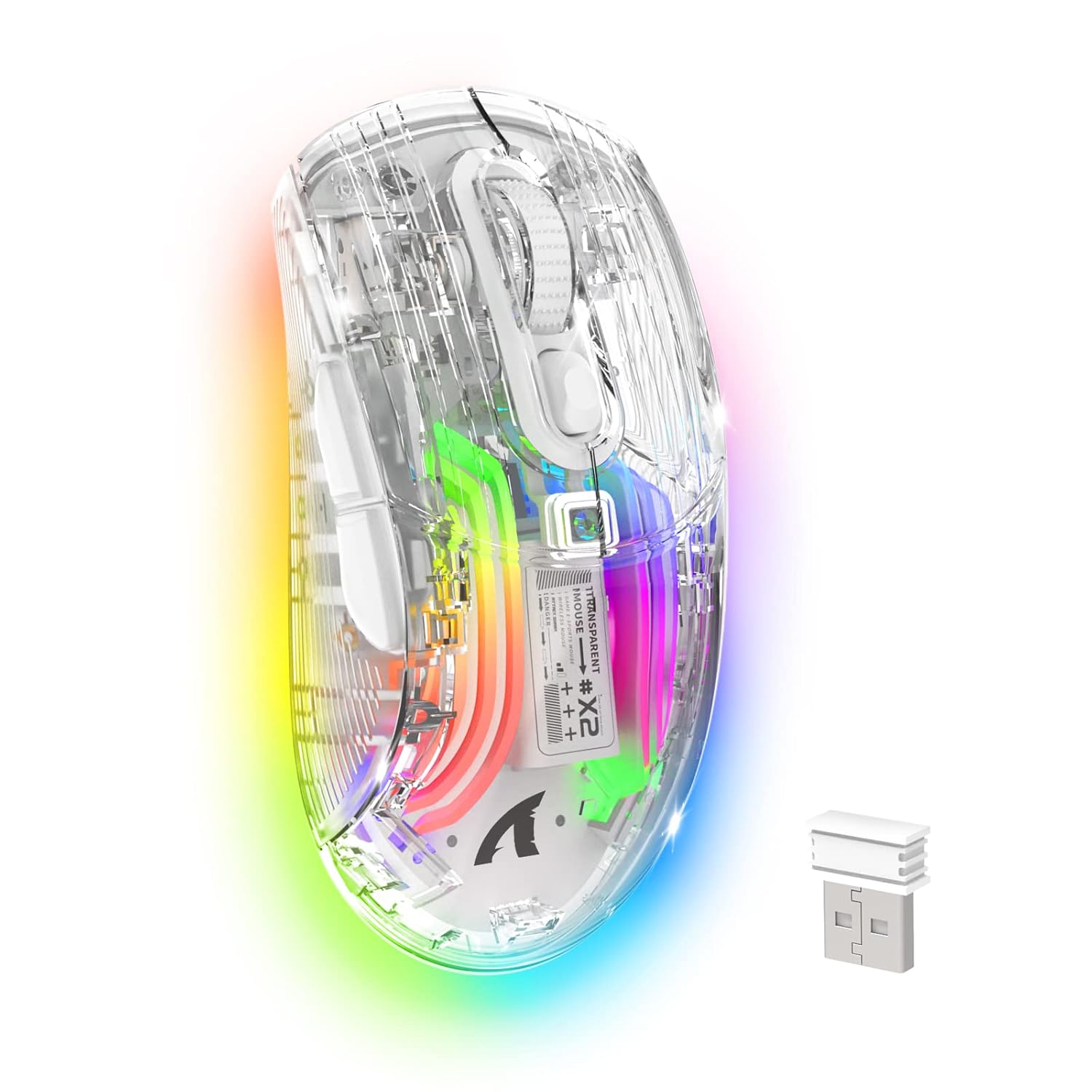
Wireless Gaming Mouse PC Transparent Shell Computer Mice with Dual mode BT5 0 2 4G PixArt Chip 3D
 1 / 9
Prices are shown for browsing. Purchases are currently unavailable.
Wireless Gaming Mouse PC Transparent Shell Computer Mice with Dual mode BT5 0 2 4G PixArt Chip 3D, $44.98, Availability unknown. Image 1 of 9.
- Selected option
- Wireless Gaming Mouse PC Transparent Shell Computer Mice with Dual mode BT5 0 2 4G PixArt Chip 3D
- SKU
- JC28153
Source specifications
- Brand
- ATTACK SHARK
- Color
- White
- Connectivity Technology
- Bluetooth, USB, Wired, Wireless
- Special Feature
- Wireless
- Movement Detection Technology
- Optical
- Package Dimensions
- 6.97 x 4.65 x 1.85 inches
- Item Weight
- 5.9 ounces
- Manufacturer
- ATTACK SHARK
The details
About this item
Product description Previous page Next page 1 Tri-Mode CONNECTION 2 USB-C RECHARGEABLE 3 5 DPI ADJUSTABLE 4 TRANSPARENT SHELL 5 ATTACK SHARK X2 Tri-mode Gaming Mouse WHITE PC TRANSPARENT SHELL COMPUTER MOUSE Tri-mode BT5.0/2.4G/USB-C,3D RGB Lighting PC Transparent Shell,Silent button Tri-mode function description 1. 2.4Ghz Wireless: a) Adjust the switch on the back of the mouse to 2.4G. b) Take out the receiver from the back of the mouse. c) Plug the receiver into the device you want to use, such as PC/laptop. 2. Bluetooth mode: a) Adjust the switch on the back of the mouse to Bluetooth. b) the mouse flashes blue light quickly, find the device named X2 Mouse and connect it. c) if not, please press and hold the left button + wheel button + right button of the mouse 4 Seconds, the blue light flashes quickly, 【3 Modes Wireless Mouse】The gaming mouse adopts 2.4GHz transmission technology,Bluetooth 5.0,Wired USB-C,providing reliable,precise and long rang connection,up to 50ft.The response is near-instantaneous,In Bluetooth/2.4G wireless/wired mode the response rate reaches 115hz,125hz,250hz respectively,which is more realistic for Gaming Players.; 【Adjustable DPI 】5 level DPI by pressin
- 【3 Modes Wireless Mouse】The gaming mouse adopts 2.4GHz transmission technology,Bluetooth 5.0,Wired USB-C,providing reliable,precise and long rang connection,up to 50ft.The response is near-instantaneous,In Bluetooth/2.4G wireless/wired mode the response rate reaches 115hz,125hz,250hz respectively,which is more realistic for Gaming Players.
- 【Adjustable DPI 】5 level DPI by pressing the button below the scroll wheel. (800/1200/1400/2000/2400) The game chip used in this mouse is PixArt 3212,although it only has 2400DPI,it is enough to surpass the 12000 DPI of ordinary mice.You can easily adjust the moving speed,perfect for games and office,and meet your multiple needs. This mouse provides extreme stability while gaming, such as League of Legends, World of Warcraft, DOTA, CS, etc.
- 【3D RGB LIGHTING Backlight】The translucent shell sets the stage for the LEDs and 11 light guides,creating an unprecedented deep and immersive lighting experience.11 different LED light colors that change while in use,offering soothing ambient lighting,The transparent light effect is suitable for demand for more types of games, making your mouse multi-colored.
- 【Rechargeable Gaming Mouse】This wireless gaming mouse has an 800mAh rechargeable battery, so you don’t have to worry about replacing the battery. It only takes 4 hours to charge once, and it can be used normally for more than 1 week. This mouse can make your life easier
- 【Wide Compatibility】The X2 wireless gaming mouse is compatible with most systems including Windows 7 / 8 / 10 / XP, Vista 7 / 8, Mac OS and Linux.Fit for PC, Laptop, Computer,Macbook and other devices.Any problem,Please feel free to contact us.
From the manufacturer
Product details
Product description Previous page Next page 1 Tri-Mode CONNECTION 2 USB-C RECHARGEABLE 3 5 DPI ADJUSTABLE 4 TRANSPARENT SHELL 5 ATTACK SHARK X2 Tri-mode Gaming Mouse WHITE PC TRANSPARENT SHELL COMPUTER MOUSE Tri-mode BT5.0/2.4G/USB-C,3D RGB Lighting PC Transparent Shell,Silent button Tri-mode function description 1. 2.4Ghz Wireless: a) Adjust the switch on the back of the mouse to 2.4G. b) Take out the receiver from the back of the mouse. c) Plug the receiver into the device you want to use, such as PC/laptop. 2. Bluetooth mode: a) Adjust the switch on the back of the mouse to Bluetooth. b) the mouse flashes blue light quickly, find the device named X2 Mouse and connect it. c) if not, please press and hold the left button + wheel button + right button of the mouse 4 Seconds, the blue light flashes quickly, the mouse enters the pairing state, finds the device named X2 Mouse and connects it. 3. Wired mode: Adjust the switch on the back of the mouse to "OFF" - insert the USB cable to enter the wired mode, which can be used directly and charge the mouse at the same time. How do I turn off the lighting effect on my mouse? Long press the light effect switching button on the back of the mouse to turn off the
Highlights: 【3 Modes Wireless Mouse】The gaming mouse adopts 2.4GHz transmission technology,Bluetooth 5.0,Wired USB-C,providing reliable,precise and long rang connection,up to 50ft.The response is near-instantaneous,In Bluetooth/2.4G wireless/wired mode the response rate reaches 115hz,125hz,250hz respectively,which is more realistic for Gaming Players. 【Adjustable DPI 】5 level DPI by pressing the button below the scroll wheel. (800/1200/1400/2000/2400) The game chip used in this mouse is PixArt 3212,although it only has 2400DPI,it is enough to surpass the 12000 DPI of ordinary mice.You can easily adjust the moving speed,perfect for games and office,and meet your multiple needs. This mouse provides extreme stability while gaming, such as League of Legends, World of Warcraft, DOTA, CS, etc. 【3D RGB LIGHTING Backlight】The translucent shell sets the stage for the LEDs and 11 light guides,creating an unprecedented deep and immersive lighting experience.11 different LED light colors that change while in use,offering soothing ambient lighting,The transparent light effect is suitable for demand for more types of games, making your mouse multi-colored. 【Rechargeable Gaming Mouse】This wireless gaming mouse has an 800mAh rechargeable battery, so you don’t have to worry about replacing the battery. It only takes 4 hours to charge once, and it can be used normally for more than 1 week. This mouse can make your life easier 【Wide Compatibility】The X2 wireless gaming mouse is compatible with most systems including Windows 7 /
Key details: Package Dimensions: 6.97 x 4.65 x 1.85 inches | Item Weight: 5.9 ounces | Customer Reviews: 4.3 4.3 out of 5 stars (122) 4.3 out of 5 stars
What you can expect: 【3 Modes Wireless Mouse】The gaming mouse adopts 2.4GHz transmission technology,Bluetooth 5.0,Wired USB-C,providing reliable,precise and long rang connection,up to 50ft.The response is near-instantaneous,In Bluetooth/2.4G wireless/wired mode the response rate reaches 115hz,125hz,250hz respectively,which is more realistic for Gaming Players. 【Adjustable DPI 】5 level DPI by pressing the button below the scroll wheel. (800/1200/1400/2000/2400) The game chip used in this mouse is PixArt 3212,although it only has 2400DPI,it is enough to surpass the 12000 DPI of ordinary mice.You can easily adjust the moving speed,perfect for games and office,and meet your multiple needs. This mouse provides extreme stability while gaming, such as League of Legends, World of Warcraft, DOTA, CS, etc. 【3D RGB LIGHTING Backlight】The translucent shell sets the stage for the LEDs and 11 light guides,creating an unprecedented deep and immersive lighting experience.11 different LED light colors that change while in use,offering soothing ambient lighting,The transparent light effect is suitable for demand for more types of games, making your mouse multi-colored. 【Rechargeable Gaming Mouse】This wireless gaming mouse has an 800mAh rechargeable battery, so you don’t have to worry about replacing the battery. It only takes 4 hours to charge once, and it can be used normally for more than 1 week. This mouse can make your life easier
Customer feedback: 4.3/5 average rating.
Customers say: Customers like the gaming mouse's design, with one noting its fun transparent shell, and appreciate its quiet operation. Customers disagree on the mouse's comfort and functionality.
Review snippets: I love the mouse, it looks great Read more / Nice and easy to use. It's also really quiet which was an adjustment. It's a cool mouse Read more
Product description Previous page Next page 1 Tri-Mode CONNECTION 2 USB-C RECHARGEABLE 3 5 DPI ADJUSTABLE 4 TRANSPARENT SHELL 5 ATTACK SHARK X2 Tri-mode Gaming Mouse WHITE PC TRANSPARENT SHELL COMPUTER MOUSE Tri-mode BT5.0/2.4G/USB-C,3D RGB Lighting PC Transparent Shell,Silent button Tri-mode function description 1. 2.4Ghz Wireless: a) Adjust the switch on the back of the mouse to 2.4G. b) Take out the receiver from the back of the mouse. c) Plug the receiver into the device you want to use, such as PC/laptop. 2. Bluetooth mode: a) Adjust the switch on the back of the mouse to Bluetooth. b) the mouse flashes blue light quickly, find the device named X2 Mouse and connect it. c) if not, please press and hold the left button + wheel button + right button of the mouse 4 Seconds, the blue light flashes quickly, the mouse enters the pairing state, finds the device named X2 Mouse and connects it. 3. Wired mode: Adjust the switch on the back of the mouse to "OFF" - insert the USB cable to enter the wired mode, which can be used directly and charge the mouse at the same time. How do I turn off the lighting effect on my mouse? Long press the light effect switching button on the back of the mouse to turn off the lights, likewise, long press this button to turn on the light effect again. Notes on using the mouse for the first time 1. The USB receiver is on the back of the mouse. 2. Please remove the clear protective film